
Pickleball Scoreboard vVARY
SeedsJP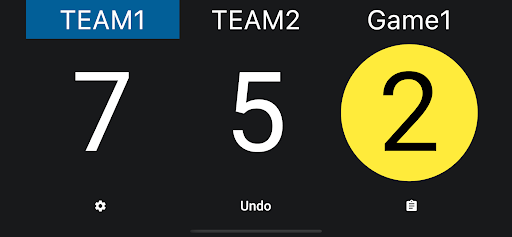


About this app
Developer Description
Scoreboard app for pickleball
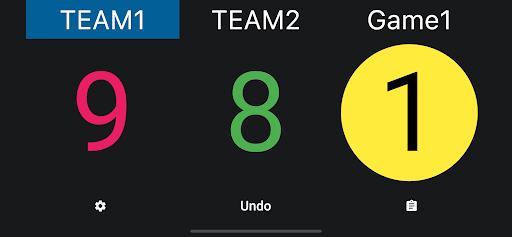
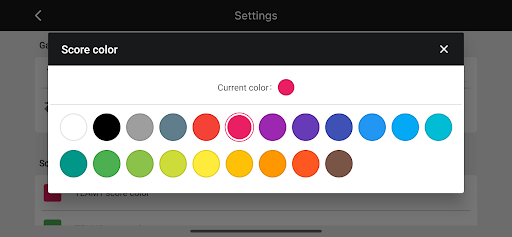
You can also set the color of the score and the team name.
● How to read the scoreboard
Left:The name of the team serving and the score
Middle:The name of the receiving team and the score
Right: The current server number (1 or 2)
● Basic Operations
1. Scoring
Tap the score of the serving team to add points.
Tap the receiver's score or current serve number to change the server.
Tap the “Undo” button to go back to the previous score, if you made a mistake in entering the score.
2. Setting a team name
Tap "TEAM1" or "TEAM2" on the screen to change the team name.
3. Serve
The serving team is colored.
Also, the serving team and its score are automatically placed on the left side of the screen. This automatic placement can be turned off in the settings.
4. reset
Tap the gear icon to display a menu where you can reset your score.
In-app purchases
$0.99 - $19.99 per item
Version Information
- Version
- -
- Downloads
- 5K+
- Updated on
- -
- Released
- Sep 22, 2022
- Requires
- Android Varies with device
Statistics
Google Play Rating History
Rating Distribution
Downloads Over Time
Pickleball Scoreboard has been downloaded times. Over the past 30 days, it averaged downloads per day.
Shaded area shows 30-day prediction based on historical trends
Historical data collection started recently. More data points will be available over time.
Pickleball Scoreboard - Google Play Rankings
Top Rankings
| Rank | Country | Category | List | Change |
|---|---|---|---|---|
| — |
Ranking History in
No ranking data available yet. Rankings are updated daily.
#85 in Top Free Sports in Philippines


#133 in Top Free Sports in Vietnam


Pickleball Scoreboard users say on Google Play
 thanh toàn lê
Great!
 Ann Thomas
Very disappointed. Downloaded, went to change color of opponents, it then went into a set up your account which I realize some apps require even if you want the free version. Started filling out the info the app wanted including my credit card information that said it would not charge my account for free version. They charged the amount immediately to my account. Got text and call from credit card company saying it was fraudulent I did not want the charge. Now I need to get a new credit card
ApkTrusted Ratings & Reviews
More from SeedsJP
See more apps
Karate Scoreboard
Free

Basketball Scoreboard
Free

Baseball Scoreboard
Free

Multiplayer Scoreboard
Free

Doodle Board | Doodly
Free

Handwritten Notepad
Free

Futsal Scoreboard
Free

Handball Tactic Board
Free

Headache Log
Free

Kabaddi Scoreboard
Free

Boxing Timer
Free

Mölkky Scoreboard
Free
Badminton Scoreboard
Free

PingPong Scoreboard
Free

Presentation Timer
Free

Profit Calculator
Free
Scan this QR code to download

Forwarding you to the page at Google Play market in seconds...
Open Google Play market now