Photo Widget Easy v15.0.0
Nbow Developer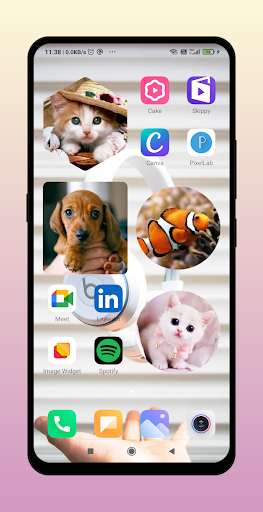




About this app
Developer Description
Photo Widget Easy to use like iOS widgets. simple widget app for homescreen.
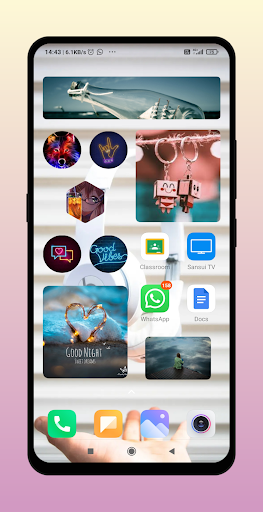
you can place images in many shapes.
This is like nice and simple photo widget aesthetic icon. it sets pictures for your home screen more aesthetic. this is like magic widget free android app.
You can use center crop to crop image from center. you can put unlimited number of widgets.
photo widget works on all android devices like oppo vivo xiaomi samsung. you can put with rounded edges or rounded corners. you can also add images in grid.
Photo Slideshow : you can pick multiple image from gallery and make a slideshow of images.
PNG images : you can pick random png image and set on homescreen.
Layouts :
1. Rectangle
2. Heart Shape
3. Circle
4. Hexagon
5. Star
6. Cloud
7. Sun
8. Fancy Shape
Tip:
1.Use inbuilt Custom Crop to crop image.
2.You can use transparent image to make your home screen more beautiful.
3 You can change corner radius.
How to add Widget?
Pinch or Long Press Home --> Widget --> Photo Widget For Home Screen -> Drag it to Home.
What's New
New Widget Click Actions
Call a Person — Make a phone call directly by tapping the widget.
Open a Website — Instantly launch your preferred website from the widget.
Change Widget Shape — Switch between different widget styles with a single tap.
Next Image — Tap to cycle through images.
No Action — Disable tap interactions for a clean, static look.
In-app purchases
$1.99 - $49.99 per item
Version Information
- Version
- 15.0.0
- Downloads
- 1M+
- Updated on
- Oct 29, 2025
- Released
- Mar 15, 2022
- Requires
- Android 7.1
Statistics
Google Play Rating History
Rating Distribution
Downloads Over Time
Photo Widget Easy has been downloaded times. Over the past 30 days, it averaged downloads per day.
Shaded area shows 30-day prediction based on historical trends
Historical data collection started recently. More data points will be available over time.
Photo Widget Easy - Google Play Rankings
Top Rankings
| Rank | Country | Category | List | Change |
|---|---|---|---|---|
| — |
Ranking History in
No ranking data available yet. Rankings are updated daily.
#36 in Top Free Personalization in Russia


#40 in Top Grossing Personalization in Vietnam



#85 in Top Grossing Personalization in Japan

#89 in Top Free Personalization in Philippines

Photo Widget Easy users say on Google Play
 Ittzzfarhan
wow
 hamz
hamz
it's just really good for Huawei users
 Shaik Khalid
good
 Clovilah ScarFolk Claudia
‼️Doesn't support GIFs, even with premium. Dissatisfied.‼️ Ads are annoying, but I get why they have to be there. I love being able to glance at my phone when I'm having a panic attack. Katya is my spirit animal. It could be better, though.
 Heather Lieskovsky
doesn't allow pngs with transparent backgrounds. not worth my time.
ApkTrusted Ratings & Reviews
More from Nbow Developer
See more apps


Scan this QR code to download

Forwarding you to the page at Google Play market in seconds...
Open Google Play market now