MyOffice Documents v3.6.1
New Cloud Technologies Ltd.


About this app
Developer Description
Office Suite: Edit Docs, Sheets, Slides & PDF Files + Access & Share Cloud Files
ALL-IN-ONE MOBILE OFFICE SUITE
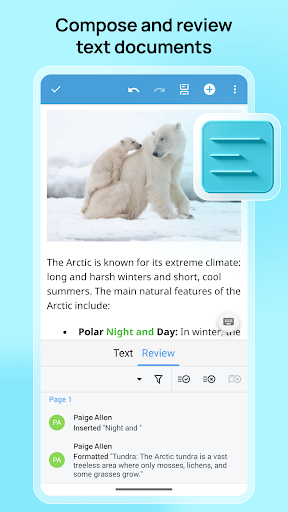
• Edit and review text documents (DOCX, DOC, and more)
• Calculate and analyze data in worksheets (XLSX, XLS, and more)
• Create and present slideshows (PPTX, ODP, and more)
• Access extensive document formatting features
• View PDFs in light or dark themes
• Work with popular file formats
With the MyOffice Documents mobile app, efficient work is possible anywhere, on any device.
TEXT DOCUMENT EDITOR
✓ View, create, and edit text files in DOCX, DOC, RTF, ODT, XML, TXT, XODT formats
✓ Export documents to DOCX, XODT, and PDF formats
✓ Add and listen to audio comments
✓ Format text: fonts, size, color, styles, alignment, and highlighting
✓ Review documents: manage edits, comments, and spell checking
✓ Work with tables: rows, columns, and cell formatting
✓ Insert, copy, resize, and edit images
✓ Utilize additional features: lists, headers/footers, numbering, reading mode, printing, and more
SPREADSHEET EDITOR
✓ View, create, and edit spreadsheets in XLSX, XLS, ODS, and XODS formats
✓ Export spreadsheets to XLSX, XODS, and PDF formats
✓ Perform cell operations: formulas, data formatting, and cell border styling
✓ Manage rows and columns: copy, delete, resize, sort, and filter
✓ Format text: fonts, size, color, alignment, and highlighting
✓ Insert, copy, resize, and edit images
✓ Leverage advanced tools: add charts, insert graphs, and print documents
PRESENTATION EDITOR
✓ View, create, and edit presentations in XODP, ODP, and PPTX formats
✓ Export presentations to XODP, ODP, and PPTX formats
✓ Manage slides: insert, copy, duplicate, move, and delete
✓ Design slides: layouts, text blocks, tables, images, shapes, and links
✓ Format content: fonts, size, color, alignment, and lists
✓ Present in slideshow mode
FILE MANAGEMENT WITH CLOUD STORAGE
✓ Unified access and management for all your documents
✓ PDF support: open and print PDF and PDF/A-1b files
✓ Share documents with other apps on your device
✓ Automatic document saving
✓ Work with cloud storage: Google Drive, OneDrive, DropBox, Box, Yandex.Disk, Mail.ru Cloud and MyOffice Private Cloud
The MyOffice Documents app is fully compatible with MyOffice Professional and MyOffice Private Cloud. Corporate users can access collaborative editing and file management features (requires an account).
Learn more about MyOffice on the official website www.MyOffice.ru
_______________________________________________
If you have any questions or concerns, please get in touch with us at https://support.myoffice.ru or mobile@service.myoffice.ru. We will respond promptly and help you resolve any issue that has arisen.
All product names, logos, and trademarks referred to on this page, the Applications and the documentation thereto shall belong to their owners and have been used here in accordance with the provisions of applicable laws.
The trademark "MyOffice" belongs to New Cloud Technologies Ltd. Nothing in these terms shall be construed under any circumstances as direct or indirect provision of a license or right to use the trademarks, logos or service marks used herein. Any unauthorized use of these trademarks, logos or service marks without the written permission of their owner is strictly prohibited.
What's New
Version Information
- Version
- 3.6.1
- Downloads
- 10M+
- Updated on
- Dec 5, 2025
- Released
- Jan 14, 2026
- Requires
- Android 9
Statistics
Google Play Rating History
Rating Distribution
Downloads Over Time
MyOffice Documents has been downloaded times. Over the past 30 days, it averaged downloads per day.
Shaded area shows 30-day prediction based on historical trends
Historical data collection started recently. More data points will be available over time.
MyOffice Documents - Google Play Rankings
Top Rankings
| Rank | Country | Category | List | Change |
|---|---|---|---|---|
| — |
Ranking History in
No ranking data available yet. Rankings are updated daily.
#71 in Top Free Productivity in Russia

MyOffice Documents users say on Google Play
 Alex
Alex
Great app for viewing and editing documents on-the-go.
 Mpawenayo Cyrille
This app is really cool. But would you add some fonts like Times New Roman, Asana Math, Arial and Arial Narrow? These fonts are very useful.
 Sasha Sasha
Друзья, добавьте китайскую кодировку. Я живу в Китае, китайский язык не отображается. Это делает приложение не основным. А жаль
 Iliya Zlygostev
I Tried to connect the app to Dropbox. Every time when change app focus on the cellphone the app reset auth process. Guys, I need to go in password storage in another app and switch app focus. I need to go to email app to get a requested approval code. I have the one cellphone screen for this. I should switch screen for auth. Anyway, after all the story link with Dropbox failed. And it's not obvious how to login after that.
 Island Technician
This app is funny & should be monitored,this app copies your personal files & documents you use it to edit them & saves them in a folder in the app it self & heaven knows were it is sent to, google should bench test this app for security loop holes & other security issues as an IT profesional i cant beleave google is alowing these types of security issues.
ApkTrusted Ratings & Reviews
Scan this QR code to download

Forwarding you to the page at Google Play market in seconds...
Open Google Play market now