Scoreboard Lacrosse v1.12.68
oootaiji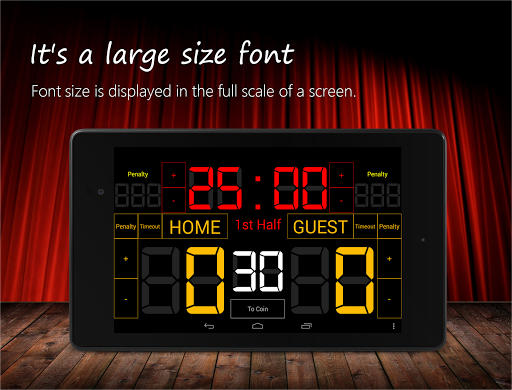


About this app
Developer Description
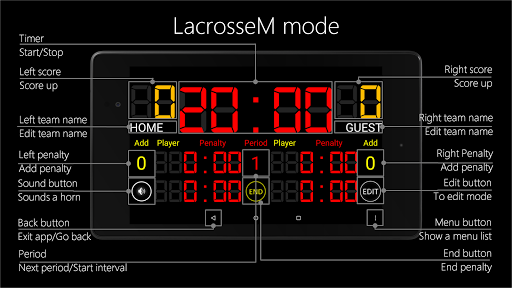
Scoreboard app for lacrosse.
Font size is displayed in the full scale of a screen. And buzzer is large volume.
This scoreboard app is simple design and easy to use!
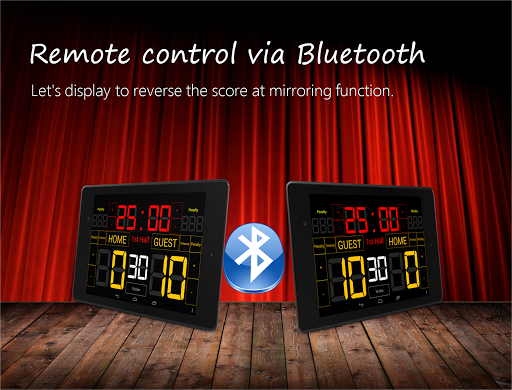
You can remote control at Bluetooth.
Please download Scoreboard Remote(Free).*
This scoreboard has two display types:
- LacrosseW mode (for Women)
- LacrosseM mode (for Men)
How change mode(display type):
Menu Button→ Setting→ Select "Mode Change"→ Select a Mode→ Save.
This app is free version:
-Ads
-Bluetooth to connect 1-on-1(Currently, bluetooth to connect 1-on-7 for beta testing)
Web Site:
Homepage - https://tokutenban.com
Twitter - https://twitter.com/7peace_com
Facebook - https://www.facebook.com/pages/Scoreboard-app/783128178408649
Features
* Timer
* Scoreboard
* Penalty
* 30sec timer
* Whistle
* Coin toss(Head or Tail)
* Timeout counter
* Support 7 inch tablet
* Support 10 inch tablet
* Remote control at bluetooth
Instructions
-Tap Timer: Start/Stop
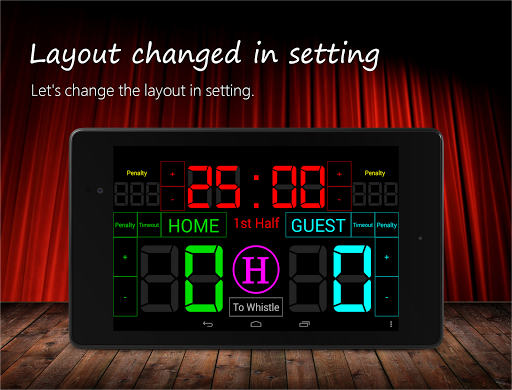
-HOME or GUEST button: Change Team Name or Team Color
-Timeout button: Start Timeout
-Penalty button: Add penalty
-Tap penalty timer: End of penalty
-Sound button: Sound the Whistle
-Coin button: toss Start/Stop
-Menu button: Functions for Futsal
Other Features
-At the start, reset function can not be used.
-Max is 99 minutes 59 seconds.
-Less than 1 minute, the display in 1/10 seconds.
-Menu button, you can switch sides, reset score, reset timer, reset all, settings.
Recommended use:
-Lacrosse
What's New
Version Information
- Version
- 1.12.68
- Downloads
- 10K+
- Updated on
- Aug 17, 2025
- Released
- Sep 18, 2014
- Requires
- Android 5.0
Statistics
Google Play Rating History
Rating Distribution
Downloads Over Time
Scoreboard Lacrosse has been downloaded times. Over the past 30 days, it averaged downloads per day.
Shaded area shows 30-day prediction based on historical trends
Historical data collection started recently. More data points will be available over time.
Scoreboard Lacrosse users say on Google Play
 A Google user
AWESOME!!!!!!!!
A Google user
UPDATE: Running clock editing is fixed, thanks! Some issues remain: 1) Penalty time advances only for the 2 players visible on the screen, but up to 3 players can serve concurrent active penalties. 2) The app allows only one team timeout per period and has an unconfigurable default of 30 secs. However, NCAA rules allow 2 TOs per HALF, which is a bit different, and they can be up to 2 mins long. OLD VERSION: Clock must be stopped to edit scores, etc. This is a problem for running-clock tournament games where the clock never stops.
A Google user
Could be more intuitive. Also needs a running time penalty setting converting all penalty time presets to time and a half (increase each by 50%). I used this at a tournament ant had to hurry and adjust penalties every time because of this.
A Google user
Does not work with new Android devices
ApkTrusted Ratings & Reviews
More from oootaiji
See more apps

Scan this QR code to download

Forwarding you to the page at Google Play market in seconds...
Open Google Play market now