
Pix Material Expressive Icons v11.3.5.Build
PashaPuma Design




About this app
Developer Description
Vibrant Adaptive Icons with Material You and Enhanced Monet Colors.
🎨 Next-Level Personalization:
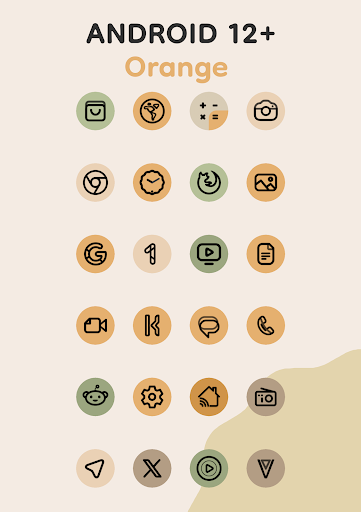
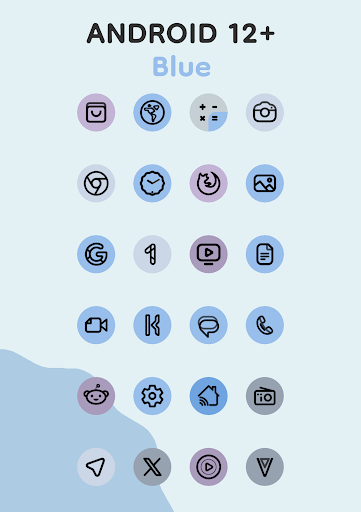
Each icon features a clean linear outline and a background that dynamically changes color based on your wallpaper.
Enjoy seamless integration with your system's color scheme, creating a harmonious and unique style.
Thanks to their adaptive nature, the icons change shape on supported custom launchers, giving you even more customization options.
🚀 Key Features:
Full Material You support.
Enhanced Monet palette with four accent colors for a more expressive design.
Dynamic icon background color change based on your wallpaper.
Clean linear icon style for a modern look.
Icon shape-shifting on compatible custom launchers.
Android 8-11: Icons are pastel colors because there is no Monet support.
Android 12+: Colors of icons and widgets depends on wallpaper and use three MaterialYou colors.
📱 Icon-Widget:
This is a completely new implementation of the Icon Pack for launchers that don't support icon packs. It's primarily designed for the Google Pixel, but can also be installed on other devices.
Icon-Widgets will change color depending on the wallpaper (MaterialYou), as well as the device's light or dark theme. You can also choose the icon shape (using Material 3 Expressive), icon name, and widget size for each screen grid, making widgets as similar as possible to the themed icons in Pixel Launcher.
What's in Icon-Widget:
- Full interaction with the icon pack.
- Various icon shapes.
- Icon animation.
- Different icon sizes depend on the grid and DPI.
Usage:
It's simple: Add a widget > Select the desired app > Select the desired icon shape > Select the desired grid size (DPI is also very important) > Click APPLY.
More details: https://pashapumadesign.com/news/pixel-icons-widget/
📝 Notes (android 12+):
After changing the wallpaper, you need to apply the icon pack again to change the color of the icons, except for those launchers that apply colors automatically. You also need to enable the system color palette from the wallpaper.
Available in application:
- Adaptive 24k+ icons.
- Clock Widgets.
- Music Widget.
- Icon Widget.
How to use:
How do I change the colors of the icons?
!Colors change ONLY Android 12+! After changing wallpaper / accent system, you need to reapply icon pack (or apply another icon pack, and then immediately this one).
Where can I find widgets?
On your home screen, long press and select "Widgets", Find "Pix Material You" in list. Typical way, like accessing regular device widgets.
Recommended use Launchers:
- Nova Launcher (Change Colors Avtomaticaly in A12+ (beta 8.0.4+)).
- Smart Launcher (Change Colors Avtomaticaly in A12+).
- Hyperion (Change Colors Avtomaticaly in A12+).
- Niagara Launcher (Change Colors Avtomaticaly in A12+).
- AIO Launcher (Change Colors Avtomaticaly in A12+).
- Stario Launcher (Change Colors Avtomaticaly in A12+).
- Pixel Launcher (Use Icon Widget).
- OneUI Launcher (Use Theme Park).
- Action Launcher.
- Ruthless Launcher.
- Lawnchair.
- And other.
If something does not work for you, you can contact "technical support" in telegram:
https://t.me/devPashapuma
What's New
- Added Extension "Folder".
- Mini-Folder Widget size has been slightly adjusted.
- Fixed non apply icons.
- Redesigned some icons.
In-app purchases
$0.49 - $9.99 per item
Version Information
- Version
- 11.3.5.Build
- Downloads
- 10K+
- Updated on
- Jan 12, 2026
- Released
- Sep 5, 2021
- Requires
- Android 8.0
Statistics
Google Play Rating History
Rating Distribution
Downloads Over Time
Pix Material Expressive Icons has been downloaded times. Over the past 30 days, it averaged downloads per day.
Shaded area shows 30-day prediction based on historical trends
Historical data collection started recently. More data points will be available over time.
Pix Material Expressive Icons - Google Play Rankings
Top Rankings
| Rank | Country | Category | List | Change |
|---|---|---|---|---|
| — |
Ranking History in
No ranking data available yet. Rankings are updated daily.
#42 in Top Paid Personalization in Philippines


#50 in Top Paid Personalization in Turkey
#50 in Top Paid Personalization in India


Pix Material Expressive Icons users say on Google Play
 Nik
Nik
Material icons always looked pretty but they weren't practical. Because they looked all the same color it was hard to find your desired app. This app kind of solves that problem by having 3 identical colors instead of 1. Also the icons are beautiful lines not just the same shape as original which also makes it unique. So definitely the best material you option out there.
 John Brophy
Used this on my Pixel 6a to add icons for apps that weren't themed by default. Works really well, but very hard to have the new icons exactly match the color of the icons the system creates. I've added 3 icons so far, and only one of them matches the color of my other icons. I've removed and re-added, but can't figure out how to have the colors match exactly. It's always a shade off. Still worth the purchase though. Edit: got the right color after posting, took some trial and error though.
 Alasdair Johnstone
Folder/custom icons don't update automatically. makes this effectively useless if you want to change wallpapers more than once a year. (Nova launcher on pixel 7 pro) Reply edit: I guess my point is that I see a small subset of dynamic folder icons being necessary for anyone who 1) uses folders, 2) doesn't want them to look bad, and 3) doesn't want to manually update them with their wallpaper. 2 and 3 seem like a universal preference for any user installing an icon pack.
 Andy Troyer
Might want to name it "Can't use on actual Pixel" Material Expressive and then leave a "refund" option 30 seconds after installing it
 Abbi Pritchard Jones
I got really excited about this app, especially the way you can customise the icons. unfortunately on pixel phones and maybe on other devices you can't put the icons in folders, possibly because they're widgets. Almost there but not quite
ApkTrusted Ratings & Reviews
More from PashaPuma Design
See more apps
PixLinear You Icon Pack
Paid

Pix Material Colors Icon Pack
Paid

PixLinear Dark Icon Pack
Paid

Pix-Pie Icon Pack
Paid
Pix-Minimal Black/White Icons
Paid
Pix Material Dark Icon Pack
Paid
Pix Material Icon Pack
Paid

Pix Wallpapers
Free

OneYou Themed Icon Pack
Free

OneYou Icon Pack
Free

Glassy MaterialYou Icons
Paid

Pix Material You Light/Dark
Free
iMaterial Light Icon Pack
Free

iMaterial Icon Pack
Paid
Similar Apps

Borealis - Icon Pack
Paid

PurpleLine Icon Pack : LineX
Paid

Vera Icon Pack: shapeless icon
Paid
Lena Icon Pack Shapeless Icons
Paid

Ares Dark Icon Pack
Paid

Ares Light: Pastel Icon Pack
Paid

Retro Mode - Icon Pack (Light)
Paid

Ikon Pass
Free
Olympia - Cartoon Icons Pack
Paid
Good Lock: Premium Lock Screen
Free

SmartPack - packing lists
Free
Icon Pack Studio
Free

BOLT Icon Pack
Paid

Sesame Search & Shortcuts
Free

AIO Launcher
Free
Shortcut Maker
Free
Scan this QR code to download

Forwarding you to the page at Google Play market in seconds...
Open Google Play market now