
Payroller Employee Portal App v3.4.3
Bookipi - Billing Estimate




About this app
Developer Description
Employee portal app for staff & teams with payroll processing through Payroller.
Perfect Payroll Processing with Payroller
We are the award-winning team that brought you Payroller for Australian payroll & STP and Bookipi for invoice and estimate creation. Trusted by over 700,000 small business owners, we've cured payroll, invoicing, and expense-tracking headaches for businesses in over 179 countries.
Integrate employees into the payroll process and foster trust and transparency!
Create a positive employee payroll experience with the Payroller Employee app.
Provide access to an easy-to-use employee portal where important documents are accessible within seconds.
What Can Employees Do on the App?
- Access payslips with complete employee details
- Apply for leaves and manage leave balances
- View year-to-date salary and wages
Key Employee Payroll Portal Features
On-the-go payslip access
With the app, employees can access all the payslips received for the current financial year and beyond. They can view payslips independently, getting a better insight into weekly wages from the app.
View employee roster
Given employees access to their scheduled work days and hours. They can view shifts from a monthly or weekly view, as well as planned annual leaves from the same calendar.
Shift notifications
Notify employees through this mobile app when they're assigned a shift, a shift changes, or a shift is cancelled. Employees can also accept or decline shifts directly from the app. Employers will be notified on the main Payroller app.
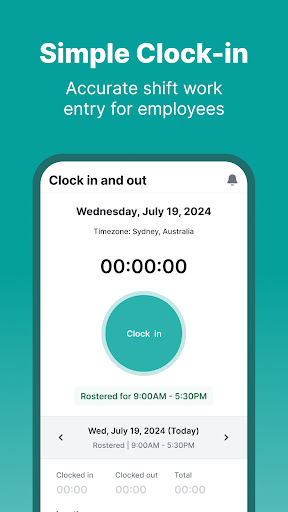
Clock in and out of shifts
Employees can clock in and out of work from the app to fill out their timesheet. Employers can ask you to enable GPS to ensure they are onsite for the shift.
Request leave
Employees can send in a request for leave through the app, which employers can then accept or reject using their own Payroller account. Staff will be able to request time off as part of their sick leave and annual leave.
Add documents to leave requests
If employees need to provide any documentation or evidence for a leave request, they can attach an image of the documentation from the app's request form, which employers will receive.
See all scheduled leave
Let employees manage their scheduled leaves and see what has been approved and what has yet to be approved. In the app, they'll also be able to see what leave they have taken in the past.
View YTD wages
From the app, employees can view their YTD totals for the financial year. The app provides a full breakdown of your wage, taxes, and superannuation.
Push notifications
Employees will be notified every time you receive a new payslip. They will also get a notification when employers approve their leave request.
Sync with Payroller for employers
Employee payslips and YTD wages are automatically synced with the employer's payroll account, letting workers relax and not worry about following up with one another.
Get on top of your pay today with Payroller Employees!
Privacy Policy: https://payroller.com.au/privacy-policy
Terms of Use: https://payroller.com.au/terms-of-service"=
What's New
• Mobile App Improvements: Faster, smoother, and more efficient.
• Bug Fixes: Stability and reliability enhanced. Numerous bugs have been fixed for smoother performance.
Upgrade now for a seamless experience!
Version Information
- Version
- 3.4.3
- Downloads
- 10K+
- Updated on
- Nov 19, 2025
- Released
- Jan 14, 2026
- Requires
- Android 6.0
Statistics
Google Play Rating History
Rating Distribution
Downloads Over Time
Payroller Employee Portal App has been downloaded times. Over the past 30 days, it averaged downloads per day.
Shaded area shows 30-day prediction based on historical trends
Historical data collection started recently. More data points will be available over time.
Payroller Employee Portal App users say on Google Play
 Nik Dee
Simple to use app,does exactly what you need it to ,very rarely does an app work as well as you expect it should....... Hats off to the team behind this app. I hope managment brought use all a round (or five ).
 Keiha Munro
Well it's better than the days we use to get them in paper form and in an envelope,lol,and it's all there
 Mar Purton
Downloaded app as requested by employer. Received my first Pay slip into the app and nothing since then and that was approximately 4 weeks ago. Everyone says app is working. I've deleted it and reinstalled still nothing.
 Anna Hapiuk
I find that this app isn't as user friendly as other timesheet apps. There is no function to allow the employee to set a roster, it has to be done by the employer and accepted which doesn't work for my circumstances. Why does the app need to have access to my location to allow me to time in? This should not be a requirement for me to keep track of my hours. Lastly, there is no widget available like other apps so I can simply press "punch in" without having to go into the app. Won't be using
 Lady_Heratio
The app has bugs. It used to work well but now I can't access my payslips. The app crashes every time and I get a message saying it crashed because the app has bugs. It was fine a couple of weeks ago. Since the last patch, the app isn't working.
ApkTrusted Ratings & Reviews
More from Bookipi - Billing Estimate
See more apps




Scan this QR code to download

Forwarding you to the page at Google Play market in seconds...
Open Google Play market now