
SuperCaddie vVARY
리소컨버전스






About this app
Developer Description
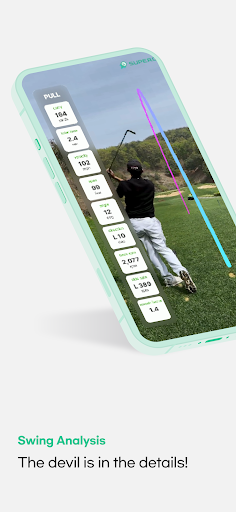
Measure the distance with your phone instead of an expensive range finder
Measure the distance with your smartphone instead of an expensive range finder
A must-have app for a good score!
You can measure the distance with one SuperCaddie
If you download SuperCaddie
It guides you through the distance measurement results by voice.
=============================
[Key function]
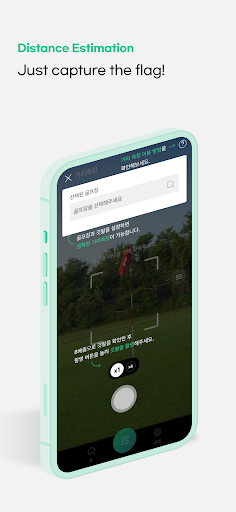
1. AI Golf Distance Measurement
Place the flag in the center of the screen and press the Shoot button to measure the distance to the flag.
- Effective measurement distance: ~180 m maximum
- Distance unit change: Yard (Y) ↔ M
- Flag size setting: Select the size of the flag for the golf course
2. Voice guidance as a result of distance measurement (data required)
※ If you can't hear the voice even after setting the sound on, check if the cell phone's own mute function is activated.)
3. Holemap : Check the position of the surrounding flag (data required)
- Touch the Map icon to guide the flag location around me and the distance to the flag.
- If the flag is not recognized, direct transactions to the touched location on the map will be guided.
[Additional function]
- Flag Size Settings
- Change in distance (Y:yard/M:meter)
- Voice guidance setting (on/off)
- Changing the System Language
[How to use it]
① Please download the SuperCaddie app and run it
② Focus the flag on the center of the screen and press the [Filming] button
③ Check the distance measurement results and [Save] or [Edit] the image
④ Click the Share button to share the image with your friends or family
※ Caution ※
1. Please make sure that the location and camera function are turned on.
2. You must allow SuperCaddie's location, camera, storage, and other permissions to use the service.
3. Some services (map, voice guidance) require data or Wi-Fi connectivity.
4. It is recommended to use the app in the golf course because the accuracy of the distance measurement may decrease in places other than the golf course.
[Support language]
Supports all languages in the system such as English, Japanese, and Chinese
[Guidance for app access]
We inform you of the access rights required to provide the service as follows.
● Location
I use the information to measure golf distance and find the position of the flag around me.
● Camera
Use a camera to measure golf distance.
● Storage
Use storage space to store images that have been distance-measured.
In-app purchases
$0.49 - $219.99 per item
Version Information
- Version
- -
- Downloads
- 50K+
- Updated on
- -
- Released
- Sep 19, 2023
- Requires
- Android Varies with device
Statistics
Google Play Rating History
Rating Distribution
Downloads Over Time
SuperCaddie has been downloaded times. Over the past 30 days, it averaged downloads per day.
Shaded area shows 30-day prediction based on historical trends
Historical data collection started recently. More data points will be available over time.
ApkTrusted Ratings & Reviews
More from 리소컨버전스
See more apps
Scan this QR code to download

Forwarding you to the page at Google Play market in seconds...
Open Google Play market now