
Ficus - Envato Sales Tracking vVARY
Robo Templates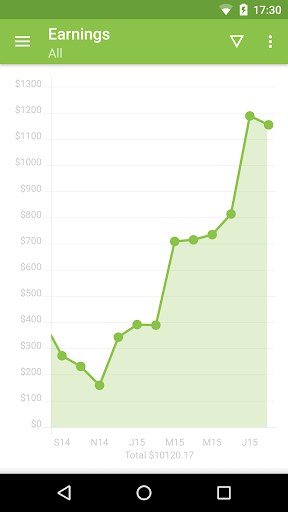




About this app
Developer Description
Ficus is for Envato Market authors. It shows useful charts about sales.
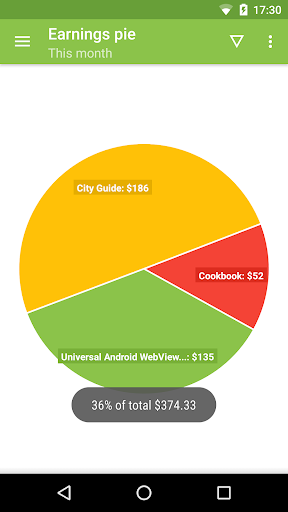
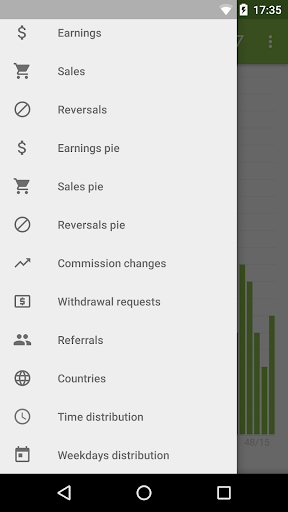
12 DIFFERENT CHARTS
Earnings, sales, reversals, commission changes, withdrawal requests, referrals, countries, time distribution, weekdays distribution etc.
FILTER
Filtering by product items, time, period, Envato sites, time zone and cumulative chart mode.
CSV DATA
Data is imported from Statement CSV file exported from Envato Market web. Ficus also works in offline mode.
ALL ENVATO MARKETPLACES
ThemeForest, CodeCanyon, VideoHive, AudioJungle, GraphicRiver, PhotoDune, 3DOcean, ActiveDen - all supported.
Ficus is a simple app for Envato authors. It shows statistics and charts about earnings and sales on Envato Market. Basically Ficus is a viewer of Statement CSV file exported from Envato Market web.
How to use it? First, you have to fill in your Envato username in Settings. Then you just need to download CSV file by clicking on "Download CSV" button in the toolbar menu and finally open CSV in the app. You can also download CSV file manually on Envato web -> My Account -> Statement -> Download your statement in CSV format.
When you open the app, last CSV file is automatically loaded. You can also load CSV by clicking on "download complete" notification or by opening from a file manager. Button "Open today's CSV" in the toolbar menu will try to open CSV file from download directory which was downloaded today. Keep in mind that CSV file is downloaded from Envato web via web browser so you have to be signed in market.envato.com. Also note that CSV is not downloaded nor refreshed automatically. You have to download CSV file every time when you want to see actual data.
You can switch between different charts in the navigation menu. You can use filter to display different data in charts. You can zoom, scroll or click within charts to get more info. Years in column charts are distinguished by different colors.
Why you have to download CSV? Because Envato API returns only last 100 events from the last 28 days so it is not possible to get the whole sales history via API. That's why we decided to use CSV export.
This app uses Envato Statement CSV. It does not use Envato API. There is no guarantee that all information and charts are correct. Use entirely at your own risk. More info about Ficus at ficus.robotemplates.com.
Version Information
- Version
- -
- Downloads
- 1K+
- Updated on
- -
- Released
- Dec 19, 2015
- Requires
- Android Varies with device
Statistics
Google Play Rating History
Rating Distribution
Downloads Over Time
Ficus - Envato Sales Tracking has been downloaded times. Over the past 30 days, it averaged downloads per day.
Shaded area shows 30-day prediction based on historical trends
Historical data collection started recently. More data points will be available over time.
Ficus - Envato Sales Tracking users say on Google Play
 A Google user
Best to track your earnings
A Google user
U must login and download can file to parse it, so it's not a live app it's just a cab parser
A Google user
I already download the data, but the data always fill in html, not csv
ApkTrusted Ratings & Reviews
More from Robo Templates
See more apps



Scan this QR code to download

Forwarding you to the page at Google Play market in seconds...
Open Google Play market now