SA Group Text v3.7.5
samapp


About this app
Developer Description
Send bulk text on your phone using excel sheet as input.
SA Group Text is also an easy way to send text messages to the contacts on your Phone. Just pick groups or individual contacts, type in a static or personalized message and send it.
With SA Group Text you can :
★ Import group Text from an Excel file via USB/Email.
★ Create your own groups in an Excel spreadsheet and send messages to them.
★ Insert tags ({firstname},{lastname},{company} etc) in your text message in order to create personalized messages. When you use this function, each message has a personal touch. For example:
Dear {firstname}, Welcome to our dinner party.
★ Use any Excel-compatible applications to create your group text messages.
★ Send SMS to as many recipients as you need within your Excel file
★ Create a formatted Excel file easily. The file can contain only two columns : Mobile and Message. You can find more example spreadsheets on the app’s website.
★ Create flexible group SMS in your spreadsheet.
For example “{family} Family – Practice Tomorrow at 5pm for little {kidname}!” becomes “David Family – Practice Tomorrow at 5pm for little Johnny!”. The names change over and over again.
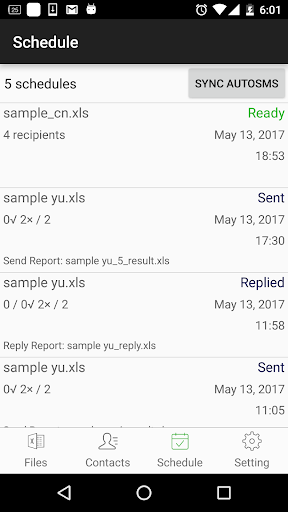
★ Schedule your messages you want to send at a specific time.
★ Set the time range of when you want your text message to send.
★ Support for Dual SIM devices (Android 5.1 or later).
★ Pause and resume schedules. You have to long press the schedule to access pause/resume option.
★ Import and send more 10,000 personalized messages in one time.
★ Send unsent messages. If the app is terminated while sending group sms, the app can continue the sending schedule after you launch the app.
★ Make send report and reply report.
★ The lite version allow you to send 120 messages each time, The full version has no limit.
★ If you provide the recipient's email address in the excel file , the same message will be sent to their email address.
In order to send messages via email, you have to
a. Enable send mail in the app’s setting page.
b. set up an email account to send messages from it.
c. add “Subject” and “EmailAddress” in the excel file. you can see the file sample-mail.xls in the app for detail.
Due to Android's SMS limitation, each app can only send 100 messages within an hour. You need to install SA Group text plug-in to extend the SMS limitation.
After download plug-ins, please go to your phone’s settings, then go to app manager, grant Send SMS permission to these plug-ins.
If the app runs on Android 8.0 and above, please enable the app running in background manually. Please also enable all Group SMS plugins running in background and send sms.
You also have to grant Run in background permission to the app and all plug-ins. Here's the way for some models to grant Run in background permission.
Huawei
go to Settings -> Battery -> Launch -> SA Group Text app
turn on Auto-launch and Run in background
Samsung
go to Settings -> Apps -> Special access -> Optimise battery usage -> All apps -> turn off SA Group Text
Vivo
go to Settings -> More Settings -> Applications -> All -> SA Group Text -> Permission -> Single Permission Setting -> Autostart
XiaoMi
Permissions -> SA Group Text -> Start in background
What's New
Version Information
- Version
- 3.7.5
- Downloads
- 5K+
- Updated on
- Jan 7, 2026
- Released
- Jan 11, 2013
- Requires
- Android 8.0
Statistics
Google Play Rating History
Rating Distribution
Downloads Over Time
SA Group Text has been downloaded times. Over the past 30 days, it averaged downloads per day.
Shaded area shows 30-day prediction based on historical trends
Historical data collection started recently. More data points will be available over time.
SA Group Text - Google Play Rankings
Top Rankings
| Rank | Country | Category | List | Change |
|---|---|---|---|---|
| — |
Ranking History in
No ranking data available yet. Rankings are updated daily.
#21 in Top Paid Business in Vietnam

#21 in Top Paid Business in Poland
#21 in Top Paid Business in Pakistan
#21 in Top Paid Business in India
SA Group Text users say on Google Play
 Charles Lungabo
I send over 100,000 SMS weekly using this app. The flexibility of using my phone and not a PC means that I can receive replies and phone calls at the same time wherever I go. At this point in time, I've never regretted purchasing it 1 year ago. It handles duplicates.. and much more.
 VantaBlack 99
02/26: Please revert to previous version, I can no longer assign a default path for my files. I am not able to choose which SIM for sending Good for text blasting but found a minor issue when switching between Files and Contacts tab. The text are overlapping Edit#1: I set the default sim to sim 1 on the settings but uses sim 2 to send.
 A Google user
A FEW PROBLEMS TO JUSTIFY (previous problems sorted), these are new little problems. 1. My Text Message apps wont work eveb after changing it back to default app. Now I couldnt reply my client in Text Message as it keeps sending fail in Text message. 2. Google Gmail option cannot work for any of my Android phone (old and new). What is wrong? Is it because of the 2 tier security set on the Gmail accounts? 3. Now the sending is so slow. Often times I have to press stop and start again. Defaulted
A Google user
You have to first permit the downloading of the plugins and after to give permission for them in app settings and then it works as it used to be with the old version. However when I think everything is fine after sending 150-350 text the application stop sending anymore?! Could you please help how I could make it not to stop?
A Google user
Hello! I am using your app for over 2 years but was really amazed how it works before few days ago. For some reason from now on I do not see an option to change default messaging app to SA Group, so from now on I am getting all sent messages to my inbox thats really annoying. Any ideas why this change took place recently? Tried already to reinstall it few times in a row. No change. Will change the rating as soon as yhis issue is resolved. Please help!
ApkTrusted Ratings & Reviews
More from samapp
See more apps


Similar Apps




Scan this QR code to download

Forwarding you to the page at Google Play market in seconds...
Open Google Play market now