Torque plugin for Perodua full vVARY
SAUKintelli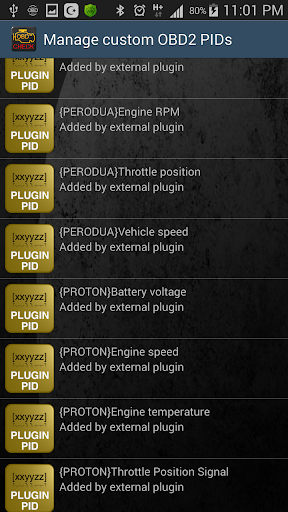

About this app
Developer Description
This is a Torque Pro plugin for Perodua cars. Read parameters in real time..!
This is the full version of Torque plugin for Malaysian made Perodua cars, particularly older cars thatdoes not support generic OBD protocols. Read real time data, read engine status, read and erase error codes...!!
This is the full version with access to all available sensors and features.
For testing purpose, we advise you to try the free version. You can get it from Google Play (https://play.google.com/store/apps/details?id=obd.saukintelli.com.perodua) and please revert to me for issues. My email address as below.
IMPORTANT..!!! …Prerequisite:
1. This is a Torque Pro plugin. You need to get Torque Pro installed in your device. This plugin will NOT work alone. Also, make sure you use later versions of Torque Pro. Torque with too old version would not be supported.
2. You need ELM327 compliant adapter. There are a lot of cheap adapters out there that does not fully support ELM327 commands. Get adapters confirmed to work from me or from ahmad hamidon (you can get it from http://bit.ly/obd2malaysia ).
3. Please also make sure you follow the instruction below. And make sure connection to ECU is OK before scan error, erase error or check the status to avoid app crashes.
Important notes..!
Later versions of android, for saving battery life, there is phone setting to stop apps from starting automatically. Please ensure you have set this plugin to autostart. The same thing will need to be done if you have autostart manager in your device.
Typically, the settings are in battery settings of the device, or in apps settings --> battery management
Installation procedures:
New vehicles with new engine such as Axia does not require any setup, except for item no 1 below. Vehicles with older engines are supported by this plugin and requires special setup as below. Please try without setup first. Some perodua such as MyVi Lagi Best, may use protocol similar to perodua 1.5 litre engines. As such, exploring different vehicle profile setup might help.
1. Please uninstall the free version of the plugin. Otherwise it may disrupt the operation of this full version plugin.
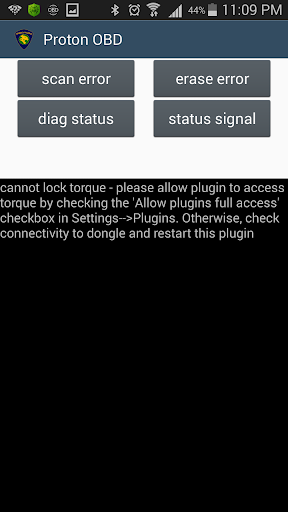
2. This plugin requires full access to OBD device. Check the 'Allow plugin full access' in Settings --> Plugins
3. For older 1.3 litre engines or smaller, create a new vehicle profile in Torque. Under Menu, select 'Vehicle Profile'. then click 'create new profile'...
4. Name the profile 'PERODUA1.3'. Scroll to the bottom and click 'Show advance settings'
5. Scroll to the bottom. For 1.3 litre engines, in 'Preferred OBD Protocol' select 'ISO 14230(fast init,10.4baud)'
6. Click 'Save'". Note that some newer 1.3 litres of below engines does not require this setup.
7. For 1.5 litre engines or some newer 1.3 engines such as Myvi LagiBest, create vehicle profile as no.2 above, but name it “PERODUA1.5”. and for the OBD protocol use the “ISO 15765-4 CAN (11bit 500k baud)”. Refer no 3 & 4 above.
8. Create another vehicle profile and name it 'Blank' scroll to the bottom and 'Save'. Do not put any advanced settings
9. Select the correct Perodua vehicle profile you created earlier everytime you want scan by tapping on Menu --> 'Vehicle Profile'-->select the ones that you created. For other vehicles, use the 'Blank' profile.
10. Create custom PIDs from Settings --> Manage extra PID/Sensors --> tap settings and select 'Add predefined set'. Select 'Perodua PIDs
11. Create displays in 'Realtime Information' by tapping Realtime Information --> go to empty page -->tap menu --> Add display -->pick your meter type --> Select PIDs that start with {PERODUA}.
12. Make sure you go to this page every time you want to use Perodua cars. Otherwise, Torque wouldn't connect to your ECU. You may need to wait for a while at this page for Torque to connect to your car
13. Now you are ready to use the Torque for scanning your car.
14. To scan error codes (or other features), tap on this plugin logo (Perodua OBD).
Version Information
- Version
- -
- Downloads
- 1K+
- Updated on
- -
- Released
- Oct 23, 2018
- Requires
- Android Varies with device
Statistics
Google Play Rating History
Rating Distribution
Downloads Over Time
Torque plugin for Perodua full has been downloaded times. Over the past 30 days, it averaged downloads per day.
Shaded area shows 30-day prediction based on historical trends
Historical data collection started recently. More data points will be available over time.
Torque plugin for Perodua full users say on Google Play
 Hadie Pranoto Soteto
Hi, this plugins works . I have few issue before getting the thing works. The technical support by developer are very well documentation , and fast response . Now i can see the error code from the check engine lights and narrow down my perodua car engine troubleshooting.. Worth 5 star from this indie developer.
 A Google user
Hai..bos...saya guna andriod 9...why when buy software after that not downloading or install the software..than it come refund pop green menu...boleh tolong...
 Vivarian 33
Hi most data avail, hope to see some update where the air fuel ratio in percentage will be avail, as normala data logger has them, readings are in mv, hope some conversion factors are build in, thanks
 Rizal Zainal
Viva 1.0..we cannot talk to your ecu..blh ajar cara nk setting tak..
 Kelvin L
I want to diagnose my Alza 2011. Error connection to ELM327. Using torque pro app the problem is still the same. I want my refund.
ApkTrusted Ratings & Reviews
More from SAUKintelli
See more apps
Scan this QR code to download

Forwarding you to the page at Google Play market in seconds...
Open Google Play market now