
Screenshot stamper vVARY
All Excellent Apps








About this app
Developer Description
Capture screenshot, markup image, get long shot, stitch photo & add timestamp
This stamping on screenshot app provides a floating button or shaking device options to capture screenshots. App also allows cropping, editing, stitching on screenshots. To add device info and datetime stamps are among interesting features of the app.
It can be widely used by Quality analysis developers and manual testers as a QA testing tool to check and record any functions and programs operating on mobile phones, tablet or any other android devices. As the app makes sure to provide Date time, App details, Device details on screenshot itself.
Key features of Screenshot stamper Application:
Floating button:
Easy button to capture a screenshot just by one click, the button is called floating as it can be moved anywhere on screen and it stays on screen above everything. Easy screenshot capture tool.
💫 Background color
💫 Opacity
💫 Floating button Size
💫 Auto-hide to the side
💫 Lock screenshot floater position
Shake to take screenshots:
Shake sensitive Feature to take a screenshot by simply shaking device
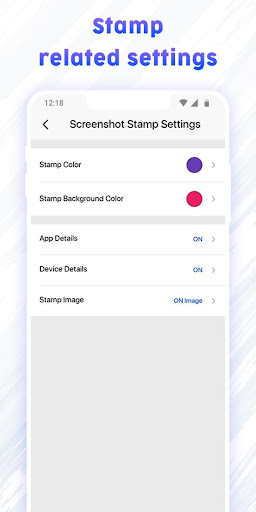
Screenshot stamp:
Get App details, Device details and date time stamp on screenshot with formatting options.
💫 Stamp color
💫 Stamp background Color
💫 App details
💫 Device details
💫 Stamp image
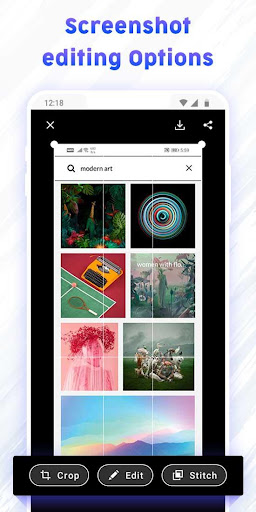
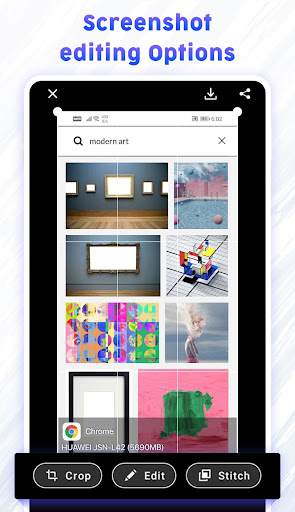
Screenshot Markup:
🕀 Crop
→Ratio - fit image, 3:4, 4:3, 9:16, 7:5, or free
→Shape - square, circle, circle-square
→Rotation- rotate left or rotate right
🕀 Edit & Annotate
→Text - Add text on photo with vivid color options
→Emoji - Add Emojis on screenshot
→Draw - Draw with colorful brush having changeable size and opacity
→Mosaic - blur the area which you don’t want to show with rearranged pixels
→Spotlight - Highlight the area with spotlight of different shapes
→Filter - various filter options to glorify screenshot
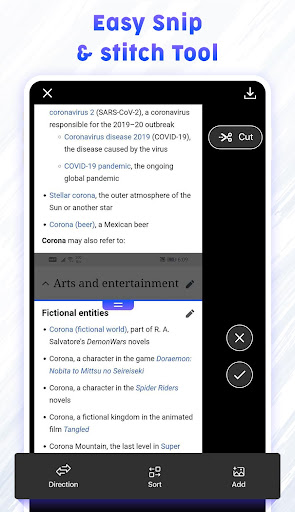
🕀 Stitch:
fine tune the seam for pixel perfect
Configuration:
→Direction: Vertical or horizontal Directions
→Sort: sort out the screen captures
→Add image: You can stitch any image from gallery along with the screenshot
Extra features:
💠 Image File format : JPG/ PNG formats available
💠 Image file quality: Scale out the quality of image you desire
💠 Filename prefix: Save files with prefix for easy sorting
💠 Sound of capture: Turn ON/OFF the sound of capturing screenshot
Why to have Screenshot Stamper Application?
→ Supports longshot and gives stitching options
→ Easy annotation with multiple tools
→ Photo Markup facilities like photo editor
→ High quality Screenshot images
→ Snipping tools for screen grabber
→ Free screen capture with ample of editing options
→ First time ever app to add date timestamp on screenshot
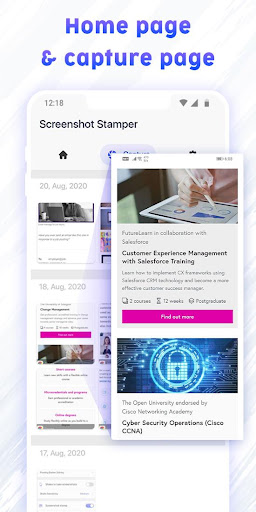
→ capture a longshot. if you have a scrolling page, then it will capture the whole page, you can stitch the shot as required.
→ Get device info & App info on screenshot
Screenshot stamper is safe to use as No privacy will be harmed, and no secured pages will get screen captured. If you have any feedback or suggestions, feel free to contact us on allexcellentapps@gmail.com.
In-app purchases
$1.99 per item
Version Information
- Version
- -
- Downloads
- 10K+
- Updated on
- -
- Released
- Aug 27, 2020
- Requires
- Android Varies with device
Statistics
Google Play Rating History
Rating Distribution
Downloads Over Time
Screenshot stamper has been downloaded times. Over the past 30 days, it averaged downloads per day.
Shaded area shows 30-day prediction based on historical trends
Historical data collection started recently. More data points will be available over time.
Screenshot stamper users say on Google Play
 Reena Savaliya
Best application ever, this is exactly what i was looking for, It provides feature where i can add date - time,device info and app info on screenshots.
 Sir Ben Potater
A pretty good screenshot app with a stupid feature.. It includes the small help/guide windows (in stich mode) in the finished screenshot... really?! I hope this is an unintended design flaw. If so, please fix. Otherwise allow the user to switch the feature off in the settings. Other than that, a nifty app.
 JoJo D
Please allow to change date format. Maybe time zone too. Fails sometimes then have to restart app. Also, it crops out some portions at the bottom. Hopefully, it will be fixed by updates. Keeps on hanging.
 Marina Prema Z.
No longshot (scrolling capture), which is one of the most important capture features to have! Many other reviews mention it but it's nowhere to be found. Uninstalling.
ApkTrusted Ratings & Reviews
More from All Excellent Apps
See more apps
Shot On Camera: ShotOn Stamp
Free

GPS Camera Lite For Location
Free

GPS Camera: Geotag Onsite Note
Free

Note Cam Lite: GPS Camera
Free
Timestamper - Activity Tracker
Free
Hourly Chime: Set Reminders
Free
Tasbeeh Counter: Tally Counter
Free

Wallext: Text Wallpaper BG
Free

ScheduleUP: Auto Text Reply
Free

GPS Date and Time Stamp Camera
Free

All Document Reader and Viewer
Free

GPS Status: Send Geotag Photos
Free

QR Code Generator & Scanner
Free
Vintage Disposable Camera
Free

Smart - Interactive Whiteboard
Free
Angle Cam - Geotag Camera
Free
Scan this QR code to download

Forwarding you to the page at Google Play market in seconds...
Open Google Play market now