
Blose v2.1.10
Kaj Bjurman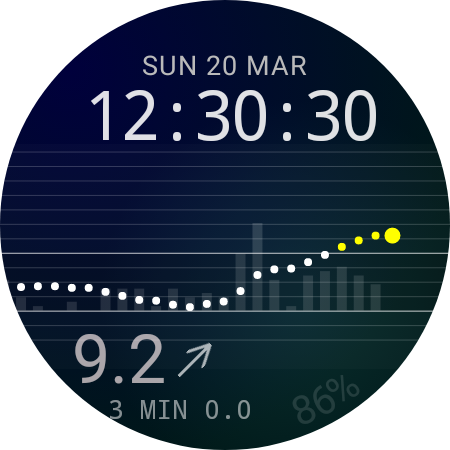


About this app
Developer Description
Wear OS app that shows glucose values from Dexcom Share or LibreLinkUp
Can also work separately as Tile and/or Complication in other watch faces.
Note! Only useful for people who are using a Dexcom CGM, and has blood sugar data uploaded to Dexcom Share or LibreLinkUp.
Note! Wear OS v5 does no longer allow apps to also have a watch face, so the watch face is not included in Wear OS 5. It's only included for Wear OS v4 and v5.
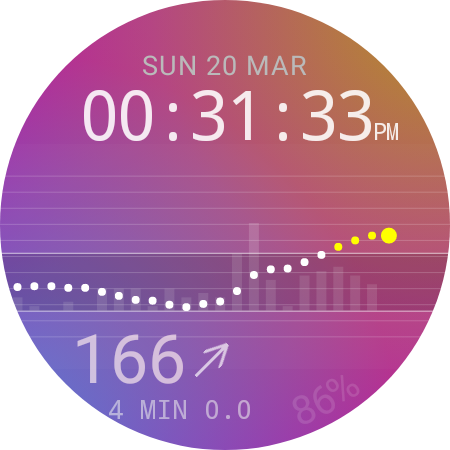
The watch face can show:
* Current glucose value in mmol/L or mg/dL
* Trend
* Graph
* Battery level
* Glucose target range
* Difference between values as bars
Double tap on the watch face to get to a details view
that shows average glucose during last 24h,
current stats, such as for how long the glucose
has been in range / above / below.
You can also access glucose graphs for 6h, 12h and 24h, and configuration from this view.
Optional vibrations can be configured for when glucose gets too high, or too low. NOTE! vibrations are just a best effort, you should still use the alarms in the official Dexcom app. Your watch might enter sleep mode, and the network connection could be down, and you won't get any vibrations in those cases.
Do note that this Watch Face doesn't require an app on the phone, but it requires access to a web browser during initial configuration, when entering Dexcom credentials.
Blose shouldn't be used instead of CGM providers official apps.
Note that there can be short delay between the CGM sending a value to sharing servers, and Blose receiving it.
The credentials are only stored on your watch, and in an encrypted format, and everything will be removed when the app is uninstalled. The credentials will only be used to login towards CGM providers sharing servers, and won't be shared with anyone.
The app does not contain any advertisement, and doesn't track, or share any data.
For Dexcom:
IMPORTANT! Dexcom share might not work for users that have phone numbers as user id. Prefixing the phone number with country code can work. This is not a bug in Blose, but a limitation in the Dexcom API.
Important note if you don't get any glucose readings!
Blose is downloading glucose readings from Dexcom Share, so sharing must be turned on in the Dexcom main app, and it might require that you have at least have one follower. You can download Dexcom follow on your phone, and invite yourself, then delete the Dexcom follow app when you start getting readings, but keep the follower invited in the main app.
For LibreLinkUp:
Blose will only automatically fetch a value every 5th minute, in order to not drain the battery. Single tap on the watch face can at any time force a download of most recent value.
Libre users that don't have a follower should create a LibreLinkUp account, and invite that user. Use the LibreLinkUp credentials when logging in in Blose.
Blose will follow the first user, if the LibreLinkUp account is following more than one user.
Note! Libre 2 in US doesn't upload values continiously, so Blose works best with Libre 3 in US. Both Libre 2 and 3 should work in Europe.
What's New
Version Information
- Version
- 2.1.10
- Downloads
- 10K+
- Updated on
- Oct 14, 2025
- Released
- Jan 11, 2022
- Requires
- Android Varies with device
Statistics
Google Play Rating History
Rating Distribution
Downloads Over Time
Blose has been downloaded times. Over the past 30 days, it averaged downloads per day.
Shaded area shows 30-day prediction based on historical trends
Historical data collection started recently. More data points will be available over time.
Blose users say on Google Play
 Eric Anderson
No longer works on Samsung Galaxy watch 4 after most recent OS update. I've tried reinstalling it several times. It gets hung up at the permissions for alarms and reminders. There seems to be no work around which is so unfortunate as I rely on this app so much! UPDATE! After leaving my review I was promptly contacted by the developer and he confirmed that the issue was the OS and not his app. He quickly found the resolution to the problem. I thankfully have my Blose app working again. Thanks!
 Collin
I love the app, but after updating my Galaxy Watch 5 Pro to One UI Version 6.0, the apps watch face disappeared. I uninstalled and reinstalled, and during the setup, it just gets stuck on the first step after you say ok to the permission notice. The screen is stuck on "Alarms and reminders" with a forever buffering circle. Any assistance would be much appreciated! Thank you
 Steve Detmer
cannot login if phone number is your login, and no way to change dexcom once it's setup (that I can find)
 Sherry Hazeltine cotterman
I used to like it then all of a sudden it stopped working. my dexcom g7 user name is my phone number and I've see a lot of other reviews of this not working all of a sudden when it used to work just fine for months and months.
 Debbie Hubbard
This is my prefered watchface on Samsung Galaxy 6 for monitoring my diabetes (with freestyle librelink). However, I've just updated the watch software and now this watchface is incompatible. Help!!
ApkTrusted Ratings & Reviews
More from Kaj Bjurman
See more apps
Scan this QR code to download

Forwarding you to the page at Google Play market in seconds...
Open Google Play market now