
Air Manager vVARY
Sim Innovations B.V.


About this app
Developer Description
Create flight simulator instrument panels with the 1500+ included instruments.
Elevate your flight simulation setup with Air Manager, the ultimate tool for creating custom, interactive instrument panels right on your Android tablet. Compatible with Microsoft Flight Simulator (2020 & 2024), X-Plane, Prepar3D, and FSX, Air Manager liberates your main monitor, letting you immerse yourself fully in the stunning outside view.
Imagine using your tablet as a dedicated primary instrument panel, or perhaps as a secondary avionics stack for effortless frequency adjustments. With Air Manager, the possibilities are endless.
Key Features:
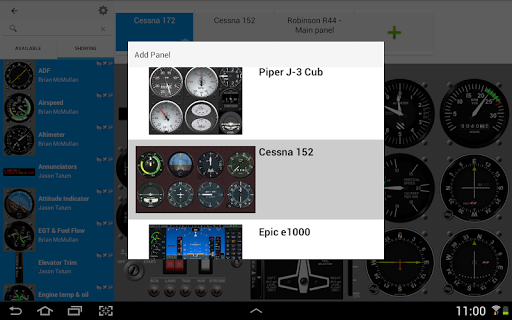
• Vast Instrument Library: Access over 1500 FREE instruments. Drag, scale, and build your perfect panel in minutes. Save and switch between custom layouts instantly.
• Intuitive & User-Friendly: Forget complicated setups. Simply download our free, essential flight simulator plugins from our website – we provide the complete solution for a seamless experience.
• Flexible Layouts: Tap to add, drag to rearrange, pinch to scale – creating your ideal cockpit layout is incredibly easy and intuitive.
• Interactive Controls: Go beyond visual displays! Implement realistic buttons, switches, and knobs on your 2D panels. Control radio frequencies, altimeter settings, electrical switches, and even your autopilot directly from your tablet, enhancing realism and reducing reliance on your main simulator interface.
• Broad Compatibility: Our flight simulator plugins support Microsoft Windows, Apple macOS, and Linux, and seamlessly integrates with Laminar Research X-Plane (9, 10, 11 & 12), Microsoft Flight Simulator (2020 & 2024), Microsoft FSX, FSX Steam Edition, and all versions of Lockheed Martin Prepar3D.
Ready to take control? Find our extensive user manual and necessary flight simulator plugins at: https://siminnovations.com/wiki
Version Information
- Version
- -
- Downloads
- 1K+
- Updated on
- -
- Released
- May 1, 2018
- Requires
- Android Varies with device
Statistics
Google Play Rating History
Rating Distribution
Downloads Over Time
Air Manager has been downloaded times. Over the past 30 days, it averaged downloads per day.
Shaded area shows 30-day prediction based on historical trends
Historical data collection started recently. More data points will be available over time.
Air Manager - Google Play Rankings
Top Rankings
| Rank | Country | Category | List | Change |
|---|---|---|---|---|
| — |
Ranking History in
No ranking data available yet. Rankings are updated daily.
#41 in Top Paid Tools in Canada


Air Manager users say on Google Play
 A Google user
I've tried loads of apps with my X-Plane setup and this is by far the best. I have it running on three tablets and have had absolutely no problems. The pre-built panels are amazing, there are hundreds of other gauges to choose from and editing the panels is really simple. Worth every penny!
A Google user
I love the concept, efficiency, and ease of use this app brings to X-plane,. However, being very detail oriented, the inability to set instruments to specific position and size through properties (as in the desktop version which I completely love) along with the inability to remove or change the instrument and panel backgrounds are real drawbacks. Snapping is a nice feature, but not being able to scale from one corner instead of the center makes it very difficult to make the instruments the same size causing black lines between instruments with colored backgrounds. Being able to adjust background properties of either or both backgrounds would eliminate this issue. The ability to adjust size by pixels would make panel layout much easier, more consistent, and better looking than is currently available in this app. I really hope to see improvements in these areas, which would then earn a full 5 Stars! It would really be nice to layout a panel in the desktop version and be able to use it in the android version without using the resources of your main computer via Air Player. Hopefully these will be addressed in future updates. Keep up the great work!
 Marco Chan
tried this with MFS2020, how ever I can't even start the plugin, wiki said check for a log file, but the folder under ProgramData didn't exists
 mercster
I used to use Air Manager with XPlane 11 on an older Android 7 tablet, it was great. Now I have Android... 13 or something? And a very new Samsung phone, the Air Manager UI is impossible to use, and crashes often. I don't know what happened here... the Android version is not even documented on the website as far as I can tell. I think the only modern version is for desktop, maybe iPad?
 Gregory
Won't connect to simulator. Could not get help from developer and wouldn't give me a refund. Trying to reinstall on a different android and now they are making me repurchase it.
ApkTrusted Ratings & Reviews
Scan this QR code to download

Forwarding you to the page at Google Play market in seconds...
Open Google Play market now