
Stairs-X Lite - Calculator v2.0.67
TinuxSoft









About this app
Developer Description
Stairs-X helps you to calculate, design and create your stairs
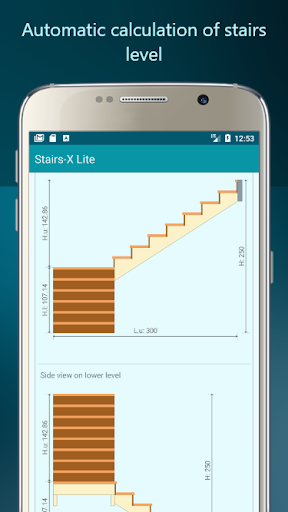
Calculations and drawings in the same time fast and accurate, useful for fast calculations and design for standard stairs and advanced stairs.
Input both IMPERIAL and METRIC units, and calculate using inch fractions.
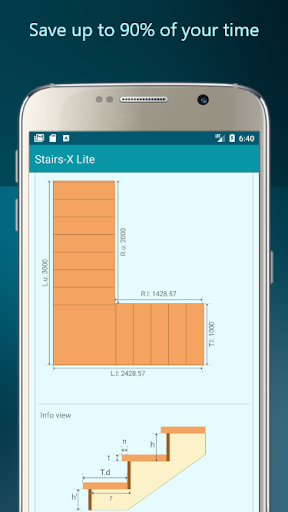
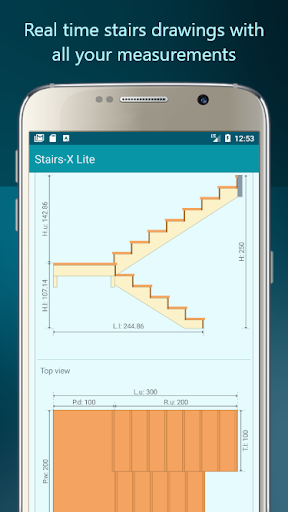
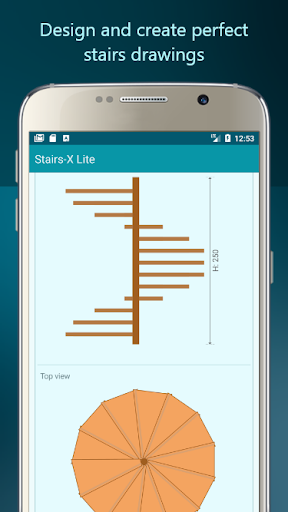
Your stairs drawings are presented in real-time in more views from side view, top view and detailed view.
Stairs-X mobile is accurate, fast and offers an abundance of features, makes life easier for everyone involved in a project.
An ideal app for architects, engineers, construction professionals, field technicians, builders, handymen and contractors
You can calculate:
- Simple stairs
- Semicircular stairs
- Stairs on stringer
- Stairs on bowstring
- Stairs on 90 degrees turn (stairs L shape)
- Stairs on 180 degrees turn (stairs U shape)
- Spiral stairs
- Helical stairs
- Stairs with intermediate landing
- Zig-zag stair
Benefits:
- More productive in the field by working with the accurate drawings and measurements
- Replace blueprints at job sites with drawings on your mobile device
- Calculate better to avoid mistakes and re-work
Features:
Create drawings on the fly
Detailed drawings, from side to top view with all type of stairs.
Send email with your calculation. (Pro version only)
Measure accurately while on site
Advanced stairs drawing
Share your designs in the field (Pro version only)
Support for tablets
Work offline without an internet connection
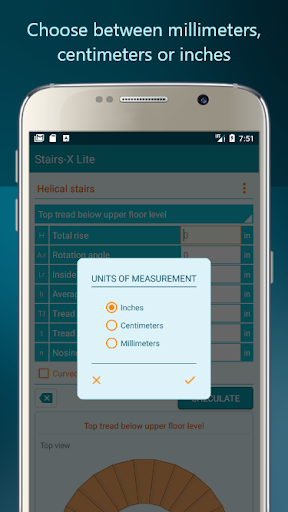
Choose between millimeters, centimeters or inches.
Detailed drawings and accurate calculations of stairs. Treads and risers, straight stairs, spiral staircase, stairs on L and U turn.
Calculate treads depth, rise height, number of steps and angle fast and easy.
Calculate concrete stairs, simple wood stairs, spiral staircase and stairs on bowstring, each one with the best techniques of calculations.
All in one stairs calculator is all what you need.
Check the Stairs-X Pro with more features.
If you have any suggestions please don't hesitate to contact me.
What's New
Version Information
- Version
- 2.0.67
- Downloads
- 1M+
- Updated on
- Aug 23, 2025
- Released
- Jan 7, 2017
- Requires
- Android 6.0
Statistics
Google Play Rating History
Rating Distribution
Downloads Over Time
Stairs-X Lite - Calculator has been downloaded times. Over the past 30 days, it averaged downloads per day.
Shaded area shows 30-day prediction based on historical trends
Historical data collection started recently. More data points will be available over time.
Stairs-X Lite - Calculator users say on Google Play
 Shane Sandberg
Works as advertised. Just needed it for one or maybe 2 sets of stairs.
 Chris Palazy
Makes calculations easy and visualizations are great!
 Keith Thurber
This is a cool app except that the dimensions on the drawing that the app calls "stringer length view" are nearly useless. The information provided is correct, however, it is very hard to use it in a practical sense. All of the dimensions are relative to each other vs. from a datum point. Using a common point for dimensions is the correct way to dimension a drawing and gives the user a starting place. If it was dimensioned correctly, I'd give it 5 stars.
 Terry Cullen
It looked like it could be a good app, but very disappointed with how it took over my phone, changed the look and layout of my widgets, would not let me access the app until I installed their calculator then deluded me with sticky add I couldn't use. Acted more like malware than an app. Never had one like it. I'd say it's just a "free" platform for their profit. I dumped it quick. It still has control of my app widget look. 😡
 Daniel Grooms
Spammed with ads, it wouldn't calculate a stair and popped an actual developer error "empty string" Bad even for a low budget app
ApkTrusted Ratings & Reviews
More from TinuxSoft
See more apps




Scan this QR code to download

Forwarding you to the page at Google Play market in seconds...
Open Google Play market now