
SmileReader vVARY
Smilelab




About this app
Developer Description
Ovulation and Period Tracker app
We help you get pregnant faster.
The app helps you map everything out so you know when you have your best chances of conceiving.
**App Features
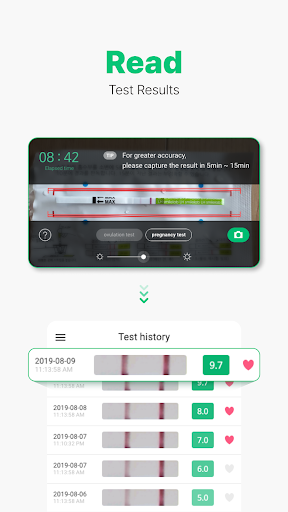
- Ovulation Tests: When you take pictures of our ovulation tests, you get to track the results directly inside this app. Map out your cycles and know exactly when you are ready to conceive.
- Pregnancy Tests: We also provide pregnancy tests as well, which can be logged inside this app.
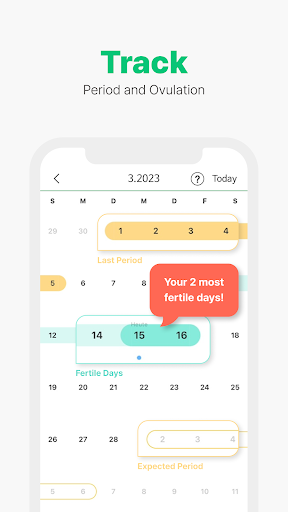
- Ovulation Calendar: Track your personal period calendar so you know when you are at peak ovulation for the best chances of a pregnancy.
- Image Scanning: Quickly scan the results of your SmileReader tests with the app. We then use technology to configure them into your own cycle.
- Daily Log: You can also use the app to log in basal body temperature, changes in your cervical mucus, and even your mood and weight to increase the accuracy of prediction.
- Information Sharing: Share information, dates, and ovulation info with your partner so they can be in-the-know as well.
**How to Use
1. Enter your latest menstrual cycle.
2. Find out your estimated fertility window and the expected date of your next period.
** To detect more accurate fertile days,
1. Start ovulation testing on the date the app suggests.
2. Get reminders from the app to test on time.
3. Take a picture of a test strip, after dipping it in urine.
4. Keep testing until you identify your most fertile days.
5. Record signals of ovulation, moods and body temperature.
6. Monitor your pattern of period and ovulation.
7. Share your information with your partner.
** Contact Us :
If you have further questions or concerns, please send an email to the following email address,
hello@smilelab.co.kr
** Disclaimer :
- This SmileReader app only works with test strips of PREGABLE and SmileReader.
- This app is merely designed to help you make a schedule around the ovulation for your best chances at pregnancy.
Version Information
- Version
- -
- Downloads
- 10K+
- Updated on
- -
- Released
- Jan 17, 2026
- Requires
- Android Varies with device
Statistics
Google Play Rating History
Rating Distribution
Downloads Over Time
SmileReader has been downloaded times. Over the past 30 days, it averaged downloads per day.
Shaded area shows 30-day prediction based on historical trends
Historical data collection started recently. More data points will be available over time.
SmileReader users say on Google Play
 Minh Huong Nguyen
Can not change temperature unit. There is only Fehrenheit unit which is not my region's commom measurement unit
 Lina Zakaria
It's useless as impossible to take pic with the application, I tried for 30 min but it couldn't read the test despite I followed all instructions. It needs fixing this error.
ApkTrusted Ratings & Reviews
More from Smilelab
See more apps

Scan this QR code to download

Forwarding you to the page at Google Play market in seconds...
Open Google Play market now