Splashtop Enterprise (Legacy) v2.5.1.1
Splashtop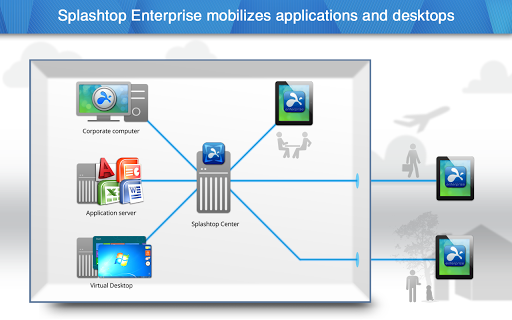


About this app
Developer Description
Splashtop Enterprise Mobilizes Corporate Applications and Desktops Instantly.
Splashtop Enterprise with SplashApp Mobilizes Corporate Applications and Desktops Instantly, enables BYOD
Splashtop Enterprise is a much simpler, higher performing, and cost-effective alternative to Citrix. It enables IT departments to deliver corporate apps and desktops (physical and virtual) to tablets, smartphones, PCs, Macs, and thin clients. It supports Microsoft and VDI infrastructures including RDP / RDS / Remoteapp / Terminal Services, VMWare, Vsphere, and Citrix Xenserver. Splashtop eliminates the complexity and expense of mobilizing all of your hard-to-access apps. Zero Coding. Zero Training. Complete Control. Superior Performance.
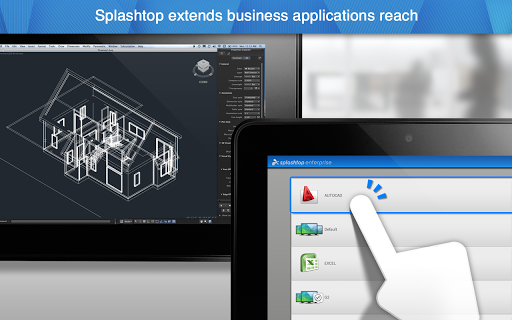
Employees on the go can enjoy all the benefits of remotely accessing applications and data from their BYOD / mobile devices as if they were in front of their computers. Top industry adoptions include 3D, CAD, CAM, design, education, government, manufacturing, healthcare, and mobile workers who traditionally use RDP / VPN. Top performance streaming and touch screen experience means mobile workers can quickly and easily use office productivity, line of business, 3D graphics, and customized Web applications from home or from the road. Learn more at www.splashtop.com/enterprise.
Over 30 million users enjoy Splashtop’s range of high performing and highly rated remote access products.
*** For personal use only please search for Splashtop Personal app ***
Splashtop Enterprise delivers:
+ Fast, cost effective high-performance alternative to VPN, RDP, VNC, Citrix
+ “Last mile” extension for VDI and RDP environments
+ On-premise deployment – secure and protect sensitive data
+ Active Directory (AD) - Integrate with your existing AD for local authentication and authorization
+ IT remote support solution+ Centralized control - Set user and device access policies, activate/deactivate users and devices, centralized streamer updates , bandwidth throttling
+ Reporting - View real-time connections and audit trails
+ Grouping - Allow access to shared pool of physical or virtual desktops
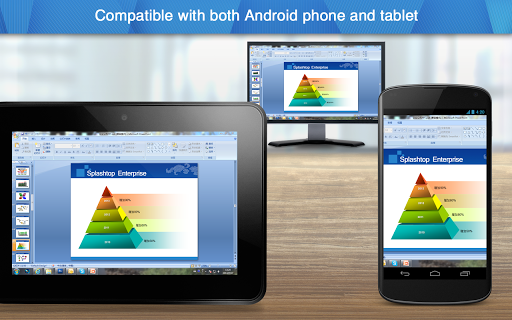
+ Multi-device support - Supports iPad, iPhone, Android tablets, Android phones, Mac and PCs
+ Support for other MDMs include Good Technology and OpenPeak (also known as AT&T Toggle) available
+ Easy to setup, get your team setup and running in an hour
How users benefit
+ Access anytime – Be able to securely access your Windows applications & data on your PC / MAC remotely from any mobile device, any time, any where
+ Easy to use - Intuitive gestures and menu interface delivers a native application experience including support for multiple displays
+ High performance - Patent pending streaming technology including 3D graphics, HD video and synchronized audio delivers a responsive and engaging user experience
+ Connect from anywhere - Intelligent optimization techniques provide reliable connections even when connected over lower bandwidth 3G and 4G connections
+ Secure connections - With support for SSL/AES 256 bit encryption, network proxies and SSL certificates you can be assured that your sessions are safe
+ Presentation and annotation capabilities (over .ppt, video, including Flash) that can be controlled via tablet and projected to a group
What's New
* Update the copyright to 2023
* Upgrade openssl to 1.1.1t
* Other optimizations and bug fixes
Version Information
- Version
- 2.5.1.1
- Downloads
- 50K+
- Updated on
- Mar 27, 2024
- Released
- Sep 10, 2012
- Requires
- Android 4.0
Statistics
Google Play Rating History
Rating Distribution
Downloads Over Time
Splashtop Enterprise (Legacy) has been downloaded times. Over the past 30 days, it averaged downloads per day.
Shaded area shows 30-day prediction based on historical trends
Historical data collection started recently. More data points will be available over time.
Splashtop Enterprise (Legacy) users say on Google Play
 A Google user
If you're looking to download Splashtop for individual use, download "Splashtop Remote Desktop" instead. This app is only for business customers, individual users will not be able to log in to this app!
A Google user
The Good: Quite responsive & pinch to zoom really helps in computers native resolution. I am able to access company resources on the go. I am able to reset my users passwords where ever I am I don't need to be tethered to my laptop anymore. Multi monitor support. ************************************************************************************************************************** The Bad: If not selecting computers native resolution it will rearrange your icons. If you don't have a stable connection the cursor will jump around a bit. When using pinch to zoom, and zooming out it turns off track pad mode. ************************************************************************************************************************** This is a really good solution for mobile devices and it ties into Active Directory rather well. Setting it up wasn't a problem either, I had a little trouble since my SSL port on the firewall was taken up by another application but changing that is very easy in Splashtop Center on the server.
A Google user
Plz help how to use these app
A Google user
Asus transformer doesnt work as a screen at all
ApkTrusted Ratings & Reviews
More from Splashtop
See more apps
Splashtop Business
Free
Splashtop Personal
Free
Splashtop SOS – Remote Support
Free
Splashtop for RMM
Free
Splashtop Classroom
Free

Mirroring360 AirPlay Receiver
Paid

Mirroring360 Sender Basic
Free

Mirroring360 Sender to AppleTV
Paid

Splashtop Business for mc
Free

Splashtop On-Prem
Free

Splashtop NetID
Free
Splashtop smart
Free
Splashtop for CACHATTO V3
Free

Splashtop AR
Free

Splashtop AR On-Prem
Free

Splashtop SOS On-Prem
Free
Scan this QR code to download

Forwarding you to the page at Google Play market in seconds...
Open Google Play market now