eSchoolPLUS Admin Mobile App v1.6.0
PowerSchool Group LLC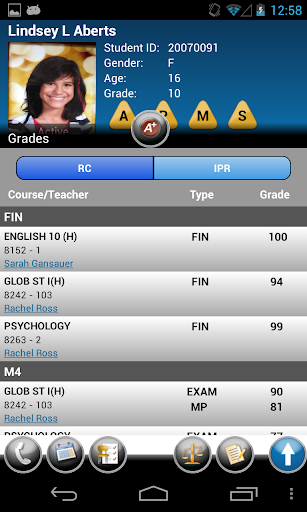


About this app
Developer Description
Real-time access to essential student data for eSchoolPlus administrators
It also helps you manage your workload by allowing you to access the discipline referral process and communicate with district staff and student contacts anytime, anywhere.
Features
Robust Functionality, Information
• Anytime, Anywhere Access. Student information is at your fingertips—contact information, class schedule, attendance, report card/individual progress reports, discipline, notes, demographics, and alerts, such as medical advisories.
• Quick Search Capabilities. Easily find student information by scanning bar or QR codes on student ID cards, or search by key student data. The search engine provides results as a gallery of student photographs so you can be sure you are connecting with the right information.
• Convenient Offline Mode. Student information is available even when a wireless connection is not, thanks to the app’s offline mode. This feature synchronizes basic information to your local device, secures it, and then makes it available when you’re not connected—on field trips, at athletic contests, or even during school emergencies.
Powerful Mobile Office
• Today at a Glance. The Dashboard features today’s class schedule and allows you to retrieve lists of students who are absent and who are celebrating their birthday.
• Portable Notifications. When paired with the notification engine, the app extends the reach and timeliness of routine and emergency communications. You can read notifications wherever you are.
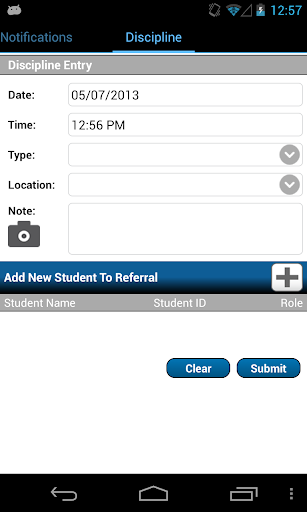
• Discipline Reporting At-the-Scene. The discipline referral process is available wherever you need it. You can submit a conduct referral and add related documentation, like photographs and notes.
• Timely Connections. Initiate conversations from your mobile device by tapping on phone numbers and e-mail addresses in a student’s contact information.
Secure Access
• Building-Specific and Student-Centric Data. Based on your eSchoolPlus domain and password, the app quickly takes you to the student information for your building. If you need to view information for more than one building, the app allows you to move there with ease.
• Protection for Student Privacy. The app’s security, with encrypted data exchange, safeguards student data from prying eyes, either on the device or in the air.
• Consistency with District Access Criteria. On first use, you will be required to enter a passkey to gain access to the district’s eSchoolPlus server. The district’s pre-established criteria determine what student information eSchoolPlus Admin Mobile App users can view.
What's New
Key Fix:
- Updated Android SDK to version 35
Version Information
- Version
- 1.6.0
- Downloads
- 10K+
- Updated on
- Oct 23, 2025
- Released
- May 17, 2013
- Requires
- Android 8.1
Statistics
Google Play Rating History
Rating Distribution
Downloads Over Time
eSchoolPLUS Admin Mobile App has been downloaded times. Over the past 30 days, it averaged downloads per day.
Shaded area shows 30-day prediction based on historical trends
Historical data collection started recently. More data points will be available over time.
eSchoolPLUS Admin Mobile App users say on Google Play
 A Google user
It is excellen
A Google user
On Samsung Galaxy S6, no buttons to allow for settings changes. As a result, I can't change schools. With 8+ buildings, the app is all but useless.
A Google user
This app dont work
ApkTrusted Ratings & Reviews
More from PowerSchool Group LLC
See more apps
Planboard - Lesson Planner
Free

SchoolMessenger
Free

SM Sender App
Free

Unified Talent Mobile
Free

SmartFind Express Mobile
Free

Kinvo
Free

SM Home
Free

PowerSchool ERP Employee
Free

PowerSchool Events
Free

PowerSchool Mobile
Free

Schoology
Free

eSchoolPLUS Family
Free

Unified Classroom Behavior
Free

PowerSchool University
Free
Scan this QR code to download

Forwarding you to the page at Google Play market in seconds...
Open Google Play market now