
Video Splitter for WhatsApp v2.48
Promising Apps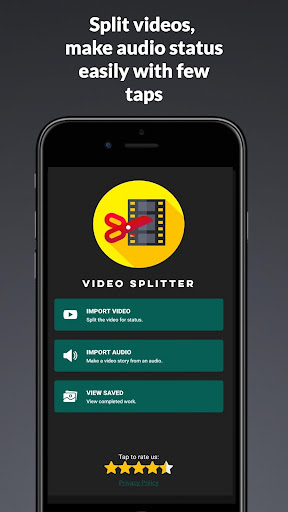


About this app
Developer Description
Split long videos, post long videos on WhatsApp status & Instagram stories
Technically you can upload 30 seconds videos as 30 parts which mean a full 15-minute video as WhatsApp status!.
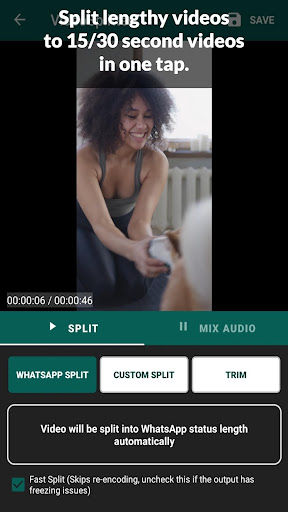
Video splitter allows you to split a long video in 3 ways:
1. WhatsApp Split - Automatically split long videos to 15/30 seconds.
2. Custom Split - Split videos based on the custom duration
3. Trim videos - Trim/cut videos from start time to end time seconds.
Video splitter Also has other features:
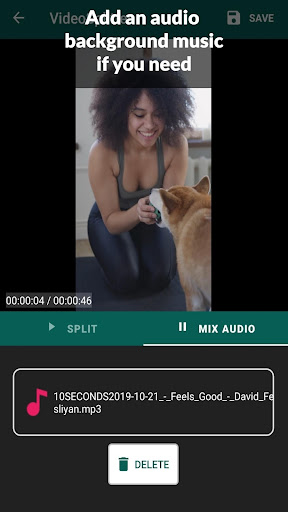
1. Add background audio to your video status before splitting. This will make your WhatsApp status or Instagram story more effective and beautiful.
2. Convert audio clip to video status - Have you ever wanted to post an audio clip as WhatsApp status?. It is now easy with Video Splitter. This feature will allow you to choose an audio clip and an image and create a video status for you. Later you can save the video or split it to status.
Video Splitter works offline and doesn't use your data.
Video Splitter uses FFMPEG open-source library to split and process videos, the carefully selected commands will ensure your video plays perfectly with audio-video sync and without any freezing issues. Video Splitter is the fastest in this category.
Features:
★ Works offline
★ More than 30 seconds status upload
★ Share videos in one tap after the split
★ Custom video chunk size
★ Add background audio to video
★ Convert audio to video with background image
★ Gallery viewer - view and manage all your files
★ View, share or delete the videos within the app.
How To Use:
➤ When you want to post a lengthy video to WhatsApp or any other social media app, open Video Splitter, choose the Import Video option
➤ Select the video file you want from the gallery or file manager
➤ You can select the WhatsApp split option if you are splitting the videos for WhatsApp status.
➤ Tap on SAVE - You will be asked if you want to split into 15 seconds or 30 seconds. This is because WhatsApp changes the status length limit often.
➤ If you want any other status video length, choose the Custom Split option. Move the slider and select a chunk size, tap SAVE.
What's New
In-app purchases
$1.79 - $8.99 per item
Version Information
- Version
- 2.48
- Downloads
- 1M+
- Updated on
- Nov 19, 2025
- Released
- May 1, 2020
- Requires
- Android 7.0
Statistics
Google Play Rating History
Rating Distribution
Downloads Over Time
Video Splitter for WhatsApp has been downloaded times. Over the past 30 days, it averaged downloads per day.
Shaded area shows 30-day prediction based on historical trends
Historical data collection started recently. More data points will be available over time.
Video Splitter for WhatsApp users say on Google Play
 Miracle Miller
3rd November 2025, it's NOT good as it used to be, the other function is not working, adding music to picture is NOT working. THIS IS SO DISAPPOINTING
 Man Wolff
Good thus far
 Andrew Ruiters
nice app
 Francis Bethel
This used to be a very good app to split videos when I first got it a few years ago. But now it's not as precise as it used to be. it used to split videos right down to the second. Now it's splitting videos a few seconds longer than I really want. I've wasted precious time trying to split certain videos, only to get the same results which were frustrating and a complete waste of time. I've uninstalled it and downloaded a better app.
 Matthew King
Used to work, but ads were always in the way. Since updating, splits no longer work as expected. Author needs to spend more time testing and less time implementing ads!
ApkTrusted Ratings & Reviews
More from Promising Apps
See more apps

Similar Apps

Status Saver App
Paid

Smart Video Crop - Video Cut
Free

Smart Video Downloader
Free

Text & Image to Video AI Gen
Paid

Video Converter Pro
Paid

Promeo - Story & Reels Maker
Free

MP4Fix Video Repair Tool
Free

Unfold: Story & Reels Maker
Free

ActionDirector - Video Editing
Free

PDF Merge: Scan, Sign & Edit
Free

GoPro Quik: Video Editor
Free

PicCollage: Photo Video Editor
Free

Add Music To Video & AI Editor
Free

Smallpdf: Scanner & PDF Editor
Free

Download Twitter Videos - GIF
Free

World Festival Guide
Paid
Scan this QR code to download

Forwarding you to the page at Google Play market in seconds...
Open Google Play market now