Lock Me Out - App/Site Blocker v7.2.5
TEQTIC Apps LLC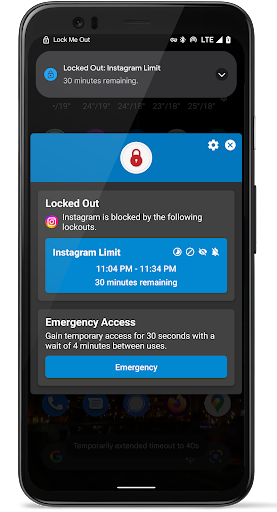
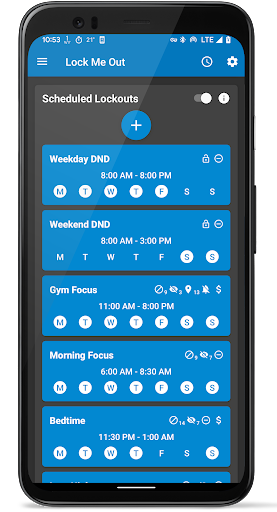
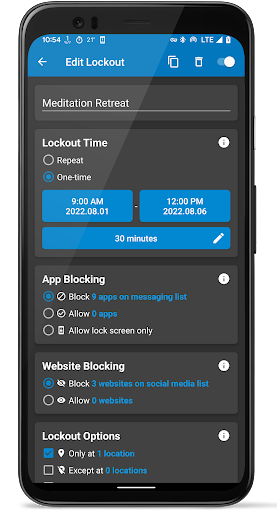
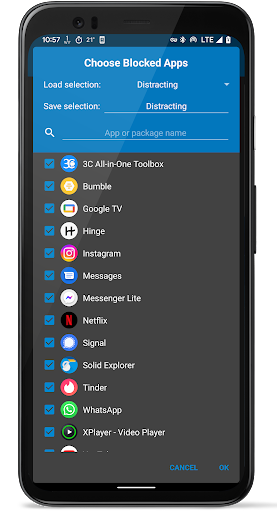
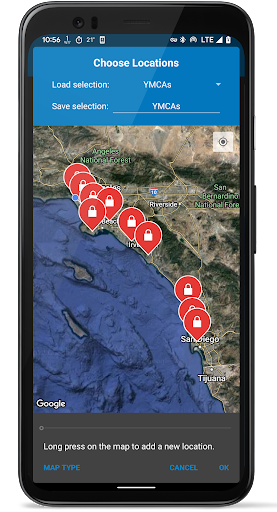
About this app
Developer Description
Block apps and websites to spend less time online and more time being present!
Can't put your phone down? Lock Me Out is a powerful and feature rich app blocker that locks you out of your chosen apps and websites when you would rather be doing something else.
Please check www.dontkillmyapp.com to ensure Lock Me Out is able to run in the background on your device!
Brief Overview (detailed overview below)
• Block chosen apps, allow chosen apps, or allow lock-screen only
• Block or allow chosen websites
• Password protection for entry, uninstall, and tampering
• Automatic lockouts based on usage: time in apps, # app opens, # device unlocks
• Only lock at chosen locations
• Hide notifications from blocked apps
• Turn on DND/silence ringer during lockouts
• Works in split screen, picture-in-picture, and Samsung's pop-up views
• Temporary emergency access
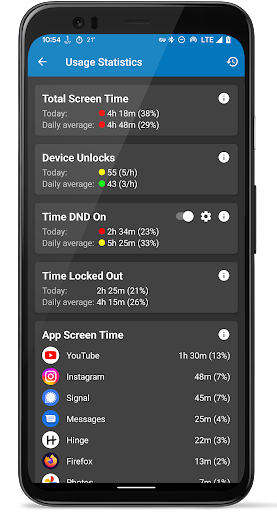
• View usage statistics
• Notifications to warn you about your usage
• No ads!
Lock Me Out has helped hundreds of thousands of people spend less time on their phones and other devices. It's proven to be an invaluable tool for students who wish to focus on studying, and for parents who wish to limit their children's screen time with a strict parental control app. Originally released in 2014, it continues to improve with new features based on user feedback.
Customer service is a top priority at TEQTIC. If you need help, please use the "Contact Support" menu option inside the app or email lockmeout@teqtic.com! We strive to respond to all emails as quickly as possible.
Install now to free yourself from digital distractions and reclaim your precious time!
Detailed Overview
App Blocking Modes
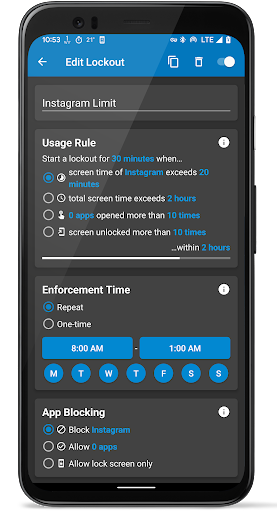
There are three app blocking modes. The first mode blocks the chosen apps and allows the rest. The second mode allows the chosen apps and blocks the rest. The third and strictest mode only allows use of the lock-screen. You can still answer calls or call emergency numbers in this mode.
Website Blocking Modes
There are two website blocking modes. The first mode blocks the chosen URLs or URL keywords and allows the rest. The second mode allows the chosen URLs or URL keywords and blocks the rest.
Usage Based Lockouts
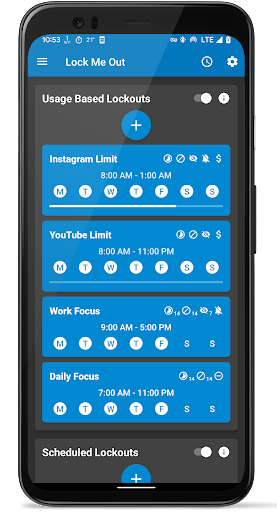
Usage based lockouts have rules that trigger automatic lockouts based on your device usage. You can set up usage rules based on time spent in chosen apps, total screen time, the number of times apps are opened, or the number of device unlocks. Usage rules are scheduled to be enforced at the chosen times.
Scheduled Lockouts
Scheduled lockouts occur at the chosen times regardless of usage.
Lockout Options
Each lockout has its own configurable options:
• Unlock periodically with regular breaks (pomodoro)
• Hide notifications from blocked apps
• Turn on Do Not Disturb (DND)
• Silence the ringer
• Only lock at chosen physical locations
• Allow a chosen payment to end the lockout early
Reducing notifications is important to help us eliminate frequent interruptions, which is vital for our focus, productivity, and mental health. Having lockouts limited to specific physical locations can improve focus while at school, the gym, or anywhere else apps can be a distraction. Less time spent on your phone at night can also improve your sleep.
Premium Version
The premium version allows an unlimited number of lockouts, apps, websites, and locations. It allows enabling the option to prevent uninstallation and tampering so that you can't get out of lockouts. Please consider upgrading to support future development! We want everyone to conquer their addiction. If you cannot afford the premium version, please email us.
Sensitive Permissions
The Accessibility Service permission is required to detect which apps or websites are open, so that your chosen apps and websites can be blocked. Information provided by the Accessibility Service is not collected or shared in any way.
What's New
-Many bug fixes
-Updated translations
-Please view the full changelog at www.teqtic.com/lockmeout-changelog or by going to Menu -> About Lock Me Out -> Changelog
In-app purchases
$0.99 - $99.99 per item
Version Information
- Version
- 7.2.5
- Downloads
- 500K+
- Updated on
- Oct 29, 2025
- Released
- Sep 23, 2014
- Requires
- Android 7.0
Statistics
Google Play Rating History
Rating Distribution
Downloads Over Time
Lock Me Out - App/Site Blocker has been downloaded times. Over the past 30 days, it averaged downloads per day.
Shaded area shows 30-day prediction based on historical trends
Historical data collection started recently. More data points will be available over time.
Lock Me Out - App/Site Blocker - Google Play Rankings
Top Rankings
| Rank | Country | Category | List | Change |
|---|---|---|---|---|
| — |
Ranking History in
No ranking data available yet. Rankings are updated daily.
#81 in Top Grossing Health And Fitness in Turkey

#114 in Top Grossing Health And Fitness in Thailand
 Welltory: Heart Rate Monitor
Lock Me Out - App/Site Blocker
Welltory: Heart Rate Monitor
Lock Me Out - App/Site Blocker
#118 in Top Grossing Health And Fitness in South Korea

#123 in Top Grossing Health And Fitness in Japan
 Step Counter - Pedometer
Lock Me Out - App/Site Blocker
Step Counter - Pedometer
Lock Me Out - App/Site Blocker
 ポケットメディカ 総額12,000円以上のアプリが使い放題
Lock Me Out - App/Site Blocker users say on Google Play
 Sabina Lyubimskaya
If you have a tendency to somehow be able to unlock your phone anyway. then this app makes it impossible (unless you use USB debugging i guess) even if your phone is rooted it works. Just dont be too strict in the beginning, block some apps in the evening and morning, and usage based lock outs are amazing. It helps if you are a doomscroller xD blocking certain websites. blocking playstore and fdroid so u cant download a new browser etc. The premium was worth it, otherwise its easy to break out
 Dave Ayland
It has reduced my screen time but I've encountered some issues. I tried to use the feature to pay to end a lockout early and my money was taken but the lockout didn't end. The screen that appears when navigating away from accessibility settings when a lockout is active also lasts far too long and can get stuck. I would caution any future users to be very careful when setting lockouts and associated settings to give yourself some way to switch off as not all features seem to work as intended.
 Jesse Aldana
you are able to bypass the time limit with simply changing the date and time on your phone's settings. any way to stop that?
 Nakkeran Ashok
The app keeps crashing during incoming calls. This goes on for atleast a month now. Have to be manually turned on after each call and accessibility permissions has to be restored repeatedly. Whatever happened to this wonderful app. Already mailed to support using the app, it's been 20 days, and patiently waiting.
 Kate H
Keeps giving an error message that I "can't edit routines while the app is in use" even though the app was currently disabled. If the app is disabled, it shouldn't still have control. I set it to work during a certain time frame. The time frame was over and it still had me locked out. I had to completely uninstall and restart my phone to fix the problem. And no, I didn't set it to do that. Stop trying to control outside of the permissions given. I can't even express how mad this made me.
ApkTrusted Ratings & Reviews
More from TEQTIC Apps LLC
See more apps
Scan this QR code to download

Forwarding you to the page at Google Play market in seconds...
Open Google Play market now