
Unistellar v4.2.1
Unistellar




About this app
Developer Description
Become the pioneers of a new astronomy.
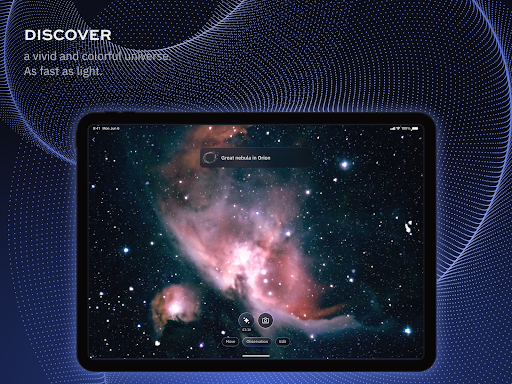
1. Control your telescope: align, point, and operate your smart telescope directly from the App.
2. Explore 5000 celestial objects: galaxies, nebulae, star clusters, planets, Moon, Sun, comets, and asteroids.
3. Observe live: see your target appear within seconds, with more details and colors revealed as the signal accumulates.
4. Share instantly: save your images as PNGs and share them in one click.
5. Go pro: download RAW images for advanced post-processing.
6. Join citizen science missions: contribute to real research with NASA and SETI—track asteroids, detect exoplanets, and more.
7. Stay connected: the App uses a foreground service to ensure a stable connection with your telescope, even when the App is running in the
What's New
- Various bug fixes
Version Information
- Version
- 4.2.1
- Downloads
- 50K+
- Updated on
- Nov 26, 2025
- Released
- Dec 16, 2019
- Requires
- Android 10
Statistics
Google Play Rating History
Rating Distribution
Downloads Over Time
Unistellar has been downloaded times. Over the past 30 days, it averaged downloads per day.
Shaded area shows 30-day prediction based on historical trends
Historical data collection started recently. More data points will be available over time.
Unistellar - Google Play Rankings
Top Rankings
| Rank | Country | Category | List | Change |
|---|---|---|---|---|
| — |
Ranking History in
No ranking data available yet. Rankings are updated daily.
#110 in Top Free Libraries And Demo in United States
 Quran kareem-القرآن الكريم
Unistellar
Quran kareem-القرآن الكريم
Unistellar
#81 in Top Free Libraries And Demo in France


#127 in Top Free Libraries And Demo in United Kingdom


#129 in Top Free Libraries And Demo in Italy


Unistellar users say on Google Play
 A Google user
The app is for the #eVscope telescope and works great! The screen view is just like the scope view. Looking forward to maybe being able to adjust exposure and gain in enhanced mode in the future. Right now you can't. The scope goto and tracking works perfectly. This is a fine all in one telescope which takes about 5 minutes to set up and start using. It is the future and I look forward to it getting better and less expensive as time goes on!
A Google user
I’ve had my eVscope for a few months. The app and telescope have seen a few updates. The device consists of two parts, the tripod and the eVscope itself and is extremely easy to setup. I can be setup and using it within a few minutes. The eVscope is very easy to use. It has a single button to turn it on and off, a dial for focusing the mirror, a couple screws for mirror collimation adjustment, an OLED view screen that has a lens with a diopter adjustment on it, a charging port for the eVscope and a USB port so you can charge a mobile device. In order to use the eVscope and the app, you first turn on the eVscope and connect your mobile device to it through the Wi-Fi hotspot the eVscope creates. The app will search for the eVscope and begin displaying what it’s currently pointed at in the app and on the OLED view screen. A rough focus using the dial on the back of the scope will allow you to use the one-button alignment in the app. The eVscope will begin analyzing the star pattern using a method known as plate solving. Once the star pattern has been analyzed and matched, the eVscope will track with the starfield. It’s recommended you use a bright star to complete the fine focusing and collimation of the eVscope per the instructions using the included aperture mask. Once the telescope itself has been focused, you can focus the OLED view screen for individual users by use of the diopter adjustment. The process of focus and collimation can be completed in a few minutes and is very simple. Once the collimation is complete, it shouldn’t need to be done again unless the eVscope is handled roughly. Focusing should be completed or checked every time the eVscope is used as the focus point can shift with rough handling of the scope itself from temperature changes. Once the setup is completed, you’re ready to begin viewing objects. The current catalogue of objects is somewhat small when compared to other planetarium apps and programs. They are always adding new objects to the database. If an object isn’t in the catalogue, you can look up its coordinates using another app or website and input those coordinates into the appropriate search field at the bottom of the list of recommended objects. The list of recommended objects are some of the brighter and more interesting objects in the night sky and consist of galaxies, clusters, nebulae, asteroids, comets, planets and the moon. The eVscope does well on deep sky objects, but the results on planets are somewhat disappointing. This is understandable though, as planets ar extremely small in comparison to some deep sky objects. You won’t see any details on the surface of planets such as Jupiter or Saturn, but you can still detect the rings around Saturn. What is interesting about some of the planets though is that you’re able to detect the moons around some of the outer planets like Uranus and Neptune. You can even see Pluto, although it will only appear as a prick of light. There are some features that aren’t currently available in the app and there haven’t been any citizen science projects that I’ve been able to take part in, but I look forward to the opportunity to use them. Here’s a list of what is available: an auto-alignment feature; the ability to live-view objects in the app; change exposure settings; an Enhanced Vision mode which stacks a new image every few seconds in order to bring out more detail; the ability to save and share images; download data from the eVscope about your observations and upload it to their servers for scientific purposes. There are only a couple of issues I’ve had with the app and the eVscope. Both were minor and resolved by restarting the eVscope or Enhanced Vision mode. The app will continue to be updated regularly and improvements will be made as time goes on. In order to update the firmware of the eVscope, you first update your app and once it’s connected to the eVscope, it will update the firmware. I look forward to continuing to use my eVscope and I look forward to future updates and capabilities of this device.
 Thierry Keller
Version 1.4.1 The evscope provides in a few minutes quite impressive pictures of nebulae and galaxies even in a big city. Despite regular updates, there's stil connectivity issues (eg. Operator/watcher, connectivity drops). It would nice to be able to download raw data of the pictures for postprocessing instead of compressed pictures. Also, why don't give the option to save the full frame pictures with the informations provided in the round ones?
 Paul Emmert
Android app is broken - selecting the Explore tab causes immediate crash.
A Google user
Absolute waste of money, can't connect to scope properly wifi keeps dropping out on scope and disconnecting. Keeps parking itself. I feel like I want to smash this damn thing waste of your money keep it and buy something else. Total waste.
ApkTrusted Ratings & Reviews
Scan this QR code to download

Forwarding you to the page at Google Play market in seconds...
Open Google Play market now