
Walgreens v108.1
Walgreen Co.



About this app
The Walgreens app solves the problem of managing prescriptions, shopping, and accessing coupons on the go, benefiting individuals who regularly use Walgreens services, such as seniors and those with chronic conditions. Compared to alternatives in the Shopping category, Walgreens stands out with its comprehensive feature set and seamless integration with the physical store experience. However, its success largely depends on the user's existing relationship with Walgreens. The app's high rating and large user base indicate a well-designed and user-friendly experience.
Pros
- With over 10 million downloads and a 4.6-star rating, the Walgreens app boasts significant social proof, indicating a reliable and trustworthy experience for users.
- The app's comprehensive feature set, including prescription management and photo services, makes it a one-stop solution for Walgreens customers, enhancing their overall shopping experience.
- The absence of in-app purchases and ads contributes to a clean and non-intrusive user interface, allowing users to focus on their shopping and health needs without distractions.
- Walgreens' reputation as a well-established and reputable brand adds to the app's credibility, ensuring users can trust the app with their personal and health information.
- The app's regular updates, as indicated by its version history, suggest a commitment to maintaining and improving the user experience over time.
Cons
- One concern is the potential for the app to collect sensitive health information, which, although necessary for its functionality, requires careful handling and protection to maintain user privacy.
- Some users might find the app's functionality limited if they do not regularly use Walgreens services, as it is tailored specifically to the company's ecosystem.
- Although the app has a high overall rating, individual experiences can vary, and some users may encounter issues with prescription management or other features, which could impact their satisfaction.
- The lack of offline capability for certain features might hinder the app's usability in areas with poor internet connectivity, limiting its accessibility for some users.
Best for: The ideal user for the Walgreens app is likely an individual aged 25-65, with a moderate to high level of technical proficiency, who regularly shops at Walgreens, manages prescriptions, or uses the company's photo services, and is looking for a convenient, integrated way to access these services on their mobile device.
Developer Description
Prescriptions, coupons, photos and shopping - it's all in the Walgreens app.
Prescriptions & Pharmacy
• Refill in a snap by scanning your prescription bottle
• Get refill updates and alerts
• Track order status for the whole family
• Never miss a refill with auto refills and stay on track with daily medication pill reminders
• Get FREE prescription and general health advice 24/7 from a pharmacy expert with Pharmacy Chat
Health Services
• Book vaccinations for the whole family
• Schedule COVID-19 and flu tests and check eligibility for antiviral prescription treatment
• Get virtual online visits with a healthcare provider 24/7 for most non-emergency conditions
• Find support for diabetes, pain management, mental health and more
Photo
• Upload photos from your device to create customized photo prints, posters, calendars, and cards available in as little as 1 hour at your local Walgreens
• Create fun photo gifts like magnets, mousepads, puzzles, cubes, collages and more
• Passport and Visa photos available during your visit
• Photo deals and promo codes updated regularly
• Get FREE same-day pickup
Shop & Savings
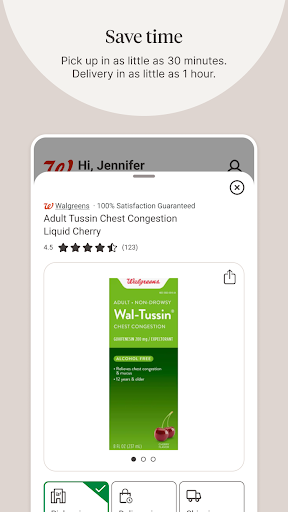
• Shop essentials with convenient delivery or pickup in as little as 30 minutes*
• Earnings made easy—clip deals & coupons from anywhere
• Earn unlimited cash rewards & get personalized offers
• Get easy access to the Weekly Ad, plus the latest sales and promo
Android Permissions:
How the app uses device permissions
• Location: Find nearby stores and enable in-store savings
• Storage: Access photos stored on your device that you want to print or share
• Camera: Take photos and to use features that require scanning
• Flashlight: Enhance the lighting in scanning features
• Control vibration: Indicate that a scan is complete
• Microphone: Speak to a healthcare provider over the phone or video, or to search for products and coupons using your voice
• Prevent phone from sleeping: Keep screen from dimming during a live consultation with a healthcare provider
• Change audio settings: Control the volume during a live consultation with a healthcare provider
The Walgreens App is free to download, but specified rates from your wireless provider and other fees as noted in your Walgreens account agreement(s) still apply.
*See Walgreens.com for details and restrictions.
Privacy
Given that the Walgreens app requests no permissions, it presents a low-risk profile in terms of data collection. However, users should still be cautious when inputting personal and health information, ensuring they understand how their data is used and protected. It's advisable to review Walgreens' privacy policy for detailed information on data handling practices.
Tips
To get the most out of the Walgreens app, users should first set up their account and explore the various features, such as prescription refill reminders and coupon clipping. Regularly checking for updates can also ensure access to the latest features and improvements. Additionally, integrating the app with other health and wellness apps can enhance the overall digital health management experience.
What's New
Version Information
- Version
- 108.1
- Downloads
- 10M+
- Updated on
- Nov 20, 2025
- Released
- Jun 3, 2010
- Requires
- Android 10
Statistics
Google Play Rating History
Rating Distribution
Downloads Over Time
Walgreens has been downloaded times. Over the past 30 days, it averaged downloads per day.
Shaded area shows 30-day prediction based on historical trends
Historical data collection started recently. More data points will be available over time.
Walgreens - Google Play Rankings
Top Rankings
| Rank | Country | Category | List | Change |
|---|---|---|---|---|
| — |
Ranking History in
No ranking data available yet. Rankings are updated daily.
#20 in Top Free Shopping in United States


Walgreens users say on Google Play
 Suzanne Reeve
always easy to use
 Julio Carbonell
always helpful and courteous
 Helen Stephens
need more pharmacist.
 Michelle Hamilton
can't upload photos. shuts down
 David Speir
authenication is a problem
ApkTrusted Ratings & Reviews
More from Walgreen Co.
See more apps

Similar Apps

Dollar General-Digital Coupons
Free

Chewy: Pet Shopping & Delivery
Free

Safeway Deals & Delivery
Free

Family Dollar
Free

BJ's Wholesale Club
Free

Food Lion
Free

ALDI USA
Free

Dunkin’
Free

Bath & Body Works
Free

QuikTrip: Food, Coupons & Fuel
Free

Casey's
Free

Chick-fil-A®
Free

Target: Shop Deals & Trends
Free

Kohl's - Shopping & More
Free
Afterpay: Pay over time
Free

Costco Wholesale
Free
Scan this QR code to download

Forwarding you to the page at Google Play market in seconds...
Open Google Play market now