
Video to MP3 Converter v1.6.0
SmartAppStudio



About this app
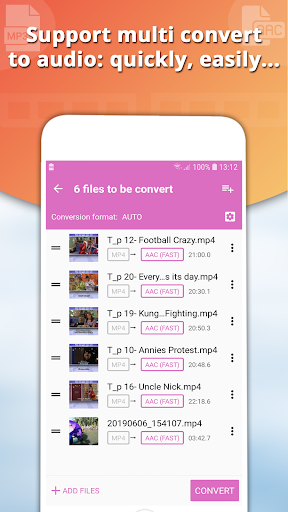
The Video to MP3 Converter app solves the problem of easily extracting audio from video files, benefiting most users who need to convert videos for music or podcast purposes. Compared to alternatives in the Video Players category, this app stands out with its simplicity and high user rating, indicating a well-optimized and user-friendly experience. However, its lack of permission requests raises questions about data collection and security. The app's excellent rating and moderate download numbers suggest a reliable choice, but its in-app purchases and ad-supported model may affect user experience.
Pros
- With over 500,000 downloads and a 4.5-star rating, the Video to MP3 Converter app has established a strong reputation for reliability and quality, making it a trustworthy choice for users.
- The app's simple and intuitive interface allows for easy video to audio conversion, making it accessible to users of all technical skill levels.
- The developer, SmartAppStudio, has a visible online presence with a website and email contact, indicating a level of transparency and accountability.
- The app's small size and lack of permission requests suggest a lightweight and secure installation process.
- The in-app purchase option for ad removal provides a way for users to customize their experience and support the developer.
Cons
- The app's monetization model, which includes ads and in-app purchases, may lead to an intrusive user experience, particularly for those who do not opt for the ad removal purchase.
- The lack of permission requests raises concerns about potential data collection and security, as it is unclear what data the app may be collecting or sharing.
- The app's functionality may be limited for advanced users who require more complex video editing features, as it is primarily designed for simple video to audio conversion.
- The developer's website, while present, lacks detailed information about the app's privacy policy and data collection practices, which may be a concern for some users.
Best for: The ideal user for the Video to MP3 Converter app is likely a casual user who needs to occasionally convert videos to audio files, such as a music enthusiast or podcast listener, and values a simple, easy-to-use interface with minimal technical requirements, but may also be willing to pay for ad removal or additional features to support the developer and enhance their experience.
Developer Description
Convert video to audio, easily & faster. Video cutter, Video to MP3 Converter
🎗️ Video to audio (Convert multiple video files at one time)
🎗️ Audio merging (Allow to cut each piece of sound before merging)
🎗️ MP3 cutter and Ringtone maker (Cut audio and convert formats quickly)
🎗️ Video cutter & Video converter (Cut and convert video)
🎗️ Video compress (Reduce the minimum video size while preserving the video quality)
🎗️🎗️🎗️ Convert video to MP3 or cut audio, cut mp3 supports converting multiple videos at once, fast and efficiently.
🎗️🎗️🎗️ Video cutter is also integrated in the application with many of the most popular video formats currently supported:
🔴 Support all files as MP4, AVI, FLV, MKV, WMV, OGV...
🔴 Convert multiple video files at one time.
🔴 Integrated video adjuster and video cutter.
🔴 Customize the best matching video output size.
🔴 Sound Boost to increase the volume.
🔴 Support hevc H265 for video.
🎗️🎗️🎗️ Audio merge allows merging multiple files with many supported audio formats. Allow to cut each piece of sound before you merge them.
🎗️🎗️🎗️ Audio cutter, Video cutter or Cut music for extremely powerful, simple and fast ringtone, you can also use them to convert audio formats. Many audio formats are also supported on this application such as:
🔴 Support MP3, FLAC, AAC, M4A, WAV, WMA, OGG, OGA, etc.
🔴 Specially allows to add cover art to audio.
🔴 Allow edit tag (Title, Artist, Album, Genre)
🔴 Support frequencies: 8000Hz, 16000Hz, 22050Hz, 44100Hz, 4800Hz
🔴 Support bitrate 32kb/s, 64kb/s, 128kb/s, 192kb/s, 256kb/s, 320kb/s, etc.
🔴 Multi-channel (Stereo) and single channel (Mono) is supported.
🔴 Sound Boost to increase the volume.
🔴 Set as Ringtone maker, Alarm, Notification...
🎗️🎗️🎗️ Powerful Video Extractor allows you to compress videos and convert video formats simply, reducing the video size the minimum but still retains the best video quality possible. With advanced options are well supported for you like:
🔶 film: use for high quality movie content; lowers deblocking
🔶 animation: good for cartoons; uses higher deblocking and more reference frames
🔶 stillimage: good for slideshow-like content
🔶 fastdecode: allows faster decoding by disabling certain filters
For more information please contact to us by email: smartappstudio39@gmail.com.
Thank you!
Privacy
Given the app's lack of permission requests, users should be cautious about potential data collection and consider using a VPN or monitoring their device's data usage. Additionally, users should review the app's terms of service and privacy policy, if available, to understand what data may be collected and shared. To minimize potential risks, users can also consider using the app in offline mode when possible.
Tips
To get the most out of the Video to MP3 Converter app, users should first review the app's settings and options to understand the available features and customization choices. Additionally, users can optimize the app's performance by closing unnecessary background apps and ensuring sufficient device storage. For advanced users, exploring the app's integration with other video editing or music apps may provide additional functionality and workflow options.
What's New
- Fixed some bugs.
- Support all file formats.
In-app purchases
$4.99 per item
Version Information
- Version
- 1.6.0
- Downloads
- 500K+
- Updated on
- Aug 31, 2023
- Released
- Jul 17, 2019
- Requires
- Android 4.4
Statistics
Google Play Rating History
Rating Distribution
Downloads Over Time
Video to MP3 Converter has been downloaded times. Over the past 30 days, it averaged downloads per day.
Shaded area shows 30-day prediction based on historical trends
Historical data collection started recently. More data points will be available over time.
Video to MP3 Converter users say on Google Play
 A Google user
Very good app is working well
A Google user
Good app since i use b4
A Google user
Laica
 Trang Nguyễn Ngọc
"oh no, the task has been stopped!" 👁️👄👁️
ApkTrusted Ratings & Reviews
More from SmartAppStudio
See more apps
Video Maker, Slideshow Maker
Free

Screen Recorder & Audio Record
Free

Video Slideshow Maker, Editor
Free
Live Weather Radar Widget
Free

Weather Forecast, Live Weather
Free

AR Draw Sketch: Trace Anime
Free

Magic Fluids - Live Wallpaper
Free

Voice Changer - Sound Effects
Free
PDF Reader: Edit, Fill and Sig
Free

Magic Doodle: Joy Glow Art
Free

Camera Map: GPS Geotag Photos
Free

Call Santa Claus, Prank Call
Free

Funky Smiles - Silly Wallpaper
Free

Language Translator - Voice
Free

ToonPhoto: AI Photo Generator
Free
Similar Apps






Scan this QR code to download

Forwarding you to the page at Google Play market in seconds...
Open Google Play market now