SkyHalo Weather for Wear OS vVARY
Videotropic






About this app
Developer Description
Ultimate weather forecast + moon phase for WearOS (Pixel, Galaxy, Fossil, etc.)
SkyHalo is the ultimate weather forecast watch face for all Wear OS watches (Pixel, Galaxy, OnePlus, etc.). Features include:
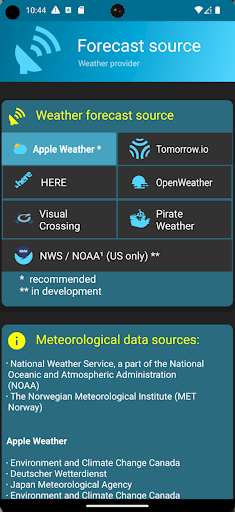
— Choice of six forecast sources (incl. Apple Weather, OpenWeather and others) -- and counting!
— Continuous forecasts up to 48 hours
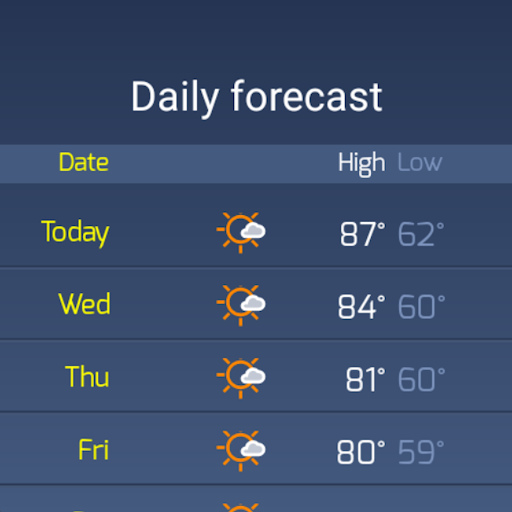
— Daily & hourly forecasts for up to 5 days
— NWS* weather alerts
— Rain/snow forecasts
— Barometer and wind displays
— Sun/moon rise/set
— Moon phase and location
— Up to three complications
It's the most weather information available in any watch face, in a beautiful and intuitive format.
Built off of an original idea by Simon Barke (the no-longer-working Krona Sunlight), we've made significant additions and improvements unavailable anywhere else.
SkyHalo is tested on Wear 2.x, 3.x and 4.x, and is protected from obsolescence (such as the shuttering of DarkSky) by allowing you to choose from six alternate sources, including Apple Weather.
HOW IT WORKS:
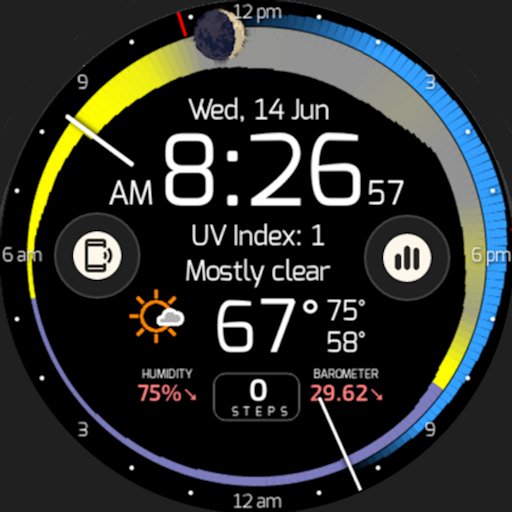
The halos are read clockwise from the hour hand (the current time), and graphically present the following information:
— Temperature: The width of the ring at any point represents the temperature forecast for that time: the thicker the ring, the warmer it will be.
— Cloudiness: The color of that part of the ring represents the sky conditions, with yellow for sunny, gray for completely cloudy, or any shade in between for partial sun. Sunset and sunrise times are indicated by a violet tint.
— Rain and snow: An outer halo will appear if precipitation is in the forecast: blue for rain, white for snow/sleet. The thickness of the outer ring indicates the intensity of the precipitation.
With no more than these three indicators you can glance at the ring and immediately see that it's cool and raining right now, but the sun should start coming out about 2:00pm with the temperatures topping out around 4:30pm, and sunset occurring at 6:15pm. You can graphically watch the increase/decrease of daylight hours as the year progresses.
---------------------
Outside the weather rings is the moon, showing the current phase and location: upper half of the watch face means above the horizon (east on the left, west on the right). Tapping the moon pops up the exact times of sun/moon rise and set.
---------------------
Current weather conditions, humidity and barometer are displayed in the lower half of the face. Tapping this area will cycle through three screens:
— Temperature (current / high / low);
— Wind speed (current / high / low); thickness of the ring represents wind speed; the wind direction is indicated by the ring's color (defined by the color key icon in the lower portion of the screen). Gust speed is indicated by the outer ring.
— Precipitation (rain, snow, sleet)
If severe weather advisories have been issued by the NWS*, a color-coded alert triangle will be displayed to the left of the current conditions (this is a feature that has never before been available on a weather watchface). Tapping it will bring up the detailed alert(s), including the severity, time, location, and any additional information.
---------------------
What's tomorrow's weather? If you tap to the right of the current conditions, the weather rings jump ahead to the next twelve hours, then twenty-four, then thirty-six.
Tapping the 6:00 position displays a table of daily/hourly forecasts, and tapping the 12:00 position displays the NWS* or AI-based three-day weather forecast in descriptive format.
* National Weather Service, within the U.S.
---------------------
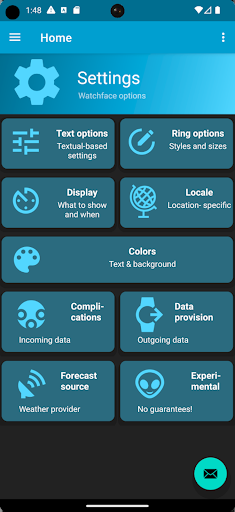
Configurable options include:
— Weather service source
— Real / Apparent temperatures
— 12h / 24h format
— Imperial / Metric units
— Date format (MM/DD or DD/MM)
— Configurable standby screen elements
— Text / background colors or images
— Availability of three complications, such as Step Count (from Fitbit/Google Fit)
What's New
Version Information
- Version
- -
- Downloads
- 1K+
- Updated on
- Oct 25, 2024
- Released
- Feb 21, 2020
- Requires
- Android Varies with device
Statistics
Google Play Rating History
Rating Distribution
Downloads Over Time
SkyHalo Weather for Wear OS has been downloaded times. Over the past 30 days, it averaged downloads per day.
Shaded area shows 30-day prediction based on historical trends
Historical data collection started recently. More data points will be available over time.
SkyHalo Weather for Wear OS - Google Play Rankings
Top Rankings
| Rank | Country | Category | List | Change |
|---|---|---|---|---|
| — |
Ranking History in
No ranking data available yet. Rankings are updated daily.
#50 in Top Paid Weather in Pakistan
#50 in Top Paid Weather in Saudi Arabia
#50 in Top Paid Weather in Thailand
#51 in Top Paid Weather in Indonesia

SkyHalo Weather for Wear OS users say on Google Play
 A Google user
This watch face is brilliant! The pros: 1. It has a clean, great-looking dial that tells you not just the current weather, but what will happen (and when) for up to the next 3 days. It even has advisories and warnings for things like severe thunderstorms and blizzards. 2. I love the moon phase information -- so OK, I'm a bit of a geek that way. 3. It has a TON of customizable options: temperatures can be displayed in F or C, real or "apparent" (Accuweather calls this "RealFeel"), winds in mph or kph, 12- or 24-hour clock, shortcut icons, ambient display, backgrounds, and who knows what else. 4. It's got a great battery life. I've only had it installed for a few days, but so far absolutely no impact on battery; I can still squeak out 3 days. 5. I LOVE the option to put the Google Fit pedometer at the bottom of the screen, which means I don't have to keep switching screens anymore. 6. It's got a professional look, unlike other weather watches I've tried. The cons: 1. There are a LOT of option screens, and it can be difficult to choose the specific option you want to set. Not important, really, but be prepared for a lot of choices. 2. You can change backgrounds, but photos don't seem to be a choice. tl;dr Summary: If you have an interest in weather, or a fan of graphical information display, it's almost worth buying an Android watch just for this.
 Nagy Balázs András
THE replacement for Krona watch face now that Apple nuked Dark Skies Yesterday. It has its pros and cons: you have a lot more customizability and active development/fixes, but at places it's not 100% tested. e.g. at my setup the watch icon and battery% can be somewhat on top of each other. My biggest gripe is getting a forecast at a specific time (like leaving to/from work) is harder and I had to look up the manual. The bottom bubble is also too small for full calendar entry text unfortunately.
 Darren Gibbard
Used this for a long while! Recently having a problem with the units being changed back to Fahrenheit every day or so (I'm a Celsius kinda guy). Other than that, very happy!
 Simon Matthews
Crashing on Fossil Watch Gen5 to "Simple" watch face instead. Unsure why but works okay to start with and then hangs and switches forcibly to what it calls a "simple" watch face. No idea why and frustrating as i absolutely love the idea and functionality!
 Kurt Selden
Errors. Weather and some complications do not load. See error messages on my Watch6 face screen. But i can't get a refund because it took me two days to realize i bought broken garbage.
ApkTrusted Ratings & Reviews
More from Videotropic
See more apps


Scan this QR code to download

Forwarding you to the page at Google Play market in seconds...
Open Google Play market now