
Colorful Spruce ZKin Watch vVARY
ZKin



/
About this app
The Watch supports running on Wear OS
The Watch supports running on Wear OS
🎁Coupon Link :
https://www.facesapps.com/brand/327
🎁Add Telegram group to obtain remaining coupons :
https://t.me/zkinwatch
Highlight: Dual mode automatic background switching (bright colors: 6:00-18:00; dark colors: 18:00-6:00)
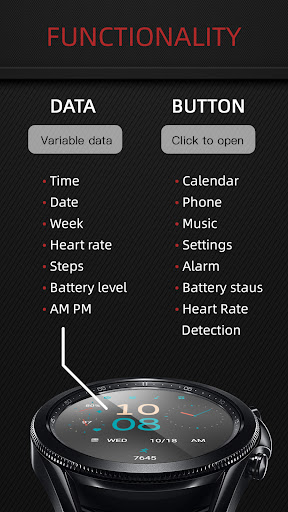
1. Top: Settings, Alarm Clock, Music, Phone
2. Middle: Battery and pointer, heart rate and pointer (click detection), time, pointer clock
3. Bottom: calendar, week, date, morning and afternoon (12 hour clock), number of steps (not clickable)
Compatible with devices: Pixel Watch, Galaxy Watch 4, Galaxy Watch 5, Galaxy Watch 6 and other devices
How do I install the watch face on WearOS ?
1. Install it from Google Play Wear Store on your watch
2. Install the companion app for fully customization (Android phone devices)
🎁Coupon Link :
https://www.facesapps.com/brand/327
🎁Add Telegram group to obtain remaining coupons :
https://t.me/zkinwatch
Highlight: Dual mode automatic background switching (bright colors: 6:00-18:00; dark colors: 18:00-6:00)
1. Top: Settings, Alarm Clock, Music, Phone
2. Middle: Battery and pointer, heart rate and pointer (click detection), time, pointer clock
3. Bottom: calendar, week, date, morning and afternoon (12 hour clock), number of steps (not clickable)
Compatible with devices: Pixel Watch, Galaxy Watch 4, Galaxy Watch 5, Galaxy Watch 6 and other devices
How do I install the watch face on WearOS ?
1. Install it from Google Play Wear Store on your watch
2. Install the companion app for fully customization (Android phone devices)
Version Information
- Version
- -
- Downloads
- 5+
- Updated on
- May 9, 2025
- Released
- Dec 30, 2023
- Requires
- Android Varies with device
What's New
The Watch supports running on Wear OS
Highlight: Dual mode automatic background switching (bright colors: 6:00-18:00; dark colors: 18:00-6:00)
1. Top: Settings, Alarm Clock, Music, Phone
2. Middle: Battery and pointer, heart rate and pointer (click detection), time, pointer clock
3. Bottom: calendar, week, date, morning and afternoon (12 hour clock), number of steps (not clickable)
Compatible with devices: Pixel Watch, Galaxy Watch 4, Galaxy Watch 5, Galaxy Watch 6 and other devices
Highlight: Dual mode automatic background switching (bright colors: 6:00-18:00; dark colors: 18:00-6:00)
1. Top: Settings, Alarm Clock, Music, Phone
2. Middle: Battery and pointer, heart rate and pointer (click detection), time, pointer clock
3. Bottom: calendar, week, date, morning and afternoon (12 hour clock), number of steps (not clickable)
Compatible with devices: Pixel Watch, Galaxy Watch 4, Galaxy Watch 5, Galaxy Watch 6 and other devices
Ratings & Reviews
Developer Response
More from ZKin
See more apps
ZKin Watch Astronaut Club
Free

ZKin Watch Face Candy Puppy
Paid

Cherry Milk ZKin Watch
Paid

ZKin Colorful function black
Paid

Cyberpunk ZKin Watch
Paid

Dynamic Desktop ZKin Watch
Paid

Dynamic Blue ZKin Watch
Paid

Gradient Green ZKin Watch
Paid

ZKin Watch Half Of Life
Paid

Mechanical Black Gold Wear OS
Paid

ZKin Watch Mechanical Fighter
Paid

Mechanical Dark Gold ZKinWatch
Paid

Mondrian Grid ZKin Watch
Free

AZKin Watch Punk Magic Purple
Paid

Saturn ZKin Watch
Free

ZKin WatchFace Smart Machinery
Paid