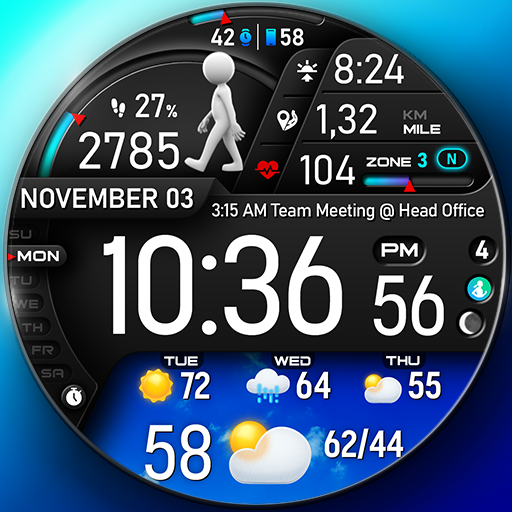
PER23 Digital Watch Face vVARY
PERSONA Watch Face


About this app
The PER23 Digital Watch Face solves the problem of bland and uninspiring watch faces for Wear OS users, offering a sleek and modern design that benefits fashion-conscious individuals and those seeking to personalize their smartwatch experience. Compared to alternatives in the Personalization category, PER23 stands out with its platinum pro digital design, but its limited functionality and lack of customization options might fall short for some users. Given its well-received user rating of 4.1/5, it appears to meet the expectations of its target audience. However, its relatively low download numbers suggest it may not be as widely known as other watch face apps.
Pros
- With a user rating of 4.1/5, the PER23 Digital Watch Face has demonstrated a high level of quality and user satisfaction, indicating a well-designed and functional app.
- The app's paid model, priced at $1.99, provides a ad-free experience, which is a significant advantage for users seeking an uninterrupted experience.
- The developer, PERSONA Watch Face, has a dedicated website and email support, suggesting a commitment to customer service and potential for future updates and improvements.
- The app requires no permissions, which is a significant pro in terms of user privacy and security, as it minimizes the risk of data collection and potential misuse.
- The app's simplicity and lack of in-app purchases make it an attractive option for users seeking a straightforward and cost-effective watch face solution.
Cons
- The app's limited functionality and lack of customization options might be a drawback for some users, as it may not offer the level of personalization they desire.
- The relatively low download numbers, with only 10,000+ downloads, may indicate a lack of awareness or popularity, which could impact the app's long-term support and updates.
- The app's compatibility with Wear OS devices may vary, and some users may experience compatibility issues or limitations, which could negatively impact their experience.
- The app's price, although relatively low, may still be a barrier for some users, especially considering the limited functionality and lack of additional features.
Best for: The ideal user for the PER23 Digital Watch Face is a fashion-conscious individual with a Wear OS device, likely between the ages of 25 and 45, who values a sleek and modern design and is willing to pay a small fee for a high-quality, ad-free watch face experience, and has a basic to intermediate level of technical skill, allowing them to easily install and customize the app.
Developer Description
PER23 Platinum Pro Digital Watch Face for Wear OS
🏃♂️ Step to See the Dancer!
We designed an interactive watch face to keep you motivated and moving. With every step, watch the runner animation change as you progress toward your goal. Hit 100% of your step goal to see the ultimate dancer animation and celebrate your success!
🎥 Check out the animations in action: https://www.youtube.com/watch?v=MYEzKs-xxAA
🎨 Endless Customization
10 font styles for time
10 backgrounds
10 bar colors
6 sky animations
30 color combinations
6 custom complications
2 custom shortcuts
10 AOD Dims
🔹 Key Features of PER23 Digital Watch Face Digital
Weather type and temperature (°F / °C)
High & Low temperature (°F / °C)
Next 3 days' weather type
Next 3 days' temperature (°F / °C)
Steps, daily goal & distance (KM / Miles)
Phone & watch battery level
Active burned calories, floors
Heart rate monitor
UV index, rain possibility
Moon phase, sunset/sunrise
Time zone, barometer
Next appointment reminder
Always-On display with adjustable colors
🛠️ Easy Customization Mode
Simply touch and hold to personalize what data you see — weather, sunrise/sunset, time zone, and more.
🔋 For extra complications and widgets like phone battery, calories, or floors, please check the setup guide here:
👉 https://persona-wf.com/installation/
❓ Weather Not Updating?
Seeing a “❓” icon? That means your watch can’t get weather data. Check your internet connection and refresh the watch face.
🌙 Always-On Display (AOD)
The watch face has an always-active display. You can change the brightness level in the customization menu. There are 10 levels in total.
The colors are synchronized with the normal view.
With the new option “AOD Dim” in the customization menu, you can now change the AOD layout.
🌐 More Details:
https://persona-wf.com/portfolios/platinum/
📖 Installation Guide
Before leaving a review, make sure to check the installation guide and FAQ for a smooth experience:
👉 https://persona-wf.com/installation/
⌚ Supported Devices
Compatible with all Wear OS devices (API Level 34+), including:
SAMSUNG: Galaxy Watch8 Classic, Galaxy Watch Ultra, Watch8, 7, 6, 5, 4
GOOGLE: Pixel Watch 1, 2, 3, 4
FOSSIL: Gen 7, Gen 6, Gen 5e series
MOBVOI: TicWatch Pro 5, Pro 3, E3, C2
🚀 Exceptional Support
Need assistance? We’re here for you
📩 support@persona-wf.com
💜 Join Our Community
Get the latest designs & exclusive offers
🌐 https://persona-wf.com
📩 Newsletter
https://persona-wf.com/register
https://www.facebook.com/Persona-Watch-Face
https://www.instagram.com/persona_watch_face
💬 Telegram
https://t.me/persona_watchface
▶️ YouTube
https://www.youtube.com/c/PersonaWatchFace
💖💖💖 Thank You for Choosing PERSONA!
We hope our design brightens your day and your wrist 😊
Designed with love by Ayla GOKMEN
Privacy
Given that the PER23 Digital Watch Face requires no permissions, users can be confident that their data is not being collected or shared. However, as with any app, it's essential to monitor the app's behavior and watch for any potential updates that may introduce new permissions or data collection practices. To ensure optimal security, users should only download the app from trusted sources, such as the official Play Store.
Tips
To get the most out of the PER23 Digital Watch Face, users should first ensure their Wear OS device is compatible and up-to-date. Upon installation, users can customize the watch face by selecting the PER23 design from their device's watch face menu. For optimal performance, users should also consider restarting their device after installation and monitoring the app's battery usage to ensure it does not negatively impact their device's overall performance.
What's New
10 dim levels added for AOD.
10 font styles added.
30 color combinations added.
6 custom complications added.
Current weather type and temperature °F °C.
High and low temperatures °F °C.
Weather forecast for the next 3 days.
Temperature forecast for the next 3 days °F °C.
Thank you for using our app. We are always working to improve it. If you have any feedback, please don't hesitate to let us know.
Version Information
- Version
- -
- Downloads
- 10K+
- Updated on
- Dec 15, 2025
- Released
- Jan 26, 2024
- Requires
- Android Varies with device
Statistics
Google Play Rating History
Rating Distribution
Downloads Over Time
PER23 Digital Watch Face has been downloaded times. Over the past 30 days, it averaged downloads per day.
Shaded area shows 30-day prediction based on historical trends
Historical data collection started recently. More data points will be available over time.
PER23 Digital Watch Face - Google Play Rankings
Top Rankings
| Rank | Country | Category | List | Change |
|---|---|---|---|---|
| — |
Ranking History in
No ranking data available yet. Rankings are updated daily.
#77 in Top Paid Personalization in United States


#20 in Top Paid Personalization in France


#31 in Top Paid Personalization in South Korea


#34 in Top Paid Personalization in Germany


PER23 Digital Watch Face users say on Google Play
 Tracy Ziska
Upgraded to the Ultra from the Pro 5. 1st watch purchase I made. I have a love/hate relationship with the walking person as it's awesome when I'm hitting my goal for the day, mad at it when I'm off target and it's "slouching" 😁. Looking at a couple more faces from developer but so far, really liking it and the allowable customization. Also like that it has 7 complications just wish I remembered what the were. 🙂🤔
 Tim Homola
I have PER023 for my Galaxy Watch Ultra. It works great except for the heart rate. It rarely works. If I assign the heart rate in the top complication, it usually works, but I would like to use the fixed heart rate that shows the zones. Any suggestions?
 WolfieIQ
Edit: I ended up buying the watchface on my watch and was able to install from there. I don't recommend buying on the phone first. I paid twice, once on the phone and once on my watch. Bought the watchface and when I clicked install on the app, it wanted me to pay for the watchface again on my watch. There are no install options. Tried to read the install instructions, but the website could not be found. I'm pretty tech savvy and tried everything.
 Terry Plummer
I can't get anyone 😕 😪 of these apps to work I must have down.louded it 6 times I just can't get it to get it on my watch from my phone I really like all that it has .it would really help me out.
 Ash Powell
I really wanted this to work. after looking at all the watch faces, I glanced at the buy one get one free offer and jumped on it. After paying for the watch face I realized that I was not able to make any changes or update it. . so I immediately deleted it from my phone/watch. I hope it is fixed in the future - and I did request a refund within a minute of the purchase and attempting to configure the face.
ApkTrusted Ratings & Reviews
More from PERSONA Watch Face
See more apps
PER005 Hybrit Watch Face
Paid

PER15 Sport Digital Watch Face
Free

PER26 Legend Digital WatchFace
Paid

PER18 Premium Sport Watch Face
Paid

PER009 Sport Watch Face Mesa
Free

PER8 Weather WatchFace Digital
Paid

PER10 Butterfly Brooch
Paid

PER006 Digital Watch Face
Paid

PER013 Hybrit Watch Face
Free

PER002 Classic Watch Face
Free

PER12 Digital Watch Face
Free

PER16 Santa Countdown NewYear
Free

PER017 Axis Digital Watch Face
Free
PER019 Classic Watch Face
Free

PER23 Platinum Watch Face
Free
PER11 Guide Weather Watch Face
Free
Similar Apps

Weather Forecast Short Term 99
Free

Modern Weather Digital ECO58
Paid

TVV Sport 7 Digital Watch Face
Free

OMG 354 Weather Watch Face
Paid
FS W254 Watch face
Free

SamWatch Digital Weather
Paid
![[KNA015] CRESCENT icon](https://play-lh.googleusercontent.com/ti1orTMCEZwaoCbG-MDyiq7CwLLTJGZ-lYBocqpGIQ4G1crZ-k03Ck1XVG4wPP_u8mk)
[KNA015] CRESCENT
Paid

FS W243 Watchface
Free

SamWatch Digital Weather 5
Paid

Animated Weather Digital ECO53
Paid

SamWatch Digital XVIII
Paid

Immortal Modern Digital ECO59
Paid
FSW247 Watchface
Free

Modular Progress Bar Face EC40
Free
PRADO 24 Weather - Km & Mile
Free

Weather watch face W7.5
Paid
Scan this QR code to download

Forwarding you to the page at Google Play market in seconds...
Open Google Play market now