
RoStar vVARY
Mohamed Nabil Elewa





About this app
Developer Description
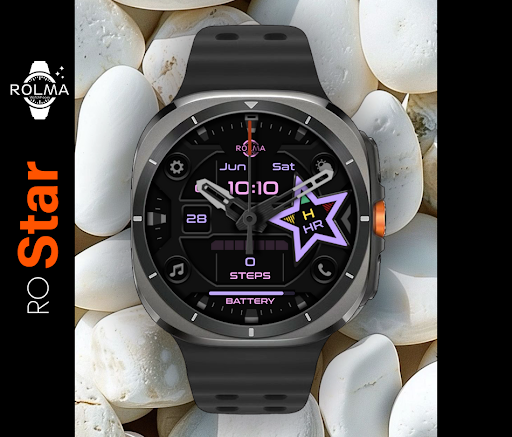
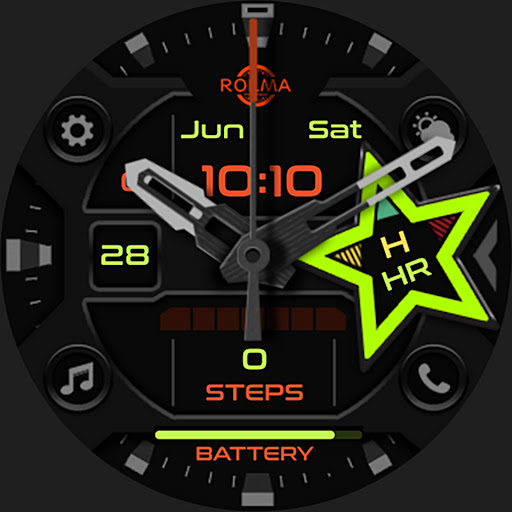
Sporty Look customizable Hybrid/Digital watch face.
This watch face was designed using Watch Face Studio tool.
Note: watch faces for the a round watches are not suitable for rectangular or square watches.
INSTALLATION:
1. Keep your watch connected to your phone.
2. Install in the watch. After installation, check your watch face list in your watch by pressing and hold display then swipe to the right end and click Add watch face. There you can see the newly installed watch face and just activate it.
3. After installation, you can also check the following:
I. For Samsung watches, check your Galaxy Wearable app in your phone (install it if not yet installed). Under Watch faces > Downloaded, there you can see the newly installed watch face and then just apply it to connected watch.
II. For other smartwatch brands, for other Wear OS devices, please check the watch app installed in your phone that comes with your smartwatch brand and find the newly installed watch face in the watch face gallery or list.
CUSTOMIZATION:
1. Press and hold display then hit "Customize".
2. Swipe left and right to choose what to customize.
3. Swipe up and down to choose options available.
4. Hit "OK".
FEATURES::
- Sporty Look customizable Hybrid/Digital watch face.
- Auto 12H/24H Mode.
- Date Infos.
- Digital Steps Counter & steps percentage of steps goal
(the target steps value is (0-10000)).
- Analog steps goal.
- Heart Rate indicator in the star with multi color indication
(N=normal, H=high, L=low)
- shortcuts for Phone, Music, Settings, battery, steps and weather only.
- Analog watch hands can be disabled to turn the watch face to digital only.
- Always On Display.
For support and request, Do not hesitate emailing me at mhmdnabil2050@gmail.com
Version Information
- Version
- -
- Downloads
- 1K+
- Updated on
- -
- Released
- Jun 23, 2025
- Requires
- Android Varies with device
Statistics
Google Play Rating History
Rating Distribution
Downloads Over Time
RoStar has been downloaded times. Over the past 30 days, it averaged downloads per day.
Shaded area shows 30-day prediction based on historical trends
Historical data collection started recently. More data points will be available over time.
RoStar users say on Google Play
 Rendell Querol
i love the design and color option. thank you so much
ApkTrusted Ratings & Reviews
More from Mohamed Nabil Elewa
See more apps


Similar Apps

Hybrid RUDUMAK CTS5 Watch face
Paid
SH088 Watch Face, WearOS watch
Free
SH090 Watch Face, WearOS watch
Paid

NTV145 - CyberWatch Pro
Paid

SH104 Watch Face, WearOS watch
Free

DARDONUS CTS28 Watch face
Paid
SamWatch AD Upsilon Renewal
Paid

Ballozi STEALTH HUNTER Hybrid
Paid

MD322 Analog watch face
Paid

MD311 Analog watch face
Paid

BRN133 - AUSTIN
Free
SamWatch AD E 2023
Free
SamWatch AD E 2025
Free

Hybrid TRADOR URX23 Watch face
Paid

NTV506 - Aircraf Pro Watchface
Paid

MD199: Analog watch face
Free
Scan this QR code to download

Forwarding you to the page at Google Play market in seconds...
Open Google Play market now