
WeMacro rail control v11.241007
William Gu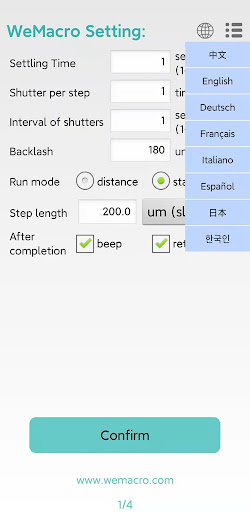


About this app
The WeMacro rail control app solves the problem of manually controlling camera rails for macro photography, benefiting professionals and enthusiasts who require precise control over their camera movements. Compared to other photography apps, WeMacro rail control stands out with its unique feature set and excellent user rating, despite being a relatively niche app. However, its limited download numbers and lack of in-app purchases or ads may raise concerns about the app's long-term support and development. Overall, the app's specialized functionality and positive user reviews make it a valuable tool for those in need of precise camera control.
Pros
- The app's excellent user rating of 4.7/5 indicates a high level of user satisfaction, suggesting that the app is reliable and effective in controlling WeMacro rails via Bluetooth.
- The app's feature set, including a calculator for macro and micro lens depth of field, is tailored to the specific needs of macro photography, making it a valuable tool for professionals and enthusiasts.
- The developer's reputation, as evidenced by their website and email contact, suggests a commitment to supporting and updating the app, which is reassuring for users who rely on the app for their work.
- The app's lack of in-app purchases or ads means that users can enjoy the full functionality of the app without interruptions or additional costs, enhancing the overall user experience.
- The app's small size and efficient design ensure that it runs smoothly on devices with limited storage and processing power, making it accessible to a wide range of users.
Cons
- The app's limited download numbers may indicate a lack of awareness or visibility, which could impact the app's long-term support and development, potentially leaving users without updates or bug fixes.
- The app's specialized functionality may not be useful for casual photographers or those who do not require precise control over their camera movements, limiting its appeal to a wider audience.
- The app's lack of permissions requests may be seen as a positive aspect, but it also means that the app may not be able to integrate with other apps or services, potentially limiting its functionality and versatility.
- The app's documentation and support resources may be limited, which could make it difficult for new users to get started with the app or troubleshoot issues that arise.
Best for: The ideal user of the WeMacro rail control app is a professional or enthusiast macro photographer who requires precise control over their camera movements and is familiar with the technical aspects of photography, including depth of field calculations and camera rail control, and is looking for a reliable and efficient tool to enhance their workflow and creativity.
Developer Description
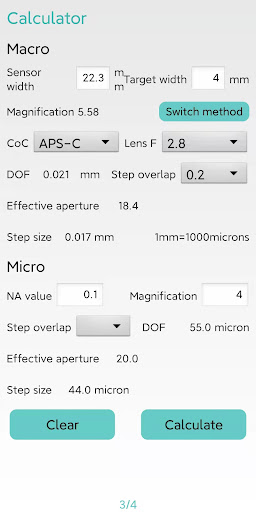
control WeMacro rail via bluetooth.Calculator for macro and micro lens DoF
Upgrade to display eight languages: English, Chinese, German, French, Italian, Spanish, Japanese, Korean.
On the third page of the APP, there is a DOF calculator for the macro lens and the microscope objective lens.
The micron step size is upgraded to one decimal place,and 2 demical place in mm unit.Such as 1.25mm or 0.25mm.
Please press "confirm" when you turn on the controller and app.
1 Distance mode :Means you can input the total distance you want to move and single step length.The program will calculate how many steps it will take automatically.If you change single step length,the step number will change accordingly.
Press “confirm”to save setting to control box after every time you change settings.
2 Start to End mode:Means you can set starting position and ending position,step length.The rail will run automatically.First,press confirm after setting the first page.
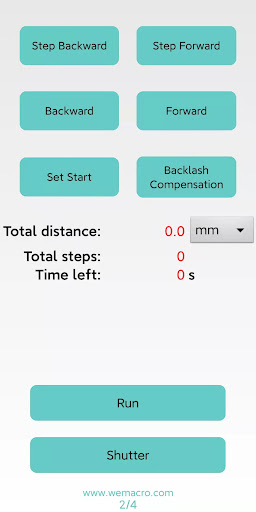
Then in second page you can adjust the position to close to the starting point.
Press “As start”to set starting point.Then press step forward or forward to find the ending point.More coverage at the beginning and ending point will make it safer to complete the whole stacking.In other words,set the beginning point few steps more than the real starting point and ending point of focus stacking.
Then press“Run”
After done,please press "Stop"to switch the status to Run again.
The app can save or load configuration as MPE65.wm.The file must end as .wm.
Privacy
Since the app does not request any permissions, users do not need to worry about their data being collected or shared. However, it is still important to ensure that the app is downloaded from a trusted source, such as the Google Play Store, to minimize the risk of malware or other security threats. Additionally, users should be cautious when using the app in conjunction with other devices or services, as this may introduce new security risks.
Tips
To get the most out of the WeMacro rail control app, users should start by carefully reading the app's documentation and tutorials to understand its features and functionality. Additionally, users should ensure that their device and WeMacro rail are properly connected and configured before using the app, and that they have a clear understanding of the app's controls and settings. By following these tips, users can optimize their experience with the app and achieve the best possible results with their macro photography.
What's New
Version Information
- Version
- 11.241007
- Downloads
- 1K+
- Updated on
- Oct 16, 2024
- Released
- Oct 23, 2019
- Requires
- Android 6.0
Statistics
Google Play Rating History
Rating Distribution
Downloads Over Time
WeMacro rail control has been downloaded times. Over the past 30 days, it averaged downloads per day.
Shaded area shows 30-day prediction based on historical trends
Historical data collection started recently. More data points will be available over time.
WeMacro rail control users say on Google Play
 Cristian Dobre
Simple and great!
 Brian Bourassa
UI not "over-the-top" but it's functionality is very good.
ApkTrusted Ratings & Reviews
Similar Apps


Scan this QR code to download

Forwarding you to the page at Google Play market in seconds...
Open Google Play market now