
Ghostalker LITE v0.6
WorldByDesign.com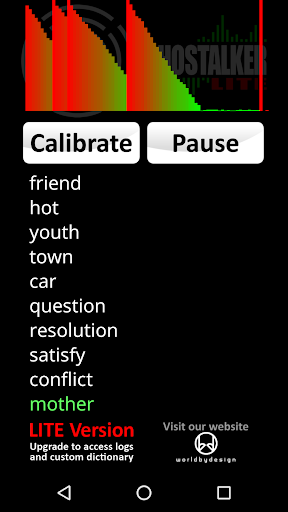


About this app
Developer Description
Use your device sensors to detect energy and convert it into spoken words.
INSTRUCTIONS: Do NOT hold your device and do NOT tap or shake your device while running Ghostalker LITE. It is designed to detect the smallest movements and vibration, as well as many other sensor readings.
With a database of over a thousand commonly used words, Ghostalker LITE will use all of the sensors it can find in your device to pick up changes in energy. This includes sensors for the tiniest amount of vibration, rotation, GPS, gyroscope, light, magnetic fields, proximity etc. and convert them to words which it will display and speak. This app uses the actual data from the sensors to determine what to say, rather than picking one at random like some other apps.
TIP 1: Paranormal investigators believe that leaving such devices running for as long as possible will allow spirits to learn what energy is required to trigger certain words.
TIP 2: If it starts to trigger words constantly you may be getting interference from something close by. Try moving the device somewhere else or tap the 'Calibrate' button to get it to tune out background variance (although you will lose some sensitivity).
TIP 3: Occasionally interference can cause individual sensors to trigger constantly. This can also be caused by faulty or overly sensitive sensors. From v0.2 you can now enable and disable individual sensors to prevent such issues.
The LITE version of Ghostalker shows the last 10 words spoken but does NOT log those words, it does NOT include the log viewer, and it does NOT allow you to create a custom dictionary of words. If you like this app and want these extra features, please download the full "Ghostalker" app:
https://play.google.com/store/apps/details?id=com.worldbydesign.ghostalker
This app is not designed to form complete sentences so it is up to you to interpret what it says in your own way. Top end phones and tablets tend to have more sensors than low end ones but the app is designed to work with whatever hardware it can find. The sensitivity of sensors will also vary between devices.
If the app does not do what you were expecting, or there is an issue with it running on your device, please contact me for help.
There are no adverts in this software and it does NOT require an internet connection so you can use it in remote locations.
What's New
+ Added link to upgrade to full version.
Version Information
- Version
- 0.6
- Downloads
- 100K+
- Updated on
- Aug 8, 2024
- Released
- Apr 23, 2019
- Requires
- Android 4.3
Statistics
Google Play Rating History
Rating Distribution
Downloads Over Time
Ghostalker LITE has been downloaded times. Over the past 30 days, it averaged downloads per day.
Shaded area shows 30-day prediction based on historical trends
Historical data collection started recently. More data points will be available over time.
Ghostalker LITE users say on Google Play
 XrJay03
I’ve used Ghostalker for years, and it’s the best on both Google and Apple platforms. Its consistent performance impresses me. Across devices, when a sensor triggers the same way, it consistently generates identical words. Testing shows the app’s responses are precise and not random. The sensors react as promised, reliably triggering the same words under identical conditions. Everything functions as advertised, making it my go-to tool. Thank you for developing such a dependable app. 5 stars!
 Brenda Harder
Just downloaded this app and started talking to my best friend who just passed away a few months ago. First word that popped up was her son's name. Also had multiple other words pop up that made sense to my questions I was asking her. There was a few words that didn't make sense but overall a good first time using this.
 Noah W
If you're trying to scare some friends or if you yourself scare easily, this app can be useful, lol. I will say, though, that every word that came through to me was either an answer back or literally describing my emotions including how my body felt physically (I was anxious if it'd work, I was tense due to some of the so say responses as well) i guess it really depends on your mindset
 Stephen Western
Hmmm not impressed. It just lists unlimited unconnected words at speed.... not great.
 Claire Whitmore
hasnt worked no voice
ApkTrusted Ratings & Reviews
More from WorldByDesign.com
See more apps





Scan this QR code to download

Forwarding you to the page at Google Play market in seconds...
Open Google Play market now