
SwifDoo PDF: Read & Edit PDFs vVARY
Chengdu Aishang Technology Co.,Ltd





About this app
Developer Description
Versatile PDF Editor: Easy, powerful, effortless for PDF reading and annotating.
SwifDoo PDF is a versatile PDF reader and annotator that combines the functionalities of annotating PDFs, reading PDF documents, converting Office to PDFs, and serving as a PDF reader. With SwifDoo PDF, your mobile device becomes a fully featured and powerful mobile PDF Office, making it convenient for you to read and access all PDF files on your smartphone. Learn how to annotate a PDF with SwifDoo PDF, your all-in-one PDF reader and annotator.
Key features of SwifDoo PDF:
Read PDF
- Support reflow of your PDF and text for a fit-to-screen experience
- Full Screen Mode that hides all the toolbars and task panes for better PDF reading experience
- Search for words and phrases in PDFs and quickly jump to specified locations
- Document reformatting supported: change the background color or image of your PDF, change the font size, and do more to relax your eyes and read joyfully
- Support viewing various files such as PDFs and images that stored on your device
- Auto Page feature allows you to read the PDFs effortlessly
- Read feature allows you to listen to the content instead of reading it yourself, and engage in other activities without needing to focus on the document visually
Annotate PDF
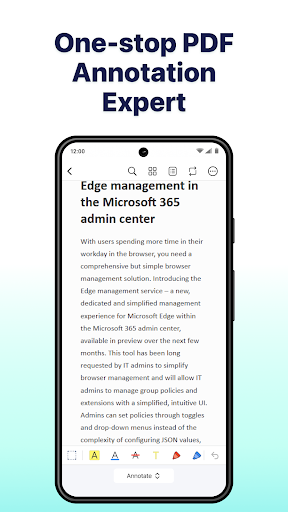
- A set of annotation tools to underline, strikethrough, and highlight text in PDFs. Also add notes, shapes, text boxes, and freehand drawings to PDFs
- Easily view all annotations from the quick navigation bar and annotation panel
- Add predefined or custom stamps to PDFs, and create dynamic stamps with the date, and time information
- Reorder, rotate and delete PDF pages in just a few click
- Save all the changes of the PDF on your device in a click
Convert PDF
- Convert PDF to Word, PowerPoint, Excel, CAD, and image formats.
- Convert Office documents, drawings and images to PDFs without losing quality.
Merge & Split PDF
- Combine two or multiple PDF files into one in the order you want.
- Split a PDF into several smaller files evenly, every X page or by entering the page ranges.
Compress PDF
- Compress a PDF file to reduce the file size by three compression levels.
- Customize image quality and resolution for PDF compression.
Import PDF
- Transfer PDF files from your computer to your phone for more convenience file
- Built-in scanning feature turns your phone's camera into a scanner, effortlessly capturing photos and converting them into PDFs
Search PDF
- Find PDF files on your device easily in a click
In-App Purchase Details
Subscription Plan: Monthly plan and Annual plan, and the new users enjoy a 7-day free trial
Contact Us
At SwifDoo PDF, we provide a useful and quick solution to your PDF-relevant needs, from reading to annotating PDFs. If you have any questions about this app, please email us at support@swifdoo.com.
You can follow us on
Facebook: @swifdoo
Twitter: @swifdoo
Youtube: @swifdoo
Instagram: @swifdoopdf
If you feel this app helped you, please leave us a positive review in Google Play. Much appreciated!
Privacy Policy and Terms of Use
Privacy Policy: https://www.swifdoo.com/privacy
Terms of Use: https://www.swifdoo.com/terms
In-app purchases
$5.99 - $25.95 per item
Version Information
- Version
- -
- Downloads
- 10K+
- Updated on
- -
- Released
- Oct 20, 2023
- Requires
- Android Varies with device
Statistics
Google Play Rating History
Rating Distribution
Downloads Over Time
SwifDoo PDF: Read & Edit PDFs has been downloaded times. Over the past 30 days, it averaged downloads per day.
Shaded area shows 30-day prediction based on historical trends
Historical data collection started recently. More data points will be available over time.
SwifDoo PDF: Read & Edit PDFs users say on Google Play
 Sanmugam
I use the free version, I didn't know about the paid version I love the interface and automatic scrolling option
 Sudipta Das
I downloaded this app after seeing alex07 video, it's good & easy to use.
 Anil Bunny
There is no option to copy text of pdf that should be improvised.
 John Farnsworth
Like other apps, the free version hooks you in by offering a wide range of tools. But it's just cynical seduction: you cannot save any changes, such as annotations, without a subscription. I've uninstalled.
 Binoy Ghosh
Useless, I have desktop perpetual licence but that's not working on mobile version.
ApkTrusted Ratings & Reviews
More from Chengdu Aishang Technology Co.,Ltd
See more apps


Scan this QR code to download

Forwarding you to the page at Google Play market in seconds...
Open Google Play market now