Resize image & Convert photo v1.12.8
Yalintech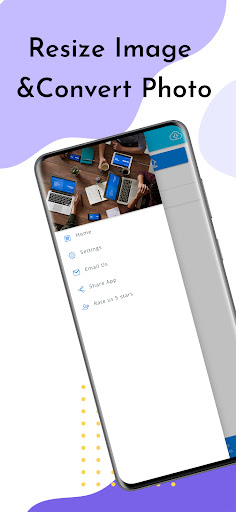


About this app
Developer Description
Resize image, Convert photo, Image Converter to PDF, Convert Images to text app
The Image Converter application has all the features that you need-
✔️Convert Images to text (OCR text recognition)
✔️Resize images to any width&high - Photo resize
✔️Convert images to PDF
✔️Support OCR text recognition in more than 60 languages
✔️Edit photos&documents easily and converts them to PDF
✔️History page - contains all your scan history
✔️Add a password to protect your PDF documents
✔️Backup and synchronize files- WhatsApp, Google Drive, Dropbox, and more
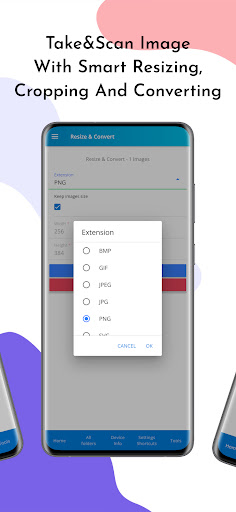
Introducing the ultimate Image Converter app - the one-stop-shop for all your image conversion needs! With our app, you can easily convert all your images to PNG, JPEG, BMP, GIF, TIFF, and RAW formats.
But that's not all - we've included a host of powerful features that make our app stand out from the crowd. Want to convert images to text? Our app supports OCR text recognition in over 60 languages. Need to resize images? No problem - our app lets you resize images to any width and height you desire.
Looking to convert images to PDF? Our app has got you covered. And with our easy-to-use photo and document editing tools, you can quickly edit your photos and documents and convert them to PDF.
Plus, our app comes with a handy History page that keeps track of all your scans, making it easy to access your files whenever you need them. And if you need to protect your PDF documents, you can easily add a password for added security.
Finally, our app lets you backup and synchronize files across all your favorite platforms, including WhatsApp, Google Drive, Dropbox, and more. So what are you waiting for? Download our app today and take your image conversion game to the next level!
What's New
🔍 Enhanced text search within images for precise findings.
🖼️ Expanded support for larger images & diverse conversion options.
🆕 Revamped interface for a smoother user experience.
📶 Detailed WIFI info including location & IP.
🔌 Monitor with "Connected Devices" page.
🛠️ "Network Tools" now with Ping; more tools coming.
🐞 Squashed bugs for smoother operation.
🌐 Improved translations for global users.
We value your feedback - enjoy the updates!
In-app purchases
$0.99 - $4.99 per item
Version Information
- Version
- 1.12.8
- Downloads
- 100K+
- Updated on
- Aug 1, 2025
- Released
- Aug 1, 2020
- Requires
- Android 7.0
Statistics
Google Play Rating History
Rating Distribution
Downloads Over Time
Resize image & Convert photo has been downloaded times. Over the past 30 days, it averaged downloads per day.
Shaded area shows 30-day prediction based on historical trends
Historical data collection started recently. More data points will be available over time.
Resize image & Convert photo users say on Google Play
 Trenttney Thompson
Great app, I've tried literally almost 10 different popular apps and this is the only one to properly resize the image to a certain shape/size to fit the frame and also decrease/increase size without changing the image! Others stretched or cut off the image. This app has saved me so much time with my business; It's honestly great. I've deleted all others and I've been using this for months with no problems, Great job to the inventor of this app! Sincerely, T.Thompson
 Charles Laux (Sonicbox)
Great app but ive run into an issue that led me to delete it. Recently my phone has been starting running strangely and lots of random things have been working in ways that they don't normally like apps having issues and load time/corruption issues. Soon after that both my VPN and malware protection app started marking this app as malware and suggesting i should delete it. I'm not sure if this is a false positive but it recognizes it as malware every time it scans so its very consistent.
 NICKESHA BAILEY
It helped
 Mark Pak
Not easy to use. Many annoying ads.
 Katherine Sponsler
The free 3-day trial of this app is so glitchy on my Pixel 5a that it took almost 20 minutes to upload a dozen photos I needed to resize. It kept restarting when I selected only a couple of photos at a time, when it said you could select up to 8 at a time. It did convert and resize the images quickly once I got them into the app, and automatically moved them back into Google Photos. Made it easy to then attach them to email. Absolute waste of time, I wouldn't recommend this app at all!
ApkTrusted Ratings & Reviews
More from Yalintech
See more apps
Compass - Digital Compass
Free
Quick Settings Shortcuts app
Free

Notes Pro- Organize Notes&Memo
Free

Battery Charging Status&Level
Free
Document Scanner & PDF scanner
Free
My Location Tracker
Free
NFC write and read tags
Free
Baby Care-Baby Feeding Tracker
Free
Barcode & QR Code Reader
Free
Metal Detector & Gold Finder
Free

Flashlight
Free

Noise detector & Decibel meter
Free

WiFi Map search&WiFi Analyzer
Free
Barcode And QR Code Generator
Free

Barcode reader&QR code scanner
Free
Device Information
Free
Scan this QR code to download

Forwarding you to the page at Google Play market in seconds...
Open Google Play market now