
BatchPad: Photo Border in Bulk vVARY
Yellowsquared





About this app
Developer Description
Add smart borders, color palettes, and metadata to keep every photo high-quality
Process one photo or one hundred in seconds—all while keeping your data private and on-device.
PERFECT FIT, EVERY TIME
Stop sacrificing your composition for an algorithm.
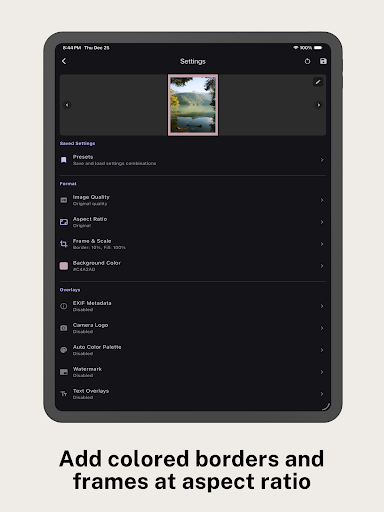
Precision Padding: Pad your photos to fit Instagram (4:5), Stories (9:16), or any custom dimension.
Smart Backgrounds: Fill empty space with auto-extracted colors, custom gradients, or professional "Blurred Glass" effects.
Orientation Intelligence: Uniquely handles mixed batches. Apply specific rules for Portrait vs. Landscape images automatically so you never have to sort your camera roll first.
PRO-GRADE COLLAGES & STORYTELLING
Moving beyond the simple grid. BatchPad offers a diptych and triptych toolkit built for narrative control.
Diptych & Triptych Templates: Choose from minimalist layouts designed to showcase series and sequences.
Per-Cell Customization: Total control over every frame. Set independent aspect ratios and crops for each image within a single collage.
Compositional Freedom: Use interactive gestures to pan and zoom each photo to the perfect focal point without affecting the rest of the layout.
Professional Insets: Fine-tune the "negative space" between your images to create a high-end gallery aesthetic.
FOR THE PHOTOGRAPHY PURIST
Turn your images into a digital portfolio display with information that matters.
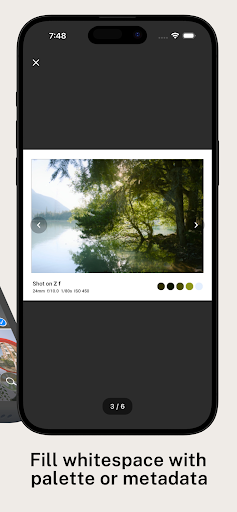
EXIF Data Overlays: Automatically display your Camera Model, Lens, ISO, Aperture, and Shutter Speed on single shots or across your entire collage.
Camera Branding: Give your work the official touch. BatchPad auto-detects and applies official logos for major camera brands based on your file data.
Color Palettes: Instantly generate and display the dominant color palette of your image for a curated design look.
PROFESSIONAL WORKFLOW
Built for speed, precision, and the power-user.
Live Preview: See every adjustment in real-time with a fluid, responsive preview engine.
Batch Watermarking: Protect your work with logos or text placed on a precision 9-point grid.
Zero Compression: Export your images at 100% quality. What you shot is what you post.
Privacy First: All processing happens locally on your device. Your photos never touch a cloud server and your data stays yours.
THE COMPLETE TOOLKIT
Crop & Straighten: Fix horizons and center subjects with tactile precision.
Dynamic Filenames: Rename files in bulk using data variables like date, camera model, or sequence.
Presets: Save your favorite padding, collage layouts, and watermark setups for one-tap edits.
Preserve your composition. Tell the story behind the shot. Download BatchPad and make your feed look professional.
In-app purchases
$3.99 - $12.99 per item
Version Information
- Version
- -
- Downloads
- 100+
- Updated on
- -
- Released
- Jun 1, 2025
- Requires
- Android Varies with device
Statistics
Google Play Rating History
Rating Distribution
Downloads Over Time
BatchPad: Photo Border in Bulk has been downloaded times. Over the past 30 days, it averaged downloads per day.
Shaded area shows 30-day prediction based on historical trends
Historical data collection started recently. More data points will be available over time.
BatchPad: Photo Border in Bulk users say on Google Play
 Lumi He
BatchPad makes resizing photos for Instagram super easy! I love the simple controls for adding watermarks and adjusting aspect ratios which is great for ins user. Perfect for getting my photos ready for posts and stories. Highly recommend for anyone who wants quick, professional results!
ApkTrusted Ratings & Reviews
More from Yellowsquared
See more apps


Scan this QR code to download

Forwarding you to the page at Google Play market in seconds...
Open Google Play market now