
예스24 eBook & 크레마클럽 v3.4.25
YES24









About this app
Developer Description
read a book. Book life Enjoy your reading life with the all-new Yes24 eBook app!
Enjoy your reading life with the all-new Yes24 eBook app!
YES24, Korea’s No. 1 Internet Bookstore!
Bestsellers, new books updated daily, romance, commercials, and comics
Read all ebooks you purchase from Yes24 in the app.
1. Intuitive bookshelf management
- With a neat bookshelf where you can see the book covers right away, you can check the books you have organized at a glance.
2. Find convenient books
- Find the books you want easier and faster with new filter and view features.
3. Provide a reading-focused environment
- Lock function: Provides a lock function within the viewer so that you can concentrate only on reading.
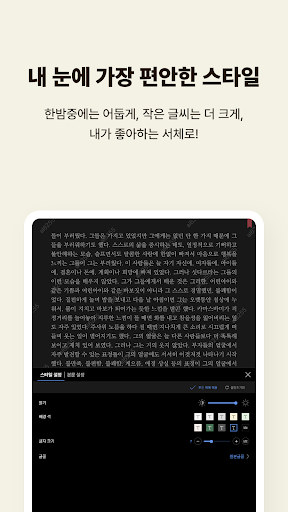
- Personalization options: Various settings such as fonts, paragraphs, background themes, etc.
- Leave a trace of your reading: Use bookmarks, highlights, and memo functions.
- Enhanced search function: Supports not only text search but also external dictionary search.
- Added convenience features: vertical scrolling, screen brightness adjustment, and screen rotation lock.
4. Auto scroll function
- Read comfortably with automatic scrolling without having to manually turn the pages.
- Adjustable speed from regular books to comics and webtoons!
5. Reading through TTS (Text-to-Speech)
- Various voices supported (Korean/English, male/female voices, Bixby and Siri supported)
- Native pronunciation is provided for English.
- Timer function: You can listen by reserving the desired time and page.
- TTS support for PDF e-books!
6. Strong privacy protection
- Hide book cover: Private reading possible.
- Lock function for each bookshelf: Create your own secret bookshelf.
- Provides full app lock function.
7. Reading life management - Reading life service
- Calendar: Records purchased and completed books by date.
- Note function: Collect highlights and notes.
- Reading statistics: Set monthly and yearly reading goals and provide statistics.
8. Eye-friendly night mode
- Apply night mode to darken the entire app on dark nights
- Linked to system settings or can be set manually.
9. Reading leads to synchronization
- Automatically sync pages, highlights, notes, and bookmarks across all your devices.
- Can be used simultaneously on up to 5 devices.
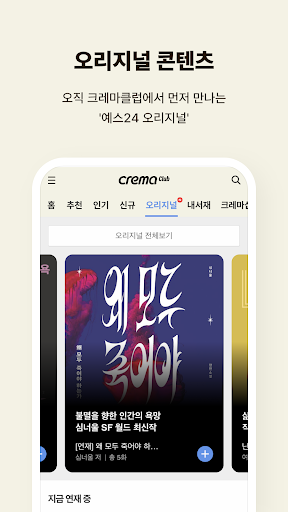
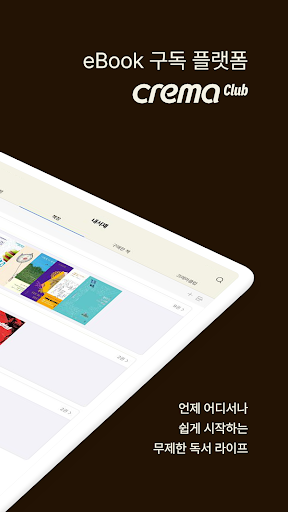
10. eBook Subscription - Crema Club
- The first month is free, unlimited reading of new and best books for the price of a cup of coffee!
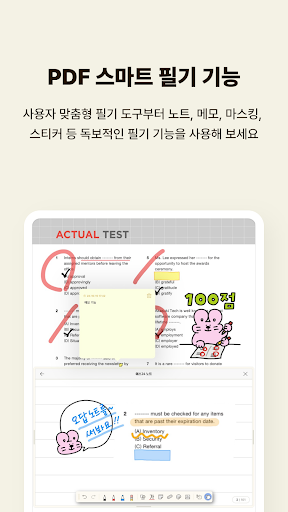
11. Add PDF handwriting function
- Try out unrivaled writing features, including custom writing tools, notes, memos, masking, stickers, and more!
■ If you have any questions during use, please leave them at the customer center.
- YES24 eBook App>Settings>Customer Center>1:1 Inquiry
- YES24 Homepage>Customer Center>1:1 Inquiry
■ App access permission information
[Required access rights]
- doesn't exist
[Optional access rights]
- Phone: Identify your device and receive push notifications
- Photos/Media/Files: Save files for reading books, 1:1 inquiry, add bookshelf image, share as image
[How to change access rights]
- Phone Settings>Application Manager>Yes24 eBook>App Permissions
■ Developer contact information
- 1:1 inquiry: https://www.yes24.com/Mall/Help/CS/Apply?AplNo=45
- Email: yes24ebookcs@gmail.com
What's New
Version Information
- Version
- 3.4.25
- Downloads
- 5M+
- Updated on
- Jan 4, 2026
- Released
- May 31, 2015
- Requires
- Android 8.0
Statistics
Google Play Rating History
Rating Distribution
Downloads Over Time
예스24 eBook & 크레마클럽 has been downloaded times. Over the past 30 days, it averaged downloads per day.
Shaded area shows 30-day prediction based on historical trends
Historical data collection started recently. More data points will be available over time.
예스24 eBook & 크레마클럽 - Google Play Rankings
Top Rankings
| Rank | Country | Category | List | Change |
|---|---|---|---|---|
| — |
Ranking History in
No ranking data available yet. Rankings are updated daily.
#21 in Top Free Books And Reference in South Korea

예스24 eBook & 크레마클럽 users say on Google Play
 A Google user
Most beneficial to read and listen to books, through TTS function. Amazing!
 이삼오
이삼오
습관적으로 슬라이딩 하는데 반대방향으로 넘어가서 읽다가 혼란스러울 때가 많아요... 페이지 넘기는 방식을 좌우 터치 말고 슬라이드 방향도 추가해 주시면 감사하겠습니다 그리고 전체화면보기 중에도 하단이나 상단에 현재페이지/전체페이지 정보를 계속 확인할 수 있도록 설정할 수 있으면 좋겠어요
A Google user
영어 번역자 새로 구하세요... 세팅 영어로 되어있는데 뭐라하는지 모르겠음
A Google user
e북을 나갔다 들어오면 모든 설정이 초기화되어 있네요. 또 전체 설정에 e북 폰트나 폰트 크기, 문단 간격 등을 조정하는 메뉴는 안 보이던데 어떻게 된건가요?
A Google user
E-PUB 상하제스쳐 밝기 조절은 몇년째 검토만 하고 끝까지 안 넣어 주시네요.. 특허걸렸나요? 이게 리디북스랑 제일 큰 차이인데...
ApkTrusted Ratings & Reviews
More from YES24
See more apps
![YES24 글로벌 [영/중문] icon](https://play-lh.googleusercontent.com/ETYN6lGip6cHxXyk83moETGB3S0KACpWflXH0CZCzTHG66CRLAJLkFcCeTGkWVpbfg)



Scan this QR code to download

Forwarding you to the page at Google Play market in seconds...
Open Google Play market now