
Onevoca - Flashcards v360
Sumin Inc




About this app
Onevoca - Flashcards effectively solves the problem of vocabulary building for language learners, benefiting students and individuals looking to improve their linguistic skills. Compared to alternatives in the Education category, Onevoca stands out with its excellent user rating of 4.7/5 and a significant user base of 600,000 learners. However, its limited data on downloads and relatively simple feature set might make it fall short for advanced users. The app's strong reputation and frequent updates are notable advantages.
Pros
- Onevoca boasts an impressive user rating of 4.7/5, indicating a high level of user satisfaction with its functionality and overall performance.
- The app's large user base of 600,000 learners provides social proof of its effectiveness in vocabulary building.
- The developer's reputation, as evident from the excellent user rating and frequent updates, suggests a commitment to maintaining and improving the app.
- The absence of ads and minimalistic in-app purchase model contribute to a distraction-free learning experience.
- The app's offline capability and lack of required permissions ensure a seamless and private learning experience.
Cons
- The limited data on downloads, despite having a significant user base, might raise questions about the app's visibility and marketing strategy.
- The in-app purchase model, although not overly aggressive, might deter some users from accessing premium features, potentially limiting the app's full potential.
- Some users might find the feature set to be relatively simple compared to other education apps, which could lead to a lack of engagement over time.
- The app's compatibility with older Android versions is not explicitly stated, which might be a concern for users with older devices.
Best for: The ideal user for Onevoca is a self-motivated individual, likely a student or young adult, looking to improve their vocabulary skills in a specific language, who values a simple, ad-free, and private learning experience, and is willing to invest time and potentially money into achieving their language learning goals.
Developer Description
A vocabulary app used by 600,000 learners
Register only the words you need, and organize them by topic or chapter using groups and collections.
Onevoca lets you study not just English or Japanese, but any set of terms that require memorization — from foreign languages to technical subjects.
• Smarter, faster word registration
Easily register words using CSV files, or simply type a word to automatically get its meaning.
AI even generates example sentences to help you understand the context in which each word is used.
• A library built by dedicated Onevoca users
If the vocabulary list you need already exists in the library, just download it!
You can also share your own word lists and contribute to the growing Onevoca library.
• High-quality, natural AI pronunciation in 33 languages
Enjoy clear, natural AI voices for all supported languages — not robotic or stiff.
We proudly invest in premium voice technology to deliver the best pronunciation experience.
Supported languages include:
Arabic, Bengali, Chinese (Mandarin), Czech, Danish, Dutch, English (US, UK, AU), Filipino (Tagalog), Finnish, French, German, Greek, Gujarati, Hebrew, Hindi, Hungarian, Indonesian, Italian, Japanese, Kannada, Korean, Malay, Malayalam, Marathi, Norwegian, Polish, Portuguese, Punjabi, Romanian, Russian, Slovak, Spanish, Swedish, Tamil, Telugu, Thai, Turkish, Ukrainian, and Vietnamese.
• Scientifically proven study methods
Every learning mode in Onevoca is based on evidence-backed memorization techniques.
From new to familiar words, you can learn and retain them through repeated exposure, interval review, and personalized settings.
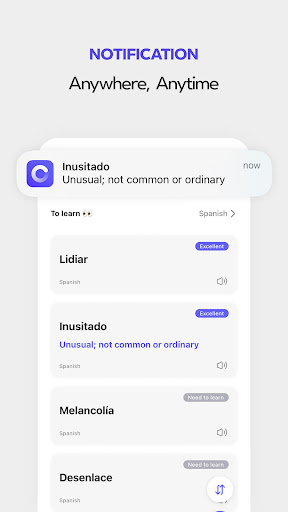
• Effortless daily learning with word notifications
Receive word notifications throughout your day to naturally strengthen recall.
Customize your notification frequency and style to maximize your memorization results.
Support: zak1ller.kr@gmail.com
Web: https://www.onevoca.com
Privacy
Given that Onevoca requires zero permissions, it appears to be a very private and secure app, with minimal risk of data collection or misuse. However, users should still be cautious when making in-app purchases and ensure they are using a secure payment method. It is also recommended to review the developer's privacy policy, available on their website, for more information on data handling practices.
Tips
To get the most out of Onevoca, users should start by exploring the various flashcard decks and creating customized decks tailored to their learning needs. Additionally, users can optimize their learning experience by utilizing the app's offline capability and setting aside dedicated time for practice. For better performance, it is also recommended to regularly update the app and report any issues to the developer.
What's New
In-app purchases
$4.99 - $20.99 per item
Version Information
- Version
- 360
- Downloads
- 50K+
- Updated on
- Jan 2, 2026
- Released
- Aug 2, 2019
- Requires
- Android 8.1
Statistics
Google Play Rating History
Rating Distribution
Downloads Over Time
Onevoca - Flashcards has been downloaded times. Over the past 30 days, it averaged downloads per day.
Shaded area shows 30-day prediction based on historical trends
Historical data collection started recently. More data points will be available over time.
Onevoca - Flashcards - Google Play Rankings
Top Rankings
| Rank | Country | Category | List | Change |
|---|---|---|---|---|
| — |
Ranking History in
No ranking data available yet. Rankings are updated daily.
#77 in Top Grossing Education in South Korea


Onevoca - Flashcards users say on Google Play
 Anjali Mondal
In my view, "Onevoca" is the great app I have used. When I updated today, a generate example button was added where I noticed the meaning and example. Awesome. But I don't understand the blue-lined text's meaning because of the language. I used this app only for English. If you implement an option in settings for language choice, it would be great. Note, I already selected English(en) while creating the folder for words.
 Jasper T.
Please disable keyboard prediction when I'm testing myself. Thanks.
ApkTrusted Ratings & Reviews
Scan this QR code to download

Forwarding you to the page at Google Play market in seconds...
Open Google Play market now