
ZipGrade v3.79.616
ZipGrade LLC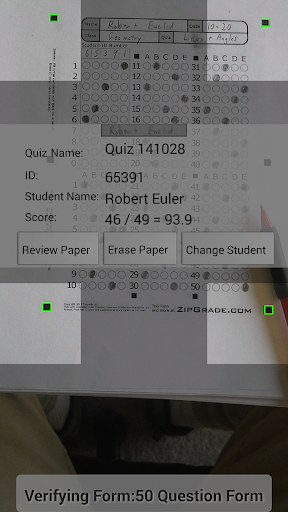
About this app
Developer Description
Grade paper multiple choice quizzes or exit tickets with your camera.
Students receive immediate feedback and can see their score on a test as soon as they're done. Teachers can have all of their multiple-choice grading done before the next class starts. Based on teacher feedback over the last year, numerous options are available to customize ZipGrade to meet different classroom needs.
--------------------------------------------------------
* Free answer sheets available in several formats and sizes (up to 100 question answer sheets)
* Works without internet connectivity. Data will sync whenever a connection is found (optional).
* Uses student ID numbers or written name of student for reporting.
* Knows when a paper is in viewfinder and sufficiently in focus to grade. No buttons to press while grading!
* Students may use pen or pencil. Handles erasures and white out well.
* Combination answers of up to 3 letters allow for up to 31 answers for each question-- great for matching portions!
* Companion website (www.zipgrade.com), allows additional functionality and reporting once a free ZipGrade Cloud user is created:
- Secure backup of all graded papers and data
- Import Student Rosters
- Manage Student and Class Information
- Export Quiz results to CSV or PDF formats
- Download answer sheet packs by class with student information pref-filled
--------------------------------------------------------
Quick Start:
1. Select from multiple answer sheet forms and sizes at ZipGrade.com. Download and print as many copies as you wish.
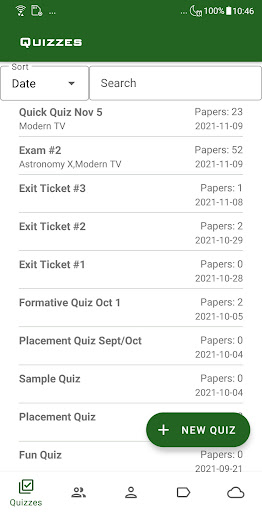
2. Within the ZipGrade app, press 'New Quiz'
3. Press 'Edit 'Key'. Enter your answer key or scan an answer sheet acting as a key
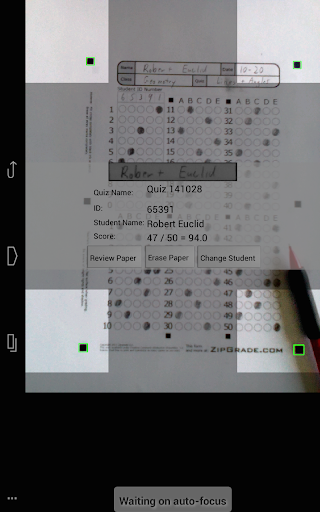
4. Press 'Scan Papers' to start scanning papers:
* Hold paper on flat surface and align the 4 corner squares in the 4 viewfinders.
* ZipGrade will automatically focus and identify when paper is readable.
* The app will vibrate when paper is graded and provide an instant summary (with links for more detail).
* No buttons to push, leaving your other hand free to turn to the next paper.
5. Review:
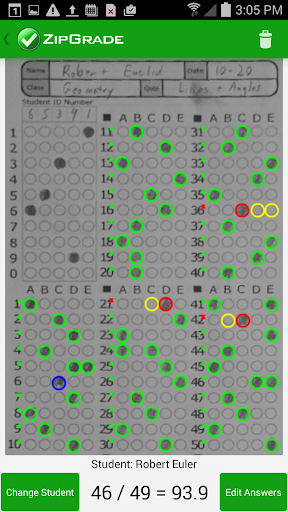
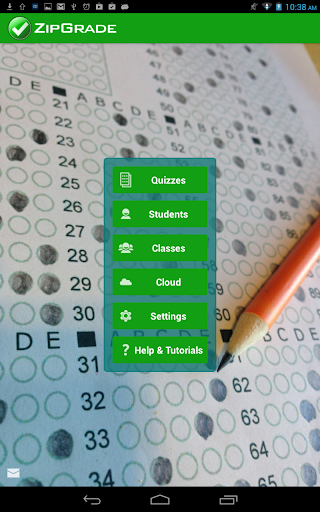
* View actual images of scanned papers and make any manual corrections (ie student's crossout out inked circles) in 'Review Papers'
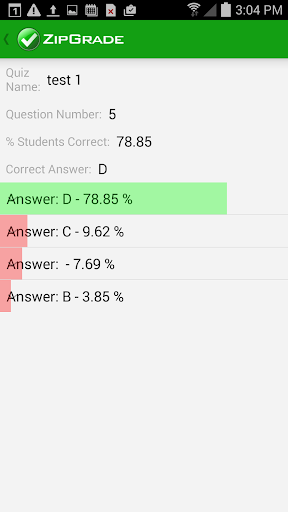
* Get a view of how the entire class did in 'Item Analysis'. Item Analysis includes a drill-through to see alternative answers and which students gave those answers.
* Export results as PDF reports (to print and hand back or post) or CSV files to upload to your gradebook.
As a free download with a 100 scan demo, we'd like you to try ZipGrade to see if it is the right grading app for you. If so, purchase additional time at any point as an in-app purchase. Once purchased, use your subscription on any device you own by logging in with the same ZipGrade Cloud user. Your data and subscription will sync between devices. Many teachers like to scan with their phone, but review with their tablet or desktop computer.
Great for exit tickets, formative assessments, summative assessments, or regular quizzes. By giving teachers the flexibility to grade papers instantly anywhere, ZipGrade provides immediate feedback on current knowledge and can be used to better focus lessons and assignments. Replace your expensive Scantron machine with the technology you're carrying with you already.
We're diligently working to improve the product and need feedback from teachers like you. Write info@zipgrade.com with any feedback or suggestions.
What's New
* Time Limit for Debug Image Setting
* Bug Fixes
In-app purchases
$6.99 per item
Version Information
- Version
- 3.79.616
- Downloads
- 1M+
- Updated on
- Oct 15, 2025
- Released
- Nov 12, 2014
- Requires
- Android 6.0
Statistics
Google Play Rating History
Rating Distribution
Downloads Over Time
ZipGrade has been downloaded times. Over the past 30 days, it averaged downloads per day.
Shaded area shows 30-day prediction based on historical trends
Historical data collection started recently. More data points will be available over time.
ZipGrade - Google Play Rankings
Top Rankings
| Rank | Country | Category | List | Change |
|---|---|---|---|---|
| — |
Ranking History in
No ranking data available yet. Rankings are updated daily.
#7 in Top Grossing Education in Philippines

#16 in Top Grossing Education in Thailand


ZipGrade users say on Google Play
 Ulukbek J.
Hello again. Everything is ok. Please add following features: 1. Attempted but not correct: 0 pt Not attempted: 1 pt Attempted and correct: 2 pts. 2. Multiple response where if only one of the true answers are marked again graded.
 pshtiwan ghareeb
It is one of the best apps for grading, but there is still room for improvement. It would be helpful to add features such as student email integration and better communication tools—like the ability to send grades or individual student portal login codes via email with a single click.
 Toby Traub
Poor customer support. The instructions are not comprehensive at all and some explanations about how to use various things is so sparse that their customers had to make videos to fill in some of the gaps, and still some things have yet to be explained. Customer support sometimes writes train of thought word salad. John should get more involved with with this app, as it used to be. He seems to have moved on and abandoned Zipgrade to a certain extent.
 R Saturnino
My phone is Redmi brand. Data do not sync from web to phone app. Please help
 Mar-vic vinzon
hard to scan waste of time and effort..
ApkTrusted Ratings & Reviews
Similar Apps

Tutor AI - math solver
Free

Course Hero: AI Homework Help
Free

Chegg Study - Homework Helper
Free
MalMath: Step by step solver
Free
Mathway: Scan & Solve Problems
Free
GradeUp: Homework Scanner
Free

Knowt: AI Flashcards & Notes
Free
Homework AI - Math & Essay App
Free

Question.AI - Chatbot&Math AI
Free

Studdy: AI Homework Helper
Free

Symbolab: AI Math Solver
Free

Periodict Table Helper
Free
Numerade - Homework Help
Free

PMP Exam Prep Test 2026
Free
Real Scientific Calculator
Free

UpStudy - Camera Math Solver
Free
Scan this QR code to download

Forwarding you to the page at Google Play market in seconds...
Open Google Play market now