
Console widgets for KWGT vVARY
Curious Inu Apps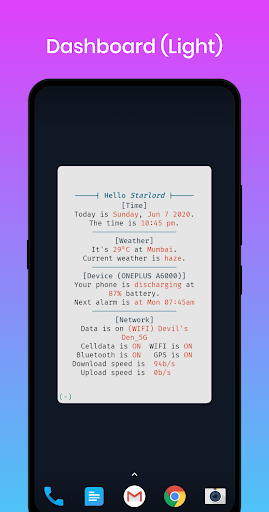


About this app
Developer Description
Text based widget pack for KWGT for the geek in you (Requires KWGT Pro).
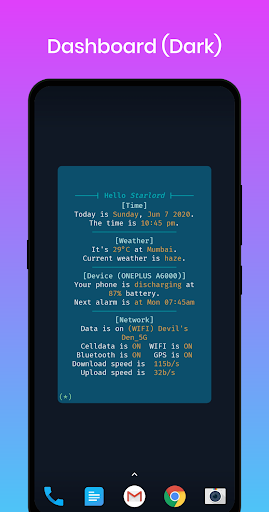
Its a strictly text based KWGT widget pack with no icons or graphic.
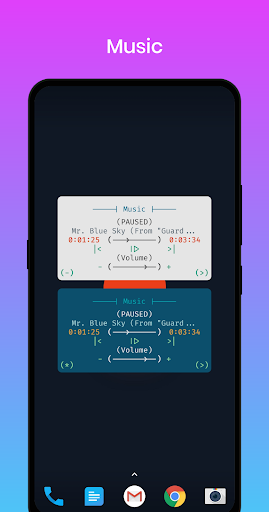
(The progress bars and control buttons are also simulated in text)
It comes with two themes dark and light, which you can toggle using the control at bottom left.
Widgets and features-
[Dashboard]
- Customizable greeting name
- Current day, date and time
- Current temperature, location and weather
- Battery level and charging status
- Next alarm time (if set)
- Data source (cell/wifi) in use and source (operator/wifi-ssid) name
- Status for Celldata, WIFI, Bluetooth, GPS
- Download and Upload speed
- Theme toggle
[Music]
- Playback status
- Track title
- Track progress vs track length
- Playback controls
- Volume level and controls
- Launch music player app
- Theme toggle
[Volume-Info]
- Ringer mode
- Ringer level and controls
- Alarm level and controls
- Media level and controls
- Theme toggle
[Weather]
- Location
- Weather for today
- Weather for tomorrow
- Weather for day after
- Theme toggle
[Resource-Info]
- RAM used vs total available and usage
- Storage used vs total available and usage
- CPU current frequency vs total max frequency and usage
- Theme toggle
[Today-info]
- Sunrise, sunset time.
- Fitness metrics
- Next calendar event time and title
- Weather
- Next alarm time
- Theme toggle
[Console Quote of the day]
- Quote of day from theysaidso
- Author info
- Global list to select the category of the quote
- Clicking the widget will open the quote on theysaidso site.
- Theme toggle (*)
- Forec pull quote button (!)
[Console Chuck Norris Facts]
- Chuck Norris random funny fact
- Global list to select the category of the quote
- Select "random" to get random fact from all categories
- Theme toggle (*)
- Forec pull quote button (!)
[Console Rajini Facts]
- Rajinikanth random funny fact
- Theme toggle (*)
- Forec pull quote button (!)
[World Clock]
- Current time, date and day
- 4 cities to select (in global lists). Input Daylight Saving Time (DST) Offset if needed.
(DST offset is manual input to keep widget work completely offline)
For each selected city
* City Name
* Local time date and day
- Light/dark toggle (*) at bottom left
** More to come
Send your suggestions at curious.inu.apps@gmail.com
Version Information
- Version
- -
- Downloads
- 50+
- Updated on
- -
- Released
- Jun 12, 2020
- Requires
- Android Varies with device
Statistics
Google Play Rating History
Rating Distribution
Downloads Over Time
Console widgets for KWGT has been downloaded times. Over the past 30 days, it averaged downloads per day.
Shaded area shows 30-day prediction based on historical trends
Historical data collection started recently. More data points will be available over time.
Console widgets for KWGT users say on Google Play
 Keel
Keel
Amazing widgets! They are truly well designed.
ApkTrusted Ratings & Reviews
More from Curious Inu Apps
See more apps


Scan this QR code to download

Forwarding you to the page at Google Play market in seconds...
Open Google Play market now