
SqueezePlayer vVARY
Stefan Hansel Solutions UG (haftungsbeschränkt)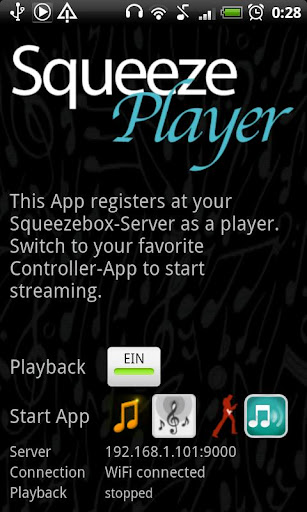

About this app
Developer Description
SqueezePlayer turns your Android phone or tablet into a SqueezeBox on its own!
You won't even need a Logitech Squeezebox to make SqueezePlayer work - just download the (free) Squeezebox-Server (see below)
★★★ Stream your Music via WiFi or Mobile Connection ★★★
Make your music free! Now you can take all your music with you - car, school, work, garden, anywhere in your house.
SqueezePlayer is able to stream your local music (see below for supported formats), internet radio stations or songs from Apps like Last.FM, Deezer or WiMP from your Squeezebox-Server directly to your mobile or tablet. (Rhapsody, Napster and Pandora NOT working right now, due to licensing issues, Spotify only works with the help of triodes plugin installed in a Squeezebox-Server).
For playback to be working via 3G you will need to open/forward port 9000 and 3483 on your router (as well as setting up a DynDNS service). As networking/streaming from your home network via internet is not straightforward, please also visit my growing tutorial: http://www.squeezeplayer.com/2011/05/how-to-connect-via-3g/
SqueezePlayer is a playback App - you won't be able to control your Squeezebox (nor itself) with it. But there are enough Apps out there being a perfect fit: OrangeSqueeze, SqueezeCommander, Squeeze Control or free alternatives like the official Logitech App, Squeezer or SqueezeDroid.
From the main screen of SqueezePlayer you can jump directly to any of these App, where you mobile will be among all other players as long as SqueezePlayer is activated.
In OrangeSqueeze this also works the other way round: it will start SqueezePlayer automatically from the players list, so here it is highly integrated.
By the way: if you have any problem with SqueezePlayer, please contact me! I'm very happy to help you sort all problems out: support(at)squeezeplayer.com
★★★ Supported Music Formats ★★★
SqueezePlayer can stream FLAC, MP3, WAV and PCM natively (i.e. these are decoded directly on your Android Device)
Your SqueezeboxServer will be able to convert other file types (Ogg, mp4) to FLAC or mp3 on the fly, so these will play as well. (You can check the settings screen of your Squeezebox Server under Advanced->File Types what other file types will be transcoded to FLAC or mp3).
Please note that the inbuilt server of the Touch will not be able to transcode as much as a real server, you will be bound to the natively support formats!
★★★ Requirements ★★★
For SqueezePlayer to work you need to set up the Logitech Squeezebox Server (recently renamed to "Logitech Media Server").
You can download it here: http://downloads.slimdevices.com/LogitechMediaServer_v7.7.1/
SqueezePlayer will also work with the integrated server of the Squeezebox Touch (but be aware, that this one cannot convert as many formats as a real server).
I test against version 7.5 - 7.7 of the server.
What's New
Version Information
- Version
- -
- Downloads
- 10K+
- Updated on
- Sep 30, 2025
- Released
- Apr 28, 2011
- Requires
- Android Varies with device
Statistics
Google Play Rating History
Rating Distribution
Downloads Over Time
SqueezePlayer has been downloaded times. Over the past 30 days, it averaged downloads per day.
Shaded area shows 30-day prediction based on historical trends
Historical data collection started recently. More data points will be available over time.
SqueezePlayer users say on Google Play
 Rob Winsall
UPDATE: With the authors help, I now understand what is going on. The http interface (material skin) cannot get and pass volume status from the phone volume switch or from bluetooth receivers/speakers back to the server. Therefore any changes using the device's volume switch will not persist in the server. and the volume will change back to the servers setting 10 seconds before the end of the track (or when pausing/resuming or seeking within a track). If volume changes are made AT THE SERVER using a controller app (like Squeezer) or even within the material skin interface's soft controls, the volume WILL persist correctly. Therefore, as long as I don't use the device volume switch on my phone or bluetooth speaker, I will have no volume surprises from track to track. I hope this helps someone else and I would like to thank the author for taking the time to help clarify the issue. I recommend this application to extend your LMS ecosystem. Original problem: The volume changes near the end of every track are frustrating.
 Jordan Hirsch
UPDATE: Like others on here, I too have the issue where the volume will either drop in the last 5-10 seconds of a song, or jump significantly. It's very disruptive and a flaw in an otherwise great app. --------- It just works. I can stream my music library anywhere thanks to this, and the ability to launch a controller app is an example of a small but well-thought-out feature.
 A Google user
I really love my squeezeboxes and the LMS is still the best free server for large music subscriptions - This app allows me to listen to my music via LMS on my phone. Fantastic. However - one issue, and I cannot seem to find a solution to it - the volume drops to a low level at the last few seconds of each song, and then I have to manually increase the volume again. This happens consistently, and I have not been able to solve this. If this was solved, then a five star review. Until then, three...
A Google user
Only worked for a short while,it now keeps saying player has stopped,I have tried several times to get it running but have failed,I think it's an android thing.
 David Johnstone
When I bought this app I was under the impression it would allow me access to my SB server and allow me to view and select my music, it does not, it connects to my server but does not allow me to view and select my music in the app. Ya need to purchase another app to do that. Requested a refund and was denied. What an assumptive, juvenile and unprofessional response from a developer to a customers valid review. Read the other 1 star reviews, I am not alone. My 1 star review stands.
ApkTrusted Ratings & Reviews
Scan this QR code to download

Forwarding you to the page at Google Play market in seconds...
Open Google Play market now