
Busch-free@home® Next vVARY
ABB AG - BUSCH-JAEGER


About this app
Developer Description
The new smartphone app for Busch-free @ home
-------------------------------------------------- ---------------------------------
New Next App features:
-------------------------------------------------- ---------------------------------
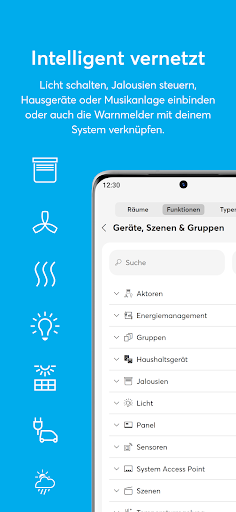
The Busch-free@home® Next app offers 4 areas between which you can switch back and forth using the lower control bar:
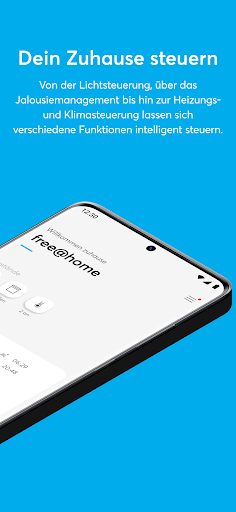
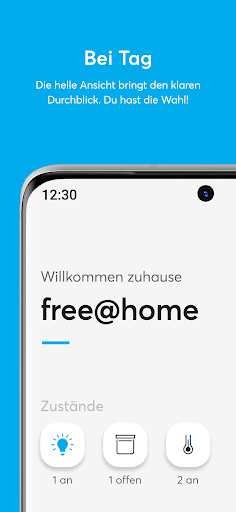
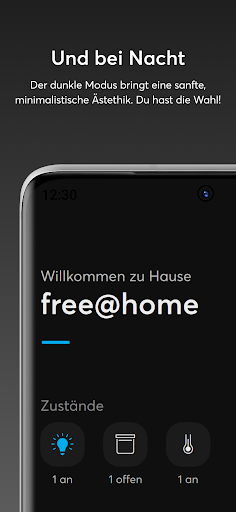
HOME
Here's a quick overview of what's going on at home:
- The “Status” tiles show you how many lights are on, how many shutters are open and whether windows are open. For example, the light can be switched off directly with a short tab on a tile.
- The “Weather” window shows you the weather data from your free@home weather station.
- The “Next switching times” window shows the two functions that will be switched next using the automated time program. The event can be suspended once using the slider. All switching events for the next 24 hours are displayed via a tab on the switching time overview.
- The “Favorites” are a collection of individually selected functions. The selection is made by setting the “star” symbol. The function can be carried out directly by clicking on the small blue symbol at the top right of the favorites tile. A tab on the main area of the tile opens the function in full-screen view, which offers even more setting options.
The order of the functional areas can be changed using the “Edit” button at the bottom of the home page.
STEERING
Here you can access all devices in your free@home installation. Optionally sorted by function or by installation location (switching is done using the switch at the top of the page).
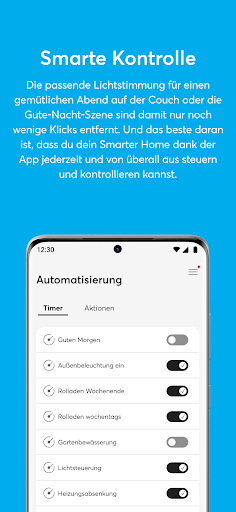
AUTOMATION
All automated processes you have created, such as timers, scenes and actions, are listed here.
timer
Existing time programs can be activated/deactivated (and new time programs can be created in the future).
Scenes
Scenes can be started by tapping the blue icon. A tab on the main area of the tile opens the scene in full screen view.
Actions
Actions can be activated/deactivated and edited. In conjunction with a myBUSCH-JAEGER remote access, geofencing actions can be created with which actions can be triggered based on entering or leaving a previously configured location.
The data is sent directly to the connected system access point via the end-to-end encrypted channel and therefore cannot be evaluated by Busch-Jaeger.
MORE
Notification Center
All system messages are stored here.
WIDGET
With the widget you can always see the current switching status of your favorites, even if they are operated via another app or directly via a switch. Of course, you can also switch favorites directly using the widget.
myBUSCH-JAEGER
Here you can connect your free@home system and your smartphone to the my.BUSCH-JAEGER portal.
GEO LOCATION
Launch actions based on your current location. Switch e.g. E.g. turn on the lights when you get home.
Version Information
- Version
- -
- Downloads
- 50K+
- Updated on
- -
- Released
- Jan 17, 2026
- Requires
- Android Varies with device
Statistics
Google Play Rating History
Rating Distribution
Downloads Over Time
Busch-free@home® Next has been downloaded times. Over the past 30 days, it averaged downloads per day.
Shaded area shows 30-day prediction based on historical trends
Historical data collection started recently. More data points will be available over time.
Busch-free@home® Next users say on Google Play
 Benno van der Sluis
Have the same issue a Joe___ cannot connect to the google home app, what is mandatory for all users in the house Next to that, the app works great.
 Youri Verbon
Unfortunately I could not get it to work with my Google Home. Not sure if the problem is on Googles side or its the free@home app that's giving me a hard time. Besides this problem, the app is 10 times better than the old one!
 Richard Baptist
Obtuse and unintuitive. It's difficult to navigate and the available options are unclear and mostly hidden in deep submenus.
 Leonid Koftun
All I want is to remote control my devices using Google Home. The myBUSH-JAEGER connection that is apparently needed for this just doesn't work and errors with 500 status codes. I have tried using the app for automation and it is wonky af. The state of IoT and UX is a joke. I have finally managed to connect it with Google Home by doing some weird voodoo magic. Only lights can be controlled. Blinds and heating systems are read only and look broken.
ApkTrusted Ratings & Reviews
More from ABB AG - BUSCH-JAEGER
See more apps


Scan this QR code to download

Forwarding you to the page at Google Play market in seconds...
Open Google Play market now