Miniris v1.4.10
Jörg Eisfeld

About this app
Developer Description
Capture iris photos with the phone and organize them
Supportive Tool for Practitioners:
This app functions as a supportive tool for alternative practitioners, enabling the capture and organization of iris photos. Please note, it does not provide standalone diagnoses.
Key Features:
🔍 Effortless Photo Capture: Capture iris photos using your phone's camera, enhanced with compatibility for devices like the Miniris-2 attachment.
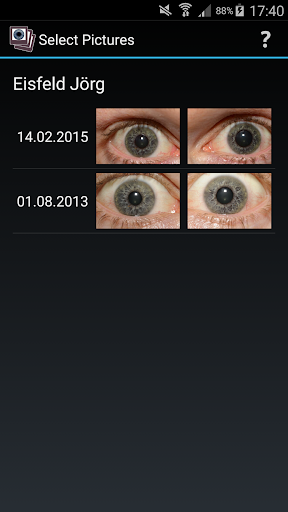
📂 Streamlined Organization: Organize iris photos systematically by name, date, and side (right/left) for easy retrieval and comparison.
🖼️ Dual Photo Display: View two iris photos simultaneously with complete resizing capabilities, facilitating detailed comparisons.
💡 Adjustable Visuals and Comments: Modify brightness and contrast during photo display, overlay images with an iris topography, and save comments for enhanced analysis.
🔒 Metadata Storage: Store vital data, including the position of the eye's center, as metadata within JPG files. Seamlessly transfer this data between devices by copying the photos.
🆓 Trial Period & In-App Purchase: Experience a complimentary trial period of two weeks to explore the app's functionalities. For continued usage, a one-time in-app package purchase is required.
Empower your diagnostic processes with a powerful tool that simplifies iris photo capture, organization, and comparison, enabling a more comprehensive approach to iris diagnosis.
What's New
In-app purchases
$0.99 - $12.00 per item
Version Information
- Version
- 1.4.10
- Downloads
- 10K+
- Updated on
- Jul 1, 2025
- Released
- Sep 5, 2015
- Requires
- Android 5.0
Statistics
Google Play Rating History
Rating Distribution
Downloads Over Time
Miniris has been downloaded times. Over the past 30 days, it averaged downloads per day.
Shaded area shows 30-day prediction based on historical trends
Historical data collection started recently. More data points will be available over time.
Miniris users say on Google Play
 A Google user
amazing
A Google user
Asked me to attach a mini 2 but the website doesn't work. So I have no idea what to attach. Plus it doesn't let me select the front camera so how am I supposed to take a picture of my eye? Use a mirror?
ApkTrusted Ratings & Reviews
More from Jörg Eisfeld
See more apps


Scan this QR code to download

Forwarding you to the page at Google Play market in seconds...
Open Google Play market now