
Clock, Date and Weather Widget v1.1.0
aac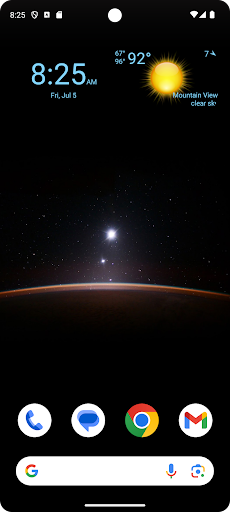



About this app
Developer Description
Display digital clock, date and current weather on your home screen.
Features:
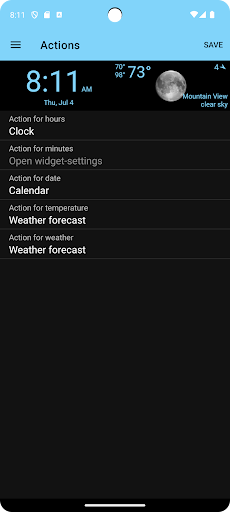
- Select widget click actions: tap on widget to show weather forecast, widget settings or pick any installed application
- Show the current weather for the device location or choose a specific location
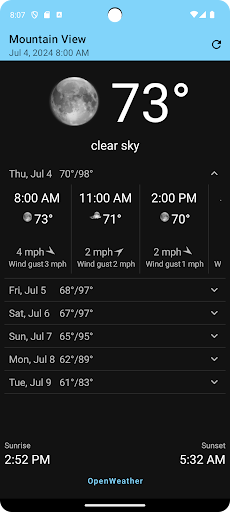
- Show current weather, weather forecast and air quality
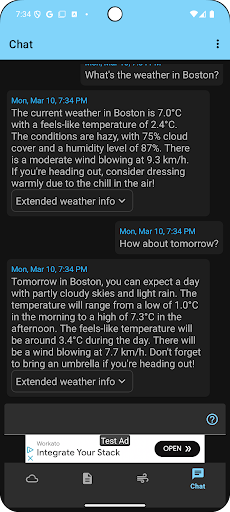
- Weather Assistant, ask questions about the weather and get weather-related recommendations for any location worldwide
- Widget preview during setup
- Material design UI
- Select widget text- and background-color from the material design color palettes.
Add the widget to your home screen:
- On a Home screen, touch and hold an empty space.
- Tap Widgets.
- Find Clock, Date and Weather Widget.
- To check the list of available widgets for the app, tap the app.
- Touch and hold a widget. You’ll get images of your Home screens.
- Slide the widget to where you want it. Lift your finger.
Tip: Touch and hold the Clock, Date and Weather Widget app and then tap Widgets.
Resize a widget:
- On your home screen, touch and hold the widget.
- Lift your finger.
- To resize, drag the dots.
- When you're done, tap outside the widget.
What's New
In-app purchases
$5.99 per item
Version Information
- Version
- 1.1.0
- Downloads
- 100K+
- Updated on
- May 17, 2025
- Released
- Apr 27, 2023
- Requires
- Android 6.0
Statistics
Google Play Rating History
Rating Distribution
Downloads Over Time
Clock, Date and Weather Widget has been downloaded times. Over the past 30 days, it averaged downloads per day.
Shaded area shows 30-day prediction based on historical trends
Historical data collection started recently. More data points will be available over time.
Clock, Date and Weather Widget users say on Google Play
 Debbie Pawlowski
I love being able to see the weather before I head outside!
 Muhammad Shoaib
Widget is not loading while adding
 John Lestourgeon
Clock going very fast
 Ronald Coleman
I like the app but it's not very accurate says it's raining when it's clear skies
 Michael Diaz
Wrong location, the app doesn't know where I'm located, even though I allowed it through the permissions option. In response to the developer (thanks for replying), it's many miles wrong. I live in San Juan, Puerto Rico, not Sabana Grande, also in Puerto Rico. I tried selecting San Juan but it still keeps Sabana as the location.
ApkTrusted Ratings & Reviews
Similar Apps
Digital Clock Widget
Free

Mausam AI – Smart Weather App
Free
Weather Live
Paid
Weather Forecast Accurate Info
Paid
Weather for Wear OS
Free

Nothing Pomodoro Timer
Paid
Alarm Clock
Free
Weather Forecast & Widget
Free

Today Weather:Data by NOAA/NWS
Free
Sunrise and Sunset Times
Free

Yahoo Weather: Forecast & Maps
Free
Calendar Widget: Month/Agenda
Free
Weather data & microclimate :
Free

Foreca Weather & Radar
Free
Weather & Radar USA - Pro
Paid
Weather & Clima - Weather Sky
Free
Scan this QR code to download

Forwarding you to the page at Google Play market in seconds...
Open Google Play market now