Working Hours 4b v8.12.1
Budescu Sorin George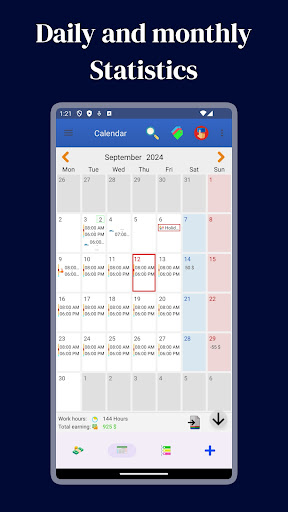


About this app
Developer Description
This app will help you to note your working hours.
Let Working Hours 4b help you !
Working Hours 4b through an easy and intuitive interface allows you to enter your work hours that may contain:
- Regular hours
- Extra: Early entry and Overtime
- Pause (paid or unpaid)
- Bonus
- Expense
- An icon and a note
You can calculate your gain:
- Monthly
- Weekly
- Biweekly - Fortnightly (14 or 15 days)
- Annual
- Custom interval
With the calendar inside you can enter, edit and observe the intervals of your working hours for each month by consulting the details divided by hours and earnings:
- Regular hours
- Extra: Early entry and Overtime
- Paid pause
- Unpaid pause
- Total
- Holidays
- Notes
Paid/Unpaid indicator: With the Paid/Unpaid indicator you can track your paid or unpaid working hours. Never forget again any payment !
Work intervals can cover a maximum of 48 hours which gives you the ability to insert both the daily hours, or night.
Holidays:
You can insert Holidays and Sick leave into the calendar and count them any time.
Export your data in any format do you want and send it directly with any app do you want!
The supported formats are:
- Text
- CSV
Do you have multiple ranges that are substantially the same for different days of the week but that may change for very little?
No problem! With this app you can insert multiple templates and add them are your preferred date!
Do you have multiple jobs or clients?
Multiple Jobs: Add how many jobs do you want with different colors and notes and distinguish the events into the calendar At a glance!
Statistics:
You can see your earnings or your annual hours (month by month) and monthly (day by day) through the graph. The events components can be configurate at will!
Notifications:
Never forget to add the worked hours!
You can choose a time and select the days of the week. The application will notify you every time!
Floating badge:
Don’t you remember when you get to work? With the floating badge on your home you have the opportunity to mark the time of entry, pause, start of extra hours and insert the interval at the end of the period in which you worked.
Data Synchronization:
With an account you can synchronize multiple devices in real time! You don’t like accounts? Login as anonymous !
For bugs, errors and ideas join the community:
Facebook: https://www.facebook.com/working.hours.4b
Twitter: https://twitter.com/workingHours4b
Or send an email in the Contact section of the options!
What's New
In-app purchases
$0.99 - $18.99 per item
Version Information
- Version
- 8.12.1
- Downloads
- 1M+
- Updated on
- Oct 8, 2025
- Released
- May 21, 2015
- Requires
- Android 8.0
Statistics
Google Play Rating History
Rating Distribution
Downloads Over Time
Working Hours 4b has been downloaded times. Over the past 30 days, it averaged downloads per day.
Shaded area shows 30-day prediction based on historical trends
Historical data collection started recently. More data points will be available over time.
Working Hours 4b users say on Google Play
 Karen K
Been using this app a cpl years. As an Independent Contractor, I've tried several "Timesheet" apps to help me track & calculate my earnings. Once I figured out the nuances, this app has so many great features. I'm able to create individual "Working Profiles" for Jobs, Admin & Drive Times! After they're Saved, able to simply "Add" the applicable Profile, enter time details=Easy-Peasy. For me, the developers have provided the perfect resource to customize it for my exact needs! Thank U! 👍
 James Gusman
Good time keeping app would just like to see copy/paste of events in the calendar view
 Tee M
Tee M
I'm only giving this app 3 stars only because it used to be a good app. Now, all the time I first open the app, there is no entries showing on my calendar. It's blank, and sometimes I'm getting my entries changed to different days. It's becoming unreliable. Why there's not been an update yet is beggars belief. I use a Samsung galaxy s22 ultra. Don't know if everyone is experiencing the same thing. You have to close the app and open again and pray you get your entries back
 Nosa Yaba
Was going well few days ago now the calculator is just giving me a different digits from what my actual calculator is giving and this is confusing...
 Domen Mori
Login / registration required. Dealbreaker. This app just tracks locally entered data. No login shoul be mandatory for such functionality.
ApkTrusted Ratings & Reviews
Scan this QR code to download

Forwarding you to the page at Google Play market in seconds...
Open Google Play market now