BRI Q-Token vVARY
PT Bank Rakyat Indonesia (Persero) Tbk.



About this app
Developer Description
It is a mobile-app to authorize transactions on the BRICaMS platform
How to activate and synchronize your BRI Q-Token:
1. Open the BRI Q-Token apps already installed in your Mobile.
2. Input your User ID/Username and password registered with the BRICaMS/CMS BRI
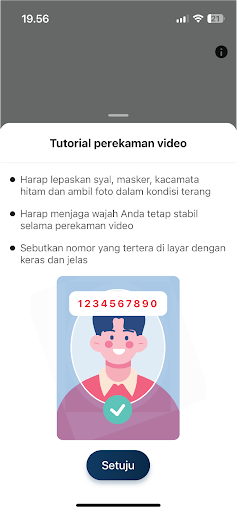
3. Scan your face to add biometrics information as per instruction in the app.
4. Specify the random numbers displayed on your mobile phone.
5. When succeeding, scan your front face and back of your valid ID card
6. Input a 6-digit number for your PIN that will be used every time you access the BRI Q-Token app.
7. When the Action Successful information is displayed on your mobile screen, your BRI Q-Token has been activated and synchronized with BRICaMS apps.
8. Your BRI Q-Token is ready to use for the purpose of authenticating your transactions on the BRICaMS platform.
Version Information
- Version
- -
- Downloads
- 10K+
- Updated on
- -
- Released
- Jul 18, 2023
- Requires
- Android Varies with device
Statistics
Google Play Rating History
Rating Distribution
Downloads Over Time
BRI Q-Token has been downloaded times. Over the past 30 days, it averaged downloads per day.
Shaded area shows 30-day prediction based on historical trends
Historical data collection started recently. More data points will be available over time.
BRI Q-Token users say on Google Play
 sobar sururi
kurang fasilitas copy, supaya memudahkan paste di browser HP,Update bintang 4. karna sudah ada respon
 Riz Warner
Appnya sih ga ada masalah, tapi masalah terus di web Qlola Cash Management. Ini sekarang approval task malfungsi. Parah banget ini bank dipake buat bisnis, amburadul & super lelet! Pake teknologi zaman dinasti Ming?
ApkTrusted Ratings & Reviews
More from PT Bank Rakyat Indonesia (Persero) Tbk.
See more apps









Scan this QR code to download

Forwarding you to the page at Google Play market in seconds...
Open Google Play market now