
Arduino ESP Bluetooth - Dabble v1.0.9
STEMpedia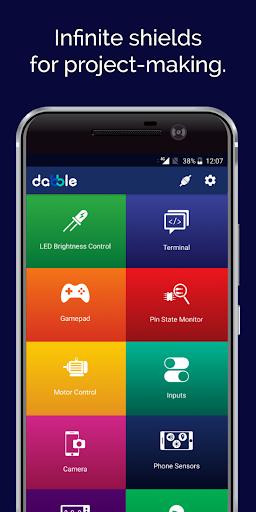



About this app
Developer Description
Virtual shields for BT gamepad, robot control, sensors, camera, IoT, & terminal.
What Dabble has in store:
• LED Brightness Control: Control brightness of LEDs.
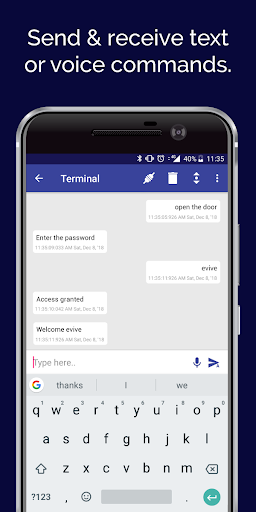
• Terminal: Send and receive text and voice commands over Bluetooth.
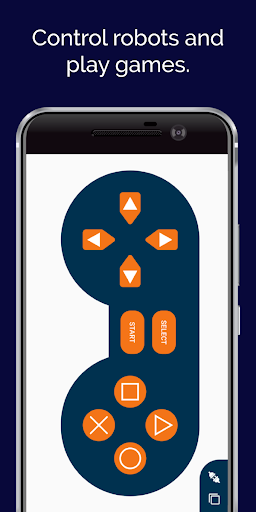
• Gamepad: Control Arduino projects/devices/robot in analog (Joystick), digital, and accelerometer mode.
• Pin State Monitor: Remotely monitor the live status of devices and debug them.
• Motor Control: Control actuators such as the DC motor, and servo motor.
• Inputs: Provide analog and digital inputs via buttons, knobs, and switches.
• Phone Sensor: Access different sensors of your Smartphone such as the accelerometer, gyroscope, proximity sensor, magnetometer, light sensor, sound sensor, GPS, temperature sensor, and barometer to make projects and conduct experiments.
• Camera:Use the camera of your Smartphone for taking photos, record videos, colour picking, and face recognition (coming soon).
• IoT : Log data, publish it on cloud, connect with internet, set notifications, and access data from APIs like ThingSpeak, openWeathermap, etc (coming soon).
• Oscilloscope : Wirelessly visualize and analyse the input and output signals given to the device using the oscilloscope module.
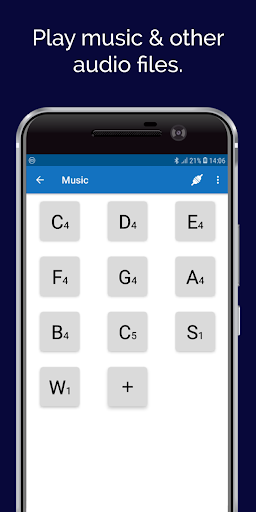
• Music Tune : Receive commands from the device and play tones, songs, or other recorded audio files on your Smartphone.
Make dedicated projects to experience different concepts of the real world first-hand like home automation, line-follower and robotic arm.
Boards Compatible with Dabble:
• evive
• Quarky
• Arduino Uno
• Arduino Mega
• Arduino Nano
• ESP32
Bluetooth Modules Compatible with Dabble:
• HC-05, Bluetooth Classic 2.0
• HC-06, Bluetooth Classic 2.0
• HM-10 or AT-09, Bluetooth 4.0 & Bluetooth Low Energy (ESP32 has inbuilt Bluetooth 4.2 & BLE)
Want to know more about Dabble? Visit: https://thestempedia.com/product/dabble
Module Documentation: https://thestempedia.com/docs/dabble.
Projects that you can make: https://thestempedia.com/products/dabble-app
Dabble app usually serves as a virtual replacement for:
• Sensors like IR, proximity, color recognition, accelerometer, gyroscope, magnetometer, mic, sound, etc.
• Arduino shields like Wi-Fi, Internet, TFT Display, 1Sheeld, touchboard, ESP8266 Nodemcu shield, GPS, gamepad, etc.
• Modules like joystick, numpad/keypad, camera, audio recorder, sound playback, etc.
Permissions required for:
• Bluetooth: to provide connectivity.
• Camera: for taking pictures, videos, face recognition, color sensor, etc.
• Microphone: to send voice commands and use the sound sensor.
• Storage: to store the pictures and videos taken.
• Location: to use Location sensor and BLE.
What's New
Added support up to Android 16.
Improved Bluetooth initialization.
Fixed empty messages in Terminal.
Resolved phone sensor toggle crash.
Fixed Camera gallery button on tablets.
Improved “Ready to connect” highlight.
Added clearer permission dialog with link to app settings
Fixed Crash issue with HC05
Version Information
- Version
- 1.0.9
- Downloads
- 100K+
- Updated on
- Dec 2, 2025
- Released
- Dec 10, 2018
- Requires
- Android 5.0
Statistics
Google Play Rating History
Rating Distribution
Downloads Over Time
Arduino ESP Bluetooth - Dabble has been downloaded times. Over the past 30 days, it averaged downloads per day.
Shaded area shows 30-day prediction based on historical trends
Historical data collection started recently. More data points will be available over time.
Arduino ESP Bluetooth - Dabble users say on Google Play
 Anderson Paunellan
Thank you for this app. This is very useful, awesome, and the game pad was designed very well. Just had minor issues when it comes to connecting via Bluetooth using Android phones. Sent to your email the details. Thank you and kudos to your team.
 Robert Forst
Still learning
 Kim Miller
Just playing around with the app. Seems like it will do what I need.
 Chumbaka Kuching
it crashes when I enable accelerometer in phone sensors
 Sreenand S
🔴🔴The bluetooth module does not connect with the App.... Worst of time😢🔴
ApkTrusted Ratings & Reviews
More from STEMpedia
See more apps

Scan this QR code to download

Forwarding you to the page at Google Play market in seconds...
Open Google Play market now