RaiPlay Sound: radio e podcast vVARY
RAI Radiotelevisione Italiana S.p.A.




About this app
Developer Description
All the radio, the author podcasts and the immense library of Rai audiobooks
You can access the RaiPlay Sound app with or without registration. Registration is free. If you access without registering, you can listen to live broadcasts from all Rai Radio channels, all national and regional news programs, audio clips, and bonus content from podcasts of your choice. By registering, you can also listen on-demand to full episodes of radio and TV programs, original podcasts, audiobooks, playlists, and audio descriptions of films and TV series. You can also enable notifications for your favorite content and download titles to the app to listen to offline.
If this is your first time accessing a Rai multimedia platform, you can register your Rai account from the RaiPlay Sound app. If you already have a Rai account that you use to access RaiPlay, you can also use it to access RaiPlay Sound.
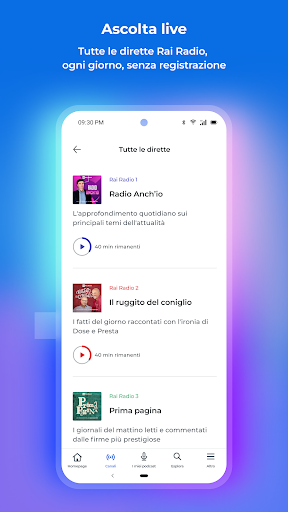
To listen to live radio broadcasts, simply open the app and choose your preferred radio channel from the "Listen Live" section at the top of the homepage or in the "Channels" section of the app. In addition to tuning in to the live broadcast, you can view the programs for the day and the following week and, if you're registered, re-listen to episodes from previous days. You can also access the complete list of podcasts associated with each channel.
From the live radio player, you can listen to a program that has already started and return to the live broadcast; you can switch to "car mode," change the channel you're listening to, view upcoming programs, share the live broadcast, access information and podcasts for the program currently airing, and set a sleep timer. If the program offers this service, you can also contact the editorial staff using your device. If you're registered, you can add the program you're listening to to your favorites.
From the "Explore" section, you can search for content by title and keywords and discover the selection of podcasts available on demand and organized by genre. From the on-demand player, you can also share the content you're listening to, set a sleep timer, skip to the next or previous episode, and view information about the audio currently playing.
By registering, in addition to having access to the entire catalog, you can also access the "My Podcasts" area and customize your listening experience: you can add podcasts to your favorites (Followed) and, for each podcast you follow, activate notifications to be notified when new episodes of that podcast are released; download the titles you're interested in to the app for offline listening (Download); create personal playlists (Add to playlist) and track a specific point in an audio file to find it again later (Add bookmark).
In the "My Podcasts" section, you can always find and manage your most recent listening sessions to resume where you left off, the podcasts you follow, the bookmarks and playlists you've created, your in-app downloads, and use the Alarm Clock feature.
From the "More" section, you can create and manage your Rai account and notifications, access FAQs and the help center, and choose whether to enable streaming and downloading content only when your device is connected to a Wi-Fi network.
https://www.raiplaysound.it
Privacy Policy: https://www.rai.it/privacy/PrivacyPolicy.html
In accordance with Law No. 4 of January 9, 2004, we have published the accessibility statement for the RaiPlay Sound app at the following webpage: https://www.rai.it/corporate/disclaimer/dichiarazione-di-accessibilita
What's New
Version Information
- Version
- -
- Downloads
- 1M+
- Updated on
- Oct 14, 2025
- Released
- Mar 14, 2013
- Requires
- Android 7.1
Statistics
Google Play Rating History
Rating Distribution
Downloads Over Time
RaiPlay Sound: radio e podcast has been downloaded times. Over the past 30 days, it averaged downloads per day.
Shaded area shows 30-day prediction based on historical trends
Historical data collection started recently. More data points will be available over time.
RaiPlay Sound: radio e podcast - Google Play Rankings
Top Rankings
| Rank | Country | Category | List | Change |
|---|---|---|---|---|
| — |
Ranking History in
No ranking data available yet. Rankings are updated daily.
#31 in Top Free Music And Audio in Italy

RaiPlay Sound: radio e podcast users say on Google Play
 Thomas Pasquini
Dopo una pessima partenza, vero e proprio passo indietro rispetto alla precedente Raiplay Radio, l'app è andata migliorando. Non va più continuamente in crash e avete apprezzabilmente reintrodotto la riproduzione automatica dei programmi in successione, sebbene il loro caricamento avvenga con più ritardo rispetto a prima. Detto questo, la varietà è la qualità dei contenuti è eccellente, e sono probabilmente i soldi che meglio spendiamo per la RAI. Manca solo il tema scuro.
 Nando8
Notevoli Miglioramenti rispetto alla 4: finalmente si stacca quando parte la telefonata o altri flussi audio. Inoltre il flusso audio riparte da dove era stato messo in pausa. Funzioni base che non erano scontate nella versione precedente. Aggiunta la suddivisione dei contenuti per gg e velocità di riproduzione, anche se manca l'utilizzazione velocità di 1.25x
 JB M (John)
Great content, terrible app. Maybe it's a classic Italian thing. Looks great! Doesn't function so well. Download a podcast, the next time you try to play it, you have to download it again anyway. Then if I pause play, it starts the next episode rather than going back to the one I was actually listening to.
 Ta lia
Not intuitive enough to use. Buttons and navigation don't follow a logical pattern within the frame and between frames, it is hard to use for elderly people. My mother found it difficult to retain the logic of the location of the buttons, the display is cluttered with too many words and the eye has to run up and down the screen too many times to search for action buttons and some are just tiny written words.Add intuitive shaped icons or pics, differentiate with the use of colours, use less words
 Federico Targetti
Navigation is awful, unintuitive and the player is less than basic. The app is often unresponsive and nothing works offline. Morover, it drains a lot of battery. I really miss the old days of RSS feeds for podcasts.
ApkTrusted Ratings & Reviews
More from RAI Radiotelevisione Italiana S.p.A.
See more apps


Similar Apps









Scan this QR code to download

Forwarding you to the page at Google Play market in seconds...
Open Google Play market now