SELPHY Photo Layout vVARY
Canon Inc.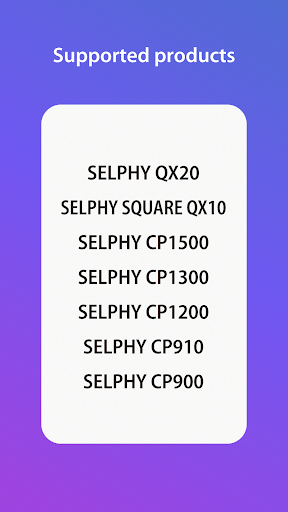

About this app
Developer Description
An application to create/save layouts using images stored on your mobile device.
[Key Features]
- Connect your smartphone or tablet wirelessly with SELPHY printers and enjoy high-quality photo printing.
("Canon PRINT" must be installed separately for CP1300, CP1200, CP910, and CP900.)
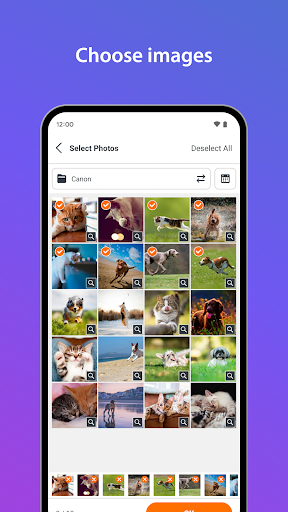
- Easily print photos directly from the ‘Photos’ menu.
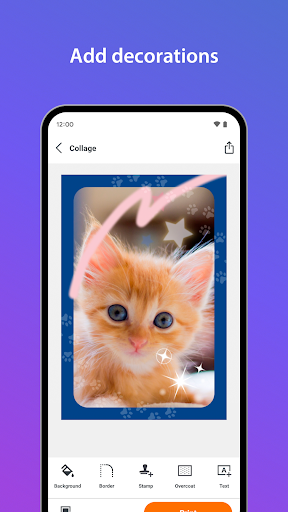
- Decorate and layout your photos freely with the ‘Collage’ menu before printing.
[Supported Products]
< SELPHY CP Series >
- CP1500, CP1300, CP1200, CP910, CP900
< SELPHY QX Series >
- QX20, SQUARE QX10
[System requirement]
- Android 12/13/14/15/16
[Supported Images]
- JPEG, PNG, HEIF
[Supported Layouts / Functions ]
< SELPHY CP Series >
- Photos (Easily print an unmodified original photo.)
- Collage (Have fun decorating or arranging multiple photos before you print.)
- ID Photo (Print ID photos such as passport and driver’s license pictures from selfies.)
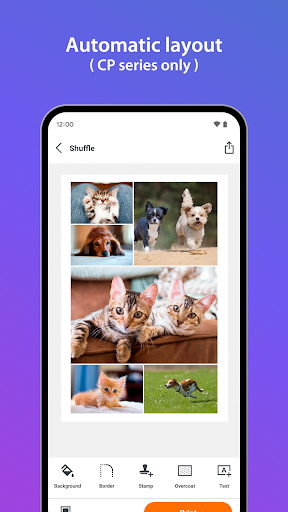
- Shuffle (Select up to 20 images, and they will be automatically arranged and printed on one sheet.)
- Custom Size (Print in any photo size)
- Tiling (split the photo into multiple tiles to print large)
- Reprint (Print additional copies from your previously printed collection.)
- Collage Decoration Features (Include stamps, text, and embedded QR codes.)
- Pattern Overcoat Processing (Only for CP1500).
< SELPHY QX Series >
- Photos (Easily print an unmodified original photo.)
- Collage (Have fun decorating or arranging multiple photos before you print.)
- Custom Size (Print in any photo size)
- Reprint (Print additional copies from your previously printed collection.)
- Collage Decoration Features (Include stamps, frames, text, and embedded QR codes.)
- Pattern Overcoat Processing.
- Card & Square Hybrid Printing / Borderless & Bordered Printing (Only for QX20).
[Supported Paper Size]
- All available SELPHY-specific paper sizes for purchase *2
< SELPHY CP Series >
- Postcard Size
- L (3R) Size
- Card Size
< SELPHY QX Series >
- Square Sticker Paper for QX.
- Card Sticker Paper for QX (Only for QX20).
*1: availability may differ depending on region.
[Important Notes]
- If application does not operate properly, try again after shutting down the application.
- Features and services available in this application may differ depending on the model, country or region, and environment.
- Visit your local Canon Web pages for more details.
What's New
- Tile printing is supported, allowing you to print large images by splitting them into multiple tiles.
- The painting function now includes a sparkling brush and rainbow colors.
- Design frames are now available on the CP series as well.
[Ver.4.2.0]
Version Information
- Version
- -
- Downloads
- 1M+
- Updated on
- Oct 8, 2025
- Released
- Sep 2, 2018
- Requires
- Android Varies with device
Statistics
Google Play Rating History
Rating Distribution
Downloads Over Time
SELPHY Photo Layout has been downloaded times. Over the past 30 days, it averaged downloads per day.
Shaded area shows 30-day prediction based on historical trends
Historical data collection started recently. More data points will be available over time.
SELPHY Photo Layout - Google Play Rankings
Top Rankings
| Rank | Country | Category | List | Change |
|---|---|---|---|---|
| — |
Ranking History in
No ranking data available yet. Rankings are updated daily.
#53 in Top Free Photography in South Korea


#59 in Top Free Photography in France


#85 in Top Free Photography in Spain
 Galleryit - Photo Vault, Album
 Face Me: AI Art Photo Editor
 AI Photo Generator, Enhancer
#85 in Top Free Photography in Netherlands
SELPHY Photo Layout users say on Google Play
 Maureen Stanage
I print photos monthly of the Grand kids and put on a calendar. mom will get an entire year of photos in January as a gift!
 Kenji Inoue
works pretty well to print photos on my cp1500. connecting to the printer was pain free. I think it's a bit difficult to find photos taken in the past. it would be nice if the photo picker was a bit more intuitive and would let you zoom in on the photo before selecting. this would help me pick the best out of a selection of similar looking photos
 Jared Kihm
The app works like it should. but I need an option to go through Google photos and share with the Selphy app. not all my photos are on my phone, and I have photos spanning several years that I don't need to be scrolling, I should be able to search my photos and then print them. PLEASE add the ability to share Google photos with the Selphy app!
 Michael Borisko
hard to work with
 Gal Bronstein
after few months the printer doesn't connect anymore. the app says to check the printer power. very expensive and doesn't work
ApkTrusted Ratings & Reviews
More from Canon Inc.
See more apps






Scan this QR code to download

Forwarding you to the page at Google Play market in seconds...
Open Google Play market now