
MyJCB v3.8.1
株式会社 ジェーシービー


About this app
Developer Description
\Understand in 1 minute/A short movie introducing the appeal of the MyJCB app. Check now!
MyJCB, the official app for JCB members
--- About using the app ---
Can be used by those who have a MyJCB ID or a JCB group card.
*The app cannot be used with some cards. Please check the notes at the bottom of this page.
↓If you do not have or do not know your MyJCB ID, click here
https://my.jcb.co.jp/RegistUser
--- Recommended features of the app ---
1. Easy login
You can easily log in using fingerprint or face recognition or an app-specific passcode.
2. Check your usage status immediately
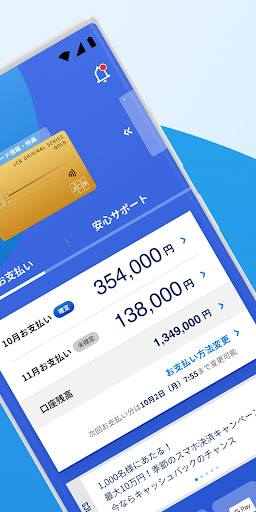
Your most recent payment amount, payment date, and points held are displayed on the top page.
You can easily find the statement you are looking for by using the statement sorting and filtering functions.
If you have multiple JCB cards, you can also smoothly switch cards by setting up a consolidated login.
3. Supports safe and secure card usage!
The "Safety Settings Status" will inform you of the registration status of various settings recommended by JCB.
You can check your safety at a glance in the unlikely event of fraudulent use.
Equipped with notifications when using your card and alert functions to prevent overspending! You can use your JCB card with more peace of mind.
↓For more information about MyJCB, click here.
https://www.jcb.co.jp/service/additional/myjcb/
--- Notes ---
■Cards that can be registered and used with MyJCB
https://www.jcb.co.jp/myjcb/pop/available-card-list.html
■Cards that cannot be used with the MyJCB app
There are some cards that cannot be used with the app, such as cards from the following card issuers.
・Seven Card Service Co., Ltd.
・Seven Bank Co., Ltd.
・West Japan Railway Company
・Life Financial Services Co., Ltd.
・au Jibun Bank Co., Ltd.
・Valor Financial Services Co., Ltd., etc.
* Miraino Card (JCB) is issued by JCB, but the MyJCB app cannot be used.
■First time using the app
When logging in for the first time after downloading the app, you will need to authenticate with a one-time password in addition to your MyJCB ID and password.
A one-time password will be sent to the email address or mobile phone number registered with MyJCB for authentication.
* Authentication methods may vary depending on the card you have.
■Other notes
・All images are for illustrative purposes only.
・Available services vary depending on the card you have.
・For inquiries, please visit the following link.
https://www.jcb.co.jp/support/jcb_contact/
* Inquiries cannot be made to the email addresses listed on this page.
・This app includes information about cash advance services (which may amount to solicitation), regardless of whether the user's card has a cash advance credit limit or whether the user wishes to accept loan contract solicitations. Cash advance services incur interest. Check the loan conditions at the link below and be careful not to borrow too much. (Depending on your card and usage, you may not be able to use this service.)
https://www.jcb.co.jp/cashing/
・Google Pay™ is a trademark of Google LLC.
--- License ---
This app uses the following licenses.
https://www.apache.org/licenses/LICENSE-2.0
https://www.eclipse.org/legal/epl-2.0/
https://github.com/Adobe-Marketing-Cloud/acp-sdks/blob/master/LICENSE.md
https://developer.android.com/studio/terms.html
https://github.com/salesforce-marketingcloud/MarketingCloudSDK-Android/blob/master/LICENSE.txt
https://opensource.org/license/MIT
What's New
軽微な修正を行いました。
■v3.8.0
・不正ログインの防止やフィッシング対策に有効なパスキーによるログイン機能を追加しました。生体認証で安全で簡単にログインできるようになります。
■v3.7.0
・お支払い明細をお好きなカテゴリで分類できる機能を追加しました。自分仕様のタグ分けで、毎月何にいくら使ったか、お支払いの傾向や内訳が簡単に確認できます。
・ザ・クラス、プラチナカード会員様向けに提供している「デジタルコンシェルジュ」について、お電話でお受けした一部のご依頼もアプリ画面より結果を確認できるようになりました。
・その他、軽微な修正を行いました。
■v3.6.0
軽微な修正を行いました。
■v3.5.2
・「iF DESIGN AWARD 2025」に続き「A’ Design Award」ゴールドを受賞しました。
・JCBおすすめ機能一覧画面を新設しました。
・その他、軽微な修正を行いました。
Version Information
- Version
- 3.8.1
- Downloads
- 1M+
- Updated on
- Dec 5, 2025
- Released
- Sep 12, 2017
- Requires
- Android 9
Statistics
Google Play Rating History
Rating Distribution
Downloads Over Time
MyJCB has been downloaded times. Over the past 30 days, it averaged downloads per day.
Shaded area shows 30-day prediction based on historical trends
Historical data collection started recently. More data points will be available over time.
MyJCB - Google Play Rankings
Top Rankings
| Rank | Country | Category | List | Change |
|---|---|---|---|---|
| — |
Ranking History in
No ranking data available yet. Rankings are updated daily.
#18 in Top Free Finance in Japan


MyJCB users say on Google Play
 Hiroshi Miyake
This app is the reason why I use JCB card. Well designed, very comfortable to use.
 A Google user
これもいいねと思ったけど、英語がないからちょっと難しい。
 Bom Tanawat
It is not bad in terms of features but should be better if English language is available.
 Ram Satya Rao Medisetti
Please add language change option so that non Japanese can understand and use this app
A Google user
Only in Japanese? How about those international card owners? How could JCB app so unfriendly?
ApkTrusted Ratings & Reviews
Scan this QR code to download

Forwarding you to the page at Google Play market in seconds...
Open Google Play market now