ジーニアス英和(第6版)・和英(第3版)辞典 vVARY
LogoVista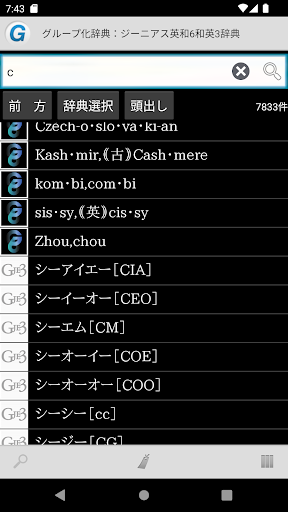


About this app
Developer Description
Includes "Genius English-Japanese Dictionary 6th Edition", the definitive edition for learning English-Japanese that is unrivaled in terms of amount of information, and "Genius Japanese-English Dictionary 3rd Edition", which covers frequently used Japanese and shows its natural English translation.
Great for classes and exams!
A classic dictionary for learning English in an app!
<================================
The latest version of the extremely popular English-Japanese dictionary and Japanese-English dictionary, which includes sharp word interpretations, abundant usage examples, and audio data.
■ Dictionary content information ■
・"Genius English-Japanese (6th edition)/Japanese-English (3rd edition) Dictionary" is a product that includes "Genius English-Japanese Dictionary 6th Edition", the definitive edition of English-Japanese learning that is unrivaled in terms of the amount of information, and "Genius Japanese-English Dictionary 3rd Edition", which covers frequently used Japanese words and provides natural English translations.
- The latest dictionaries from the "Genius" brand have been compiled into one software, making dictionary lookup convenient.
- Genius Sounds for G5 provides additional examples that are not found in books, as well as Genius Sounds for G5, which contains approximately 105,000 words with pronunciation audio that supports native speakers' variations.
・The 6th edition of Genius English-Japanese continues the tradition of ``Genius, which is strong in usage,'' including a complete review of the usage section and usage notes, and an increase in collocations.
■ Power up the features of dictionary content with app functions! ■
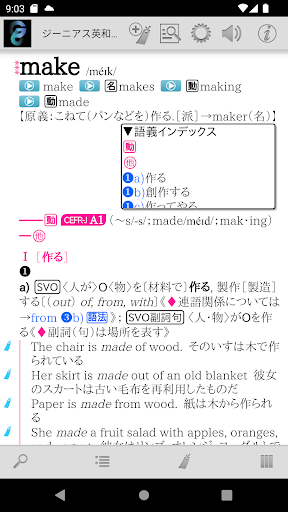
-Tap the icon in the dictionary entry to immediately play the pronunciation audio by a native speaker!
- Equipped with "example search" and "idiom search" functions that allow you to search only example parts and idiomatic phrases within a dictionary entry.
-You can register not only headwords but also "examples" and "phrases" as bookmarks.
- An index that organizes important words by rank from A to D, an index by rank of "CEFR-J (ranks A1 to B2)" that is not found in books, English history Q&A, synonym comparison, and columns on word structure and interpretation are also summarized in a list, and you can display the column you want to see.
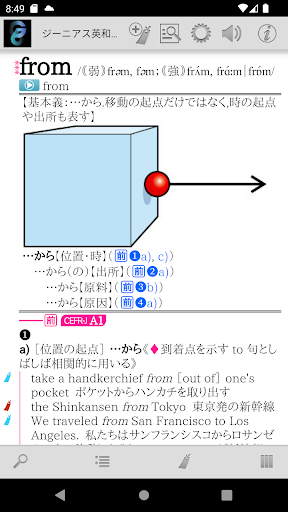
- Introduces mainly familiar things through illustrations. Contains a "Picture Dictionary" that allows you to enjoy learning the names of things visually. By tapping the name/term in the illustration, you can jump to the glossary of the term and read it. You can learn systematically from illustrations.
■ Complete search function! ■
・Automatic search every time you enter a keyword. Instantly update search results with "Incremental Search".
- Search keyword input is of course also supported by voice input.
- Match conditions for search keywords can be specified in detail, such as "starting match" and "suffix matching". Instantly re-search even when conditions change.
・You can use "Full text search" to search the text of all items in almost all dictionaries.
・It is possible to search within the text of the dictionary entry you are currently reading.
- Automatically records the history of entered keywords and displayed items. Re-entering and re-displaying is easy.
■ Since it is an app, you can share operations with other apps! ■
・Supports basic Android operation "Share"! It is possible to have the dictionary browser search for text selected in another app.
- You can freely specify the dictionary you want to search using "Shared" from among the dictionary apps you already have.
・Contrary to "Share", you can search the web using the text of the dictionary entry. Of course, you can also search in dictionary apps.
■ Customize the text to make it easier to read! ■
- Font size can be set in detail for text in dictionary entries.
- Equipped with a dark theme type display mode (black background + white text) that is less tiring on the eyes.
- Of course, you can also change the item size using touch operations.
■ Register important information as a bookmark! ■
-You can register bookmarks to dictionary items at any time.
- Bookmarks can be divided into 10 color patterns and memo text can be set.
- The bookmark list screen is equipped with a filter function that displays only bookmarks of a specific color.
- The display order on the bookmark list screen can be sorted by registration date, item order, etc.
■ Strong cooperation between dictionary series! ■
- You can freely group dictionary series and search them all at once.
・In the group dictionary search result list, you can jump to the beginning of each member's dictionary.
・Duplicate is also OK! One dictionary can be registered as a member of various groups at the same time.
・Of course, the bookmarks of the group dictionary can be displayed all at once.
-You can immediately search in another dictionary using the text of the displayed dictionary item.
■ Equipped with convenient additional/expanded functions! ■
・You can have the text of dictionary entries read out loud with a synthesized voice.
■ No need to connect to the internet after preparations are complete! ■
- All data required by the dictionary is saved within the app.
・After installation and preparation for use, it can be used completely offline.
■ Notes ■
- To use this app, you will need the companion app ``LogoVista Electronic Dictionary Viewing Browser Ver.2 for Android''.
Please install "LogoVista electronic dictionary viewing browser Ver.2 for Android" from Google Play. .
・To use the text reading function using synthesized voice, you need to install the separate free "Google Text-to-Speech" app.
-If you have any questions about our products, please contact us at the address below.
android.dev@logovista.co.jp
■ About saving data to external storage (external SD card) ■
・You can save some of the dictionary app data to external storage (external SD card).
*There are precautions such as conditions for use. For more information, please check Q8 from our Q&A page below.
https://www.logovista.co.jp/LVERP/information/support/user_qa/android/top.html#Q8
■ Operating environment ■
・Android OS 6.0 to 14.0
*The operating environment is the latest version released. If you are using an earlier version, the terms may be different.
■ About Chromebook compatible models
To use the LogoVista electronic dictionary series for Android app on your Chromebook, you need a Chromebook that supports Google Play (Android app).
■ Operation not guaranteed ■
・Android OS 1.0 to 5.1.1
・Android device equipped with a non-ARM CPU
・“Go Edition” version of each Android OS
■Developer/Distributor ■
Logovista Co., Ltd. https://www.logovista.co.jp/
■ Content publisher ■
Taishukan Shoten Co., Ltd.
Version Information
- Version
- -
- Downloads
- 1K+
- Updated on
- -
- Released
- Dec 5, 2022
- Requires
- Android Varies with device
Statistics
Google Play Rating History
Rating Distribution
Downloads Over Time
ジーニアス英和(第6版)・和英(第3版)辞典 has been downloaded times. Over the past 30 days, it averaged downloads per day.
Shaded area shows 30-day prediction based on historical trends
Historical data collection started recently. More data points will be available over time.
ジーニアス英和(第6版)・和英(第3版)辞典 users say on Google Play
 D A
D A
紙の辞書よりも利便性がいいと判断しこちらを購入しました。とても使いやすくて良い感じです。改善点を上げるとするなら、左方向へは単語をさかのぼっていけるのに、右方向へはさかのぼれないのが残念。辞書はペラペラめくって新たな発見があると思うので、もう少し左右にページをめくる感覚があればいいなと思いました。あとこのアプリをインストールするだけで完結にしてほしい、辞書閲覧ブラウザのインストールは時代遅れの感じがする。 とはいえ辞書の情報量があり、使えるアプリとは思うが評価が少し低めなのでもっと使う人が増えればいいなと思い、応援の意味を込めてレビューを書きました。
ApkTrusted Ratings & Reviews
More from LogoVista
See more apps![最新日米口語辞典[決定版] icon](https://play-lh.googleusercontent.com/7uTJ4Li0HzgaVrR7U19kNfUIOv_3aTQQiuiIDWC_8jqDcJHfjsVkRCetb6Gpnzh4DMg)
最新日米口語辞典[決定版]
Paid

岩波 仏教辞典 第三版
Paid

クラウン独和(第5版)・新コンサイス和独辞典
Paid

大辞林 第四版
Paid

ジーニアス英和大辞典
Paid

現代用語の基礎知識 カタカナ外来語略語辞典 第5版
Paid

現代スペイン語辞典・和西辞典 改訂版
Paid

最新 地学事典
Paid

改訂新版 世界大百科事典
Paid

字通
Paid

有斐閣 法律学小辞典 第6版
Paid

岩波 国語辞典 第八版
Paid

日本語シソーラス 類語検索辞典 第2版
Paid

漢字源 改訂第五版
Paid

新編英和活用大辞典
Paid

研究社 新英和(第7版)・和英(第5版)中辞典
Paid
Scan this QR code to download

Forwarding you to the page at Google Play market in seconds...
Open Google Play market now