
NeSYNC vVARY
radius co., ltd.



About this app
Developer Description
By linking with the completely wireless earphones of radius compatible with the app, the viewing environment and earphones are integrated to support the desired music experience.
(1) Equalizer function that can be customized to your favorite sound
With a 5-band EQ, you can set it according to the field of music,
You can easily set the sound creation according to the viewing environment.
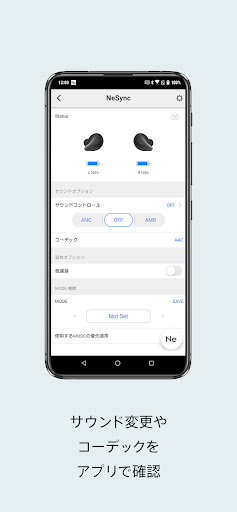
(2) Check the sound control and codec with the app
You can control the noise canceling (ANC) and ambient sound (AMB) of the earphones, and you can easily switch between them by operating the screen.
(3) MODE function that can easily save earphone settings
Save the earphone settings that match your viewing environment to "MODE" and save them to "MODE".
You can immediately call your favorite "MODE" at any time.
(4) Widget function that allows you to check the remaining battery level and change settings immediately
Equipped with a widget function, you can quickly access the app when you want to check the battery level of a completely wireless earphone from the home screen or change the sound control settings.
(5) After setting the earphones, go to NePLAYER
After completing the settings, please use the link function to NePLAYER / NePLAYER Lite! You can watch your favorite music immediately by linking with the app. .
【Compatible models】
・ HP-R300BT (NEW)
・ HP-P100BT
* HP-P100BT is in beta and is in beta.
We support applications.
You may not be able to use the function completely.
We cannot guarantee the operation.
Please note that.
Version Information
- Version
- -
- Downloads
- 1K+
- Updated on
- -
- Released
- Jan 17, 2026
- Requires
- Android Varies with device
Statistics
Google Play Rating History
Rating Distribution
Downloads Over Time
NeSYNC has been downloaded times. Over the past 30 days, it averaged downloads per day.
Shaded area shows 30-day prediction based on historical trends
Historical data collection started recently. More data points will be available over time.
ApkTrusted Ratings & Reviews
More from radius co., ltd.
See more apps![ハイレゾ対応音楽プレイヤー[NePLAYER Lite] icon](https://play-lh.googleusercontent.com/Arx4EtmMTVQWqMvrSzvOBFfKKttY4l6lARZnpr-kizNCuHVl5NGxVhZnkq9MLbRDeA4)
![ハイレゾ再生音楽プレイヤーアプリ[NePLAYER] icon](https://play-lh.googleusercontent.com/nOllfikH7b0xhpqUz8bZc6Kcjdr13cix1LNomZ-5rkuWnUXgwN3XN6iESLUiIGkrt8M)
Scan this QR code to download

Forwarding you to the page at Google Play market in seconds...
Open Google Play market now