
Copy&Paste & Memo&Launcher pro v3.1.0
Snow Technology






About this app
Developer Description
It is the pro version of Copy & Paste & Memo & Launcher.
■ The difference between the free version
・You can save the settings and data to Google Drive.
・The ad does not appear.
・Pro version is not require a network communication authority.
・Pro version can save text unlimited.
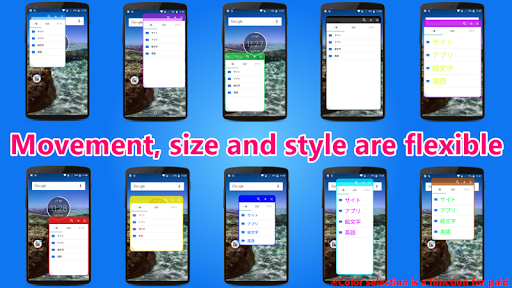
・You can change the color and font size of the dialog window.
・You can change the color of the dialog window.
・I am going to continue to add various functions in addition to this.
・Home button function has been added at the time icon long press on icon display mode.
・White icon is now possible to select on icon display mode.
・Automatically restart function at the time of memory usage increase(can also be not restart).
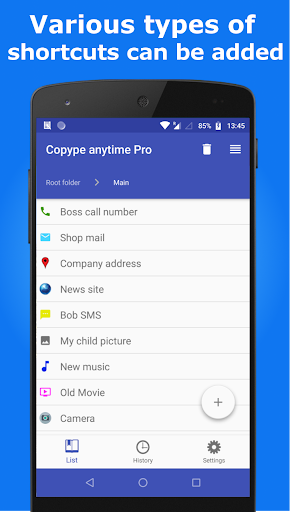
・You are able to display a shortcut to the application of your choice in the dialog window. (Free version up to three, paid version is unlimited) Please select apps Setting tab in the "App launcher".
※ Due to the security update of android10, contents copied on other applications can no longer be saved with this application.
-------------------------------------------------- ---------------------
※ You can migrate data from free version by clicking bottom("data migration") of the Setting tab of the free version.
If "data migration" does not appear in "Setting tab", please update to the latest version of the free version. (If data has been registered in Pro version already, the data will be removed, please note.)
Please don't use the pro version and free version at the same time, because there will be an unexpected behavior.
★ How to use ★
1. Open the Copype anytime.(Automatically it will be started service of Copype anytime. Please check the setting tab. If service of Copype anytime is running, Bottom button in setting tab is orange color, and showing "Stop Service".
If you copy a text while running the service, it will be automatically saved in the app. )
2. Edit the text.
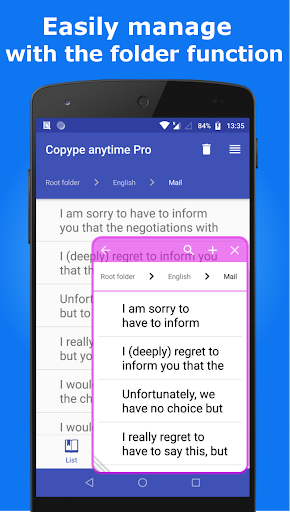
In the Category tab, You can edit the copied text, and you can also save new texts you like.
3. Copy and Paste
You can open the dialog window by swiping the lower right or lower left position of screen while service of Copype anytime is running.(Please see the picture of this app in the Google play)
4. App launcher function in dialog window
You are able to display a shortcut to the application of your choice in the dialog window. (Free version up to three, paid version is unlimited) Please select apps Setting tab in the "App launcher".
This software includes the work that is distributed in the Apache License 2.0.
What's New
2.You can now save photos and URLs from sharing from other apps.
3.Line text type added (saved text can be transferred to Line)
4.You can now add a subject and body to the email type.
5.You can now add a body to the SMS type.
6.Some bugs have been fixed.
Version Information
- Version
- 3.1.0
- Downloads
- 1K+
- Updated on
- Jan 14, 2024
- Released
- Mar 5, 2014
- Requires
- Android 5.0
Statistics
Google Play Rating History
Rating Distribution
Downloads Over Time
Copy&Paste & Memo&Launcher pro has been downloaded times. Over the past 30 days, it averaged downloads per day.
Shaded area shows 30-day prediction based on historical trends
Historical data collection started recently. More data points will be available over time.
Copy&Paste & Memo&Launcher pro users say on Google Play
 A Google user
Still figuring out possibilities. Initial setup settings could use better interface. Labeling is a bit unclear(names in settings misleading & vague).Great once you have 45minutes to a hour(or more) to initally setup, try, go back, adjust (if able to navigate back so you can adjust). So far settings are brilliant!! Easing operability and personalization but need to spend more time...I know i saw settings somewhere, just gotta track them down again!!
A Google user
I bought the pro version so I can change the setting, but it won't let me. I'll keep trying for a day or i might have to get the refund.
A Google user
Ruined app with new version!!! Text doesn't stay fixed in place! Terrible interface!
ApkTrusted Ratings & Reviews
More from Snow Technology
See more apps


Scan this QR code to download

Forwarding you to the page at Google Play market in seconds...
Open Google Play market now