
Bikini Girls Watch Face vVARY
Full Eyes Inc.




About this app
Developer Description
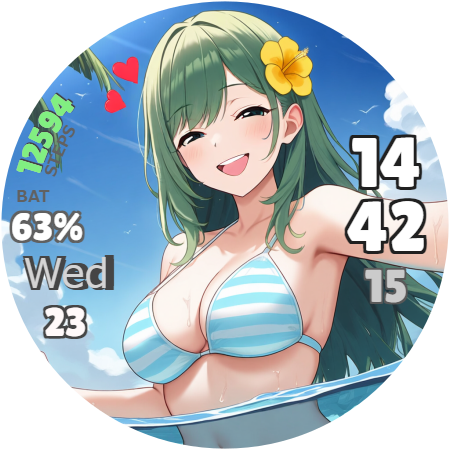
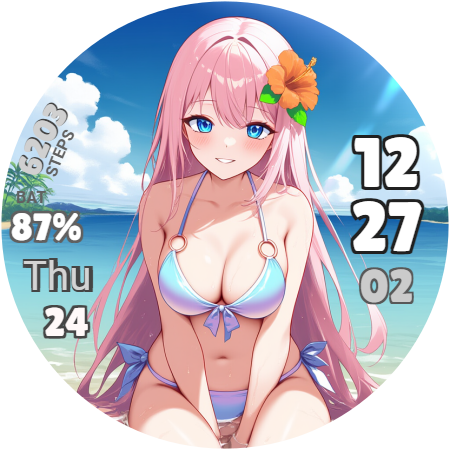
Bikini Girls Watch Face for Wear OS.
You can choose the background from six girls in the options settings. Also, the girl's expression will change if you exceed your goal number of steps for the day.
The watch face displays hours, minutes, seconds, day of the week, date, and number of steps.
How to change the background:
1. Display this watch face on your WearOS smartwatch.
2. Press and hold the center of your smartwatch.
3. Press the pencil icon at the bottom of the screen.
4. Press the options settings icon at the bottom of the screen.
5. Select your preferred options.
6. Press the crown button on your smartwatch to reflect the background.
How to change your step goal:
1. Open the Fitbit app on the smartphone that is paired with your WearOS smartwatch.
2. Tap "You" in the bottom right.
3. Tap "Show all" to the right of the "Goals" item.
4. Tap "Steps" and change the number of steps you want.
How to change the 12/24 hour format:
1. Open Setting on the smartphone that is paired with your WearOS smartwatch.
2. Tap "System."
3. Tap "Date and Time."
4. Tap "Use 24-hour format" to switch the setting. If you cannot switch, disable "Use default formats for language/region" and then switch.
What's New
Version Information
- Version
- -
- Downloads
- 50+
- Updated on
- Jun 27, 2025
- Released
- Apr 30, 2025
- Requires
- Android Varies with device
Statistics
Google Play Rating History
Rating Distribution
Downloads Over Time
Bikini Girls Watch Face has been downloaded times. Over the past 30 days, it averaged downloads per day.
Shaded area shows 30-day prediction based on historical trends
Historical data collection started recently. More data points will be available over time.
ApkTrusted Ratings & Reviews
More from Full Eyes Inc.
See more apps


Scan this QR code to download

Forwarding you to the page at Google Play market in seconds...
Open Google Play market now