JPG to PDF - PDF Converter v1.5.6
Star App Team




About this app
Developer Description
Convert JPG, PNG, WebP, etc. to PDF for offline use, fast, simple and beautiful.
With JPG to PDF Converter you can:
1) Merge multiple images into PDF files.
First, click the + button to select the image file (JPG, PNG, WebP, etc) on the Android phone;
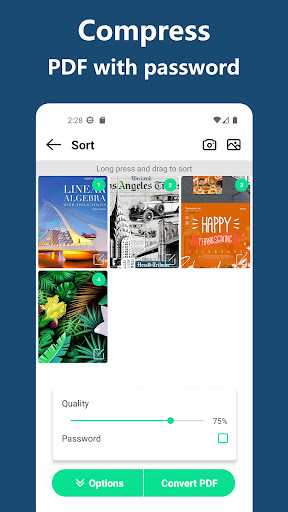
Then, click the import button to enter the picture sorting page, and move the pictures by long pressing to complete the sorting;
Finally, click the Generate button to enter the export page of PDF generation result.
2) Search PDF document function.
By entering part of the name of the PDF file, the name will be highlighted in the search results.
3) Automatically sort the generated PDF documents.
Automatically sort through PDF files by name, size, creation date, modification date, etc.
4) Use JPG to PDF Converter offline.
You can quickly convert multiple pictures into PDF files locally on the Android phone, without uploading the picture files to the web.
5) Convenient and fast sharing of converted PDF document files
After generating the PDF document, you can share the generated PDF file through social media such as Facebook, Bluetooth, Email or Cloud disk.
6) Read and view the converted PDF document
The converted PDF document can be opened and viewed through the built-in PDF viewer.
JPG to PDF Converter and PDF Editor is very easy to use and completely free, it is a good helper in work and life. In the future, we will continue to optimize the application software and improve the user experience.
What's New
Version Information
- Version
- 1.5.6
- Downloads
- 100K+
- Updated on
- Nov 5, 2025
- Released
- Apr 22, 2023
- Requires
- Android 5.0
Statistics
Google Play Rating History
Rating Distribution
Downloads Over Time
JPG to PDF - PDF Converter has been downloaded times. Over the past 30 days, it averaged downloads per day.
Shaded area shows 30-day prediction based on historical trends
Historical data collection started recently. More data points will be available over time.
JPG to PDF - PDF Converter users say on Google Play
 Neel .H
Sat 15 2025 So far this app is exactly doing what it says. No unnecessary spamming of advertisements or unnecessary complicated steps. Nothing! Simple and easy to use. It deserves the Five star rating. 👏🏻👏🏻👍
 Sailu Ravuri
automatic cropping is required
 Terrence Carter
I like it...but you gotta read and make sure you are navigating correctly or you won't get the results from the application you desire.
 Ava Victoria
not ways reliable
 Anshul Khare
It automatically cropped the images which is not good.
ApkTrusted Ratings & Reviews
More from Star App Team
See more apps
Scan this QR code to download

Forwarding you to the page at Google Play market in seconds...
Open Google Play market now